
The smartest way to get started with customer service automation is to figure out what your team is doing over and over again. Find those repetitive, time-sucking tasks, and then bring in the right tool—like a well-trained chatbot or a simple, clear knowledge base—to take them off your team's plate.
Starting small is the key. It helps you avoid the common mistakes that sink these projects and frees up your agents to handle the really tricky stuff.
Starting Your Customer Service Automation Journey
Diving into automation can feel like a huge undertaking, but it’s more manageable than it seems. I've seen too many businesses get tripped up because they try to boil the ocean and automate everything from day one. That’s a recipe for clunky bots, broken workflows, and seriously frustrated customers.
A much better approach? Start by identifying and solving the simplest, most frequent problems your customers have.

Why a Focused Strategy Matters
Instead of thinking about automation as a replacement for your people, see it as a powerful assistant for your support team. The real goal isn't just about slashing costs; it’s about making smarter use of your most valuable resource—your team’s time and expertise.
When you automate the routine questions like "Where's my order?" or "How do I reset my password?", you give your team room to breathe. This frees up your best agents to focus on the high-stakes conversations that need genuine empathy, critical thinking, and a human touch. To get this right, you first have to commit to understanding the true voice of your customer—that’s how you make sure your automation is actually solving their real problems.
This shift moves your support team from constantly fighting fires to proactively adding real value. They can spend more time building customer relationships and less time on mind-numbing data entry.
The Tangible Benefits of Automation
Beyond making your team’s life easier, a smart automation strategy delivers real, measurable results that boost your bottom line and build customer loyalty.
Before we dive into the "how," let's quickly summarize why this is worth your time. Automation isn't just a trend; it's a fundamental improvement to your support operations.
Key Benefits of Customer Service Automation
| Benefit | Impact on Your Business | Example Metric |
|---|---|---|
| 24/7 Availability | Customers get instant help anytime, day or night, even on holidays. | Increase in off-hours ticket deflection rate. |
| Faster Response Times | Immediate answers to common questions eliminate frustrating queues. | Reduction in First Response Time (FRT). |
| Increased Efficiency | Your team spends less time on repetitive tasks and more on complex issues. | Decrease in average handle time (AHT) for human agents. |
| Lower Operational Costs | Handling more volume with the same or fewer resources saves money. | Reduction in cost-per-contact. |
Ultimately, a good automation plan is about creating a smarter support system where technology and people work together to deliver faster, more consistent, and more satisfying experiences for your customers.
Finding Your Best Automation Opportunities
Before you even think about looking at software demos, you need a clear map of what to automate. I've seen too many teams get this backward, wasting months on flashy tools that don't solve their real problems. The goal here is to stop guessing and build a plan based on actual data.
The best place to start digging for gold is in your existing support tickets. Pull up your help desk data from the last 30-60 days and look for the most common, repetitive questions that are clogging up the queue. These are your quick wins, the low-hanging fruit just waiting to be automated.
Find Your Top Five Inquiries
Don’t try to boil the ocean. Seriously, just look for the top five most frequent and simple questions. For most e-commerce or SaaS businesses, they probably look something like this:
- "Where is my order?"
- "How do I reset my password?"
- "What's your return policy?"
- "When are you open?"
- "How do I update my billing info?"
These kinds of questions are ideal for automation because the answers don't change. Answering them automatically can immediately free up a huge chunk of your team's day to handle the trickier stuff. To get a structured approach for spotting these kinds of bottlenecks, it’s worth getting familiar with some basic business process improvement techniques.
Talk to Your Support Agents
Your support agents are your single greatest resource in this process. They live on the front lines every single day and know exactly what drains their energy and frustrates customers.
Set up a quick brainstorming session and ask them one simple question: "If you could snap your fingers and make one repetitive task disappear forever, what would it be?"
Their answers are pure gold. They'll point out the tedious, soul-crushing manual work that you'd never find just by looking at ticket categories.
I once worked with a team where agents spent nearly an hour each day manually looking up and sending license keys. This task never showed up as a "top ticket" category, but automating it saved each agent over 20 hours per month.
Map the Customer Journey
Finally, take a step back and walk a mile in your customer's shoes. Look at the entire customer journey, from the moment they land on your site to when they might need help. Where do they get stuck? Where do simple questions pop up that could be answered on the spot?
Think about the friction points that happen before someone even decides to create a ticket. For instance, if a customer is on your pricing page and can't find shipping details, that's a perfect automation opportunity. A proactive chatbot or a simple pop-up could serve them that info instantly, preventing a support ticket from ever being created.
When you combine your ticket data, agent feedback, and a customer journey map, you'll have a solid, prioritized list of what to tackle first. This isn't just a wishlist; it's a strategic plan to put automation where it will make the biggest difference for your team and your customers.
2. Pick the Right Automation Tools for Your Team
Once you’ve pinpointed what to automate, it’s time to choose your toolkit. Don't fall into the trap of searching for one magic tool that does it all. The real secret is building a smart, connected system where different tools handle different jobs.
Think of it less like buying a single product and more like assembling a team of specialists. Each one has a distinct role to play in solving the customer service puzzle you mapped out earlier.
The Three Pillars of Support Automation
A solid automation strategy usually rests on three core types of tools. You'll likely need a mix of them to cover all your bases.
-
AI Chatbots: These are your digital front-line agents. A simple, rules-based chatbot is great for answering straightforward, predictable questions like "What are your business hours?" or checking an order status. For more complex conversations, advanced AI bots like those from BizSage can understand what a customer is actually asking and pull answers straight from your help articles.
-
Self-Service Knowledge Bases: This is your library of answers. A well-stocked and easy-to-search knowledge base lets customers help themselves, which is exactly what most of them want to do. Every ticket you prevent this way is a win for your team's workload.
-
Automated Ticketing Systems: Think of this as your team's mission control. The automation here isn't customer-facing; it's all about managing the incoming queue. You can set up rules to automatically tag, sort, and send tickets to the right person or department, saving countless hours of manual triage.
This flowchart gives a great visual of how to think about this. When you're dealing with a high volume of the same question, that’s your green light for automation.
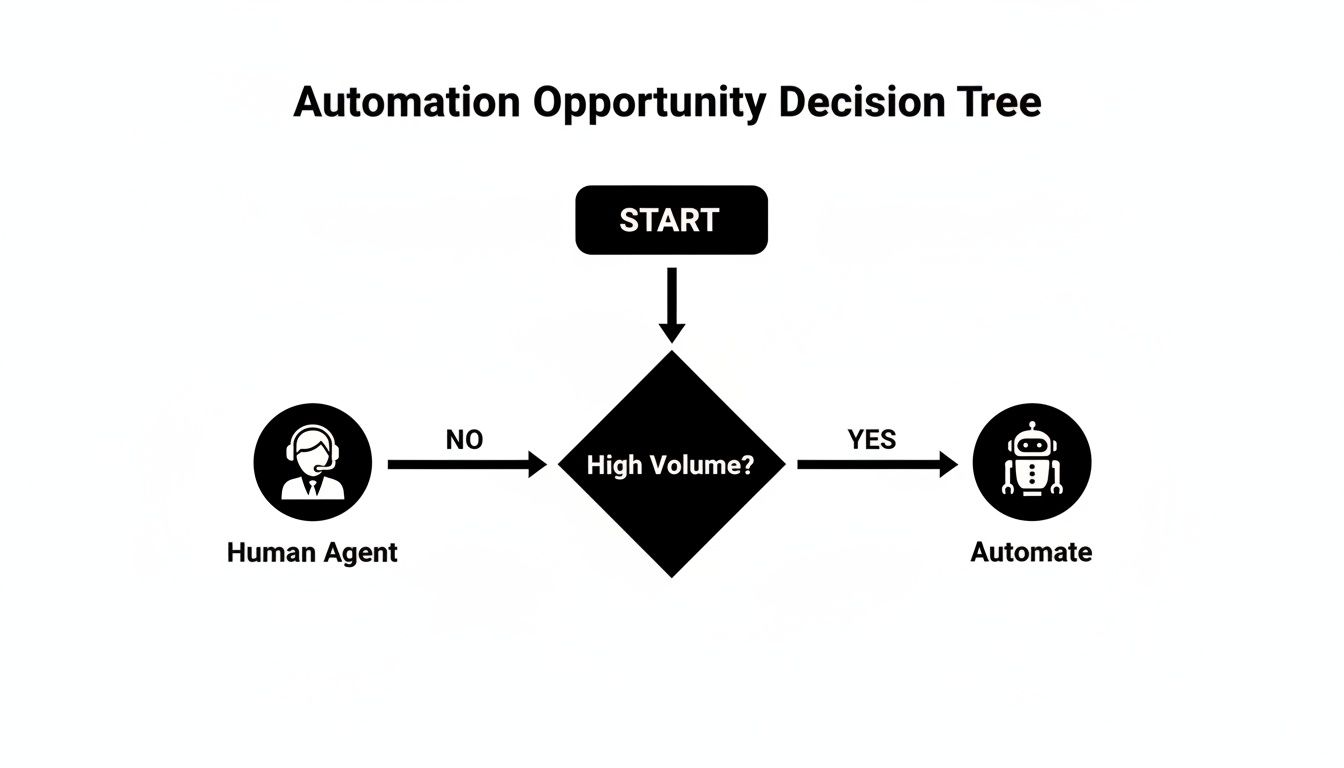
As you can see, the first question is always about volume. If a task is repetitive and comes up constantly, it’s a perfect candidate to hand off to a bot or a self-service article.
Comparing Automation Tool Types
To help you decide where to start, here's a quick breakdown of the main tool types and what they're best at.
| Tool Type | Best For | Key Feature | Example Use Case |
|---|---|---|---|
| AI Chatbot | Instant answers to common, high-volume questions | Natural language processing to understand user intent | An e-commerce customer asks, "Where is my package?" and the bot provides real-time tracking info. |
| Knowledge Base | In-depth, step-by-step guidance and technical troubleshooting | A centralized, searchable library of articles and tutorials | A user needs to reset their password and follows a detailed guide with screenshots. |
| Ticket Automation | Internal ticket routing, categorization, and prioritization | "If-then" rules and workflows that operate behind the scenes | A ticket containing the word "refund" is automatically tagged as "Urgent" and assigned to the billing team. |
Each tool solves a different piece of the puzzle. The goal is to create a seamless experience where the customer gets the right answer, fast, without ever knowing (or caring) which system provided it.
Connecting Tools to Real-World Problems
Let’s put this into practice. Imagine you run an online store and get hundreds of "Where is my order?" tickets every single day. A chatbot that integrates with your shipping platform is a game-changer. It can instantly give customers personalized tracking updates, no human intervention required.
Or maybe you have a software product, and you notice that 20% of all support tickets are about resetting passwords. Instead of agents explaining the same steps over and over, you write one amazing knowledge base article with pictures and a video. Then, you set up your chatbot to instantly share that link whenever someone mentions "forgot password" or "can't log in."
The best automation feels invisible. Customers don’t care if they’re talking to a bot or reading an article—they just want a fast, accurate answer to their problem.
The Market is Betting on AI
Jumping on this now means you’re aligning with a major industry shift. The market for AI in customer service is exploding and is projected to hit $47.8 billion by 2030. That kind of growth doesn't happen unless businesses are seeing a serious return on their investment. If you're curious, you can explore more statistics about AI in customer service and see just how widespread this trend has become.
Ultimately, your goal is to build a system that works in harmony. Let self-service and chatbots handle the simple, repetitive stuff, and use ticket automation to make sure the truly complex issues get to your human experts faster than ever. It's the perfect partnership.
Bringing Your Automation to Life and Getting Your Team On Board
Alright, you've done the planning. Now comes the fun part: making it all work in the real world. This is where your strategy gets put to the test. Just remember, implementing automation isn't a "flip the switch and walk away" deal. It’s a hands-on process that’s as much about your people as it is about the technology. The real win is when your team and your new tools work together like a well-oiled machine.
Getting from plan to practice can be tricky. We see this all the time in the industry. While a whopping 88% of call centers have adopted AI in some form, a staggering 75% haven't actually woven it into their day-to-day work. Only 25% have fully integrated it. Closing that gap is what separates a clunky, frustrating bot from a genuinely helpful customer experience. You can see more stats and insights on AI adoption to understand just how common these hurdles are.

From Robotic Scripts to Real Conversations
First things first, let's make sure your automation sounds human. If you’re setting up a chatbot, like one from a platform such as BizSage, feed it your best stuff. Use your existing knowledge base articles, website copy, and even internal training docs. This trains the bot to match your brand's voice and tone, so it sounds like you.
When you're crafting those automated responses, keep a few things in mind:
- Be brief and easy to scan. Think short sentences, bullet points, and lots of white space. No one wants to read a novel.
- Give it some personality. A little warmth goes a long way. An emoji or a friendly sign-off can make the whole interaction feel less sterile.
- Always have an escape hatch. The option to "talk to a human" should be front and center, available at any point in the conversation. Don't make customers hunt for it.
For your knowledge base, the game is all about clarity and structure. Use super-descriptive titles for your articles. Add screenshots and short videos wherever you can. Break up long articles with subheadings. The goal is simple: help people find what they need in seconds.
Turning Agents into Automation Champions
This might be the most important part of the whole process: getting your team on board. It’s totally normal for agents to see automation and worry about their jobs. Your mission is to frame these new tools as a partner—a sidekick that handles the boring, repetitive tasks so they can focus on being expert problem-solvers for the really tough customer issues.
Automation should feel like a promotion for your agents. They graduate from answering the same five questions all day to handling the complex, interesting work that actually requires their expertise.
Show them exactly how this makes their jobs better, not obsolete. For instance, walk them through how ticket automation routes inquiries straight to the right person, cutting out the tedious manual sorting. Demonstrate the bot-to-agent handoff, pointing out that they'll get a full transcript so the customer never has to repeat their story.
Launching with a Pilot Test
Whatever you do, don't roll out your new automation to everyone at once. That's a recipe for disaster. Start small with a controlled pilot test to find and fix the inevitable hiccups. This lets you gather real-world feedback without frustrating your entire customer base.
Pick a small segment to start with—maybe enable the bot for 5% of your website visitors or offer it to a select group of loyal customers. During this test phase, you need to be watching a few key things like a hawk:
- Conversation transcripts: Where are people getting stuck? Are the bot's answers confusing?
- Handoff rates: Is the bot escalating too many simple questions to your agents?
- Agent feedback: What’s clunky about the new system from their perspective?
This is your chance to tweak your scripts, fix broken workflows, and make sure that handoff to a human is absolutely seamless. By testing and fine-tuning in a safe environment, you can launch with confidence, knowing you’ve built something that will actually make life better for both your customers and your team.
Measuring Your Automation ROI and Optimizing for Growth
Flipping the switch on your new automation is a fantastic feeling, but the real work starts now. You've got to prove it's actually making a difference. This is where data becomes your best friend, turning those high-level goals into hard numbers you can take to your team. It’s how you’ll show the impact on the bottom line and, just as importantly, figure out how to make your system even better.
To get there, you need to track the right Key Performance Indicators (KPIs). The key is not to get bogged down in a sea of metrics. Focus on the few that tell the clearest story about what’s working and what isn’t.
The KPIs That Truly Matter
I always tell teams to start with a handful of core metrics. These will give you a clear, immediate picture of how your automation is performing.
Here are the essentials I recommend you monitor right from the start:
- Ticket Deflection Rate: This is the big one. It’s the percentage of customer questions that get solved without ever hitting a human agent's inbox. When you see this number climbing, you know your knowledge base and chatbots are pulling their weight.
- First Response Time (FRT): Automation should crush this metric. Keep an eye on the average time it takes for a customer to get any kind of answer. Instantaneous bot replies will drag this number way down, proving the value of your new 24/7 availability.
- Resolution Time: This is the full lifecycle of a ticket, from open to close. Good automation has a huge effect here. We've seen from research that AI can cut resolution times by up to 50% and slash first response times by 37%. And since 72% of customers stay loyal to brands that respond quickly, this isn't just a vanity metric. You can see the full analysis on AI's impact on service speed for more on that.
- Customer Satisfaction (CSAT): Always, always watch your CSAT scores. If they dip after you launch, it could be a sign that your bot-to-human handoffs are clunky or your help articles are confusing. On the flip side, an increase is a great signal that customers love the new self-serve options.
Turning Data Into Actionable Insights
Your metrics are telling you a story, and your job is to learn how to read it. A number on a dashboard is useless without context. The whole point is to use this data to create a feedback loop that helps you continuously improve.
Don’t view a high bot abandonment rate as a failure. See it for what it is: a crystal-clear signal that a specific script or workflow needs refinement. It's a gift of direct, actionable feedback.
Let's say you see that customers constantly ask to speak with an agent after going through one particular chatbot flow. That's your cue to dig into those transcripts. You'll probably find the bot’s wording is a bit off or it’s missing a critical piece of information. Add the missing detail, tweak the script, and watch what happens to the numbers.
It's the same with your knowledge base. If an article gets tons of views but is also linked to a high number of new tickets, it's clearly not solving the problem. That’s your signal to rewrite it for clarity, maybe add a short video, or break it down with better screenshots. This is what a data-driven approach really looks like—it’s how you turn a good automation setup into a great one that actually evolves with your business.
Common Questions About Automating Customer Service
Even with a solid plan, jumping into automation always brings up a few questions. It’s a good idea to get these out in the open so your whole team feels confident and on the same page. Let's walk through some of the most common ones we hear from businesses just starting out.
Will Automating Customer Service Replace My Human Agents?
This is easily the biggest worry I hear, but the answer is a hard no. The whole point of automation isn't to replace your people; it's to make them better at their jobs. When you automate all those repetitive, high-volume questions, you free up your agents to handle the complex issues that actually require a human brain and genuine empathy.
Think of it like giving your team a super-efficient assistant. This lets them shift from just answering tickets to becoming expert problem-solvers who can build real, lasting relationships with your customers.
What Is the Biggest Mistake to Avoid When Automating?
The absolute worst thing you can do is create a frustrating dead end for your customers. We’ve all been there—stuck in a bot loop with no clear way to talk to a real person. It's infuriating.
Your automation strategy must include a seamless and obvious way to reach a human. At any point, a customer should be able to connect with a live agent. This simple escape hatch makes sure your tech is helping the customer experience, not hurting it.
The rule is simple: the bot is there to help, not to trap. If a customer types "agent" or seems frustrated, the very next step should be connecting them to a person. No exceptions.
How Much Does It Cost to Automate Customer Service?
Honestly, the cost can be all over the map—from surprisingly cheap to a major investment. The good news for small teams is that many modern help desk platforms now bake basic automation features, like ticket routing and simple chatbots, right into their standard plans.
More sophisticated AI tools and dedicated platforms can run from a few hundred to several thousand dollars a month. The trick is to avoid paying for bells and whistles you don't need yet. Figure out your budget, then focus on tools that solve your most immediate pain points, like automating the top three questions you get every single day.
Looking ahead to 2025, with 95% of customer interactions expected to involve AI, it's becoming less of a choice and more of a necessity. We're already seeing businesses that automate get 36% increases in repeat purchases because they can offer faster, better service. You can discover more insights about AI in customer service to see just how much is changing.
How Do I Know if My Business Is Ready for Automation?
You're probably more ready than you think. The most obvious sign is if your team spends a huge chunk of every day answering the same handful of questions.
A few other clear indicators are:
- You have long wait times during your busiest hours.
- You can't offer any support after hours or on weekends.
- You get a ton of simple, transactional questions (like "Where's my order?" or "How do I reset my password?").
If you see these patterns in your own support queue, you've got the perfect launching point for an automation project. It’s a clear signal that you can bring in a solution that will make a real, measurable difference right away.
Ready to automate your support without losing that human touch? BizSage turns your company's knowledge into an on-brand AI agent that provides instant, accurate answers 24/7. Get started in minutes and see how easy it is to deflect repetitive questions and empower your team. https://bizsage.io