
What if your entire company had one shared brain? A single, reliable place where every employee, every customer, and even your AI tools could go to find instant, accurate answers. That’s exactly what a company knowledge base software creates: a central hub for all your organizational wisdom, accessible 24/7.
What Is a Company Knowledge Base Anyway?
Think about all the knowledge locked away in your company right now. It's scattered across dusty shared drives, buried in endless email chains, siloed in chat conversations, and stored in the heads of your most experienced people. When someone needs an answer, the frantic search begins.
A company knowledge base acts as the ultimate librarian for this chaos. It organizes everything into one searchable, digital system that everyone can actually use. It’s the single source of truth that stops the same questions from being asked over and over, draining your team's productivity.
More importantly, this "Company Brain" prevents critical knowledge from walking out the door when a key employee leaves. It ensures that valuable information remains a company asset, not a personal one.
The Two Core Types of Knowledge Bases
Every knowledge base is built for one of two audiences, each with very different needs.
- Internal Knowledge Base: This is your team's private playbook. It’s where you keep confidential information like HR policies, standard operating procedures (SOPs), sales scripts, and internal technical documentation. The goal is simple: make your employees more efficient, informed, and self-sufficient.
- External Knowledge Base: This is your public-facing self-service center for customers. It's home to your FAQs, how-to guides, troubleshooting articles, and product tutorials. The main objective here is to empower customers to find their own answers, which dramatically reduces support tickets.
Many modern platforms, like BizSage, are designed to handle both from one system. This creates a really smooth flow of information, allowing you to easily publish validated internal knowledge for your external audience when the time is right.
To help you decide what you need, here's a quick breakdown of how they compare.
Internal vs External Knowledge Base At a Glance
This side-by-side comparison should help you quickly pinpoint which type of knowledge base your business needs most right now.
| Attribute | Internal Knowledge Base | External Knowledge Base |
|---|---|---|
| Audience | Employees, contractors, internal teams | Customers, prospects, partners |
| Goal | Improve productivity, streamline operations | Reduce support tickets, improve customer satisfaction |
| Content | HR policies, SOPs, training materials, sales playbooks | FAQs, how-to guides, product tutorials, troubleshooting |
| Access | Restricted, requires login credentials | Public, open to anyone on the web |
| Tone | Professional, internal-specific language | Simple, customer-friendly, easy to understand |
While they serve different groups, the best systems see them as two sides of the same coin, ensuring information is consistent and easy to manage across the board.
This idea of a central "Company Brain" isn't just a static library; it's a living ecosystem.
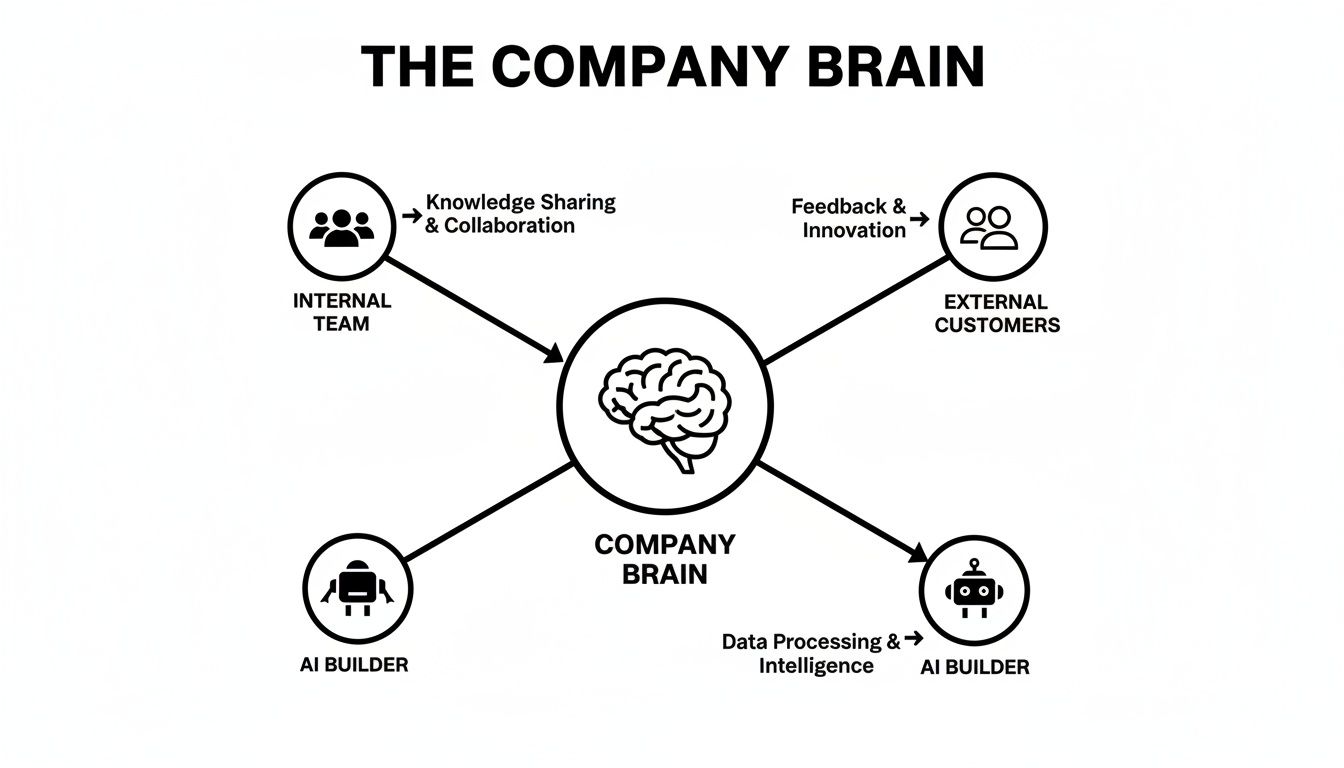
As you can see, internal teams, customers, and even AI all contribute to and draw from this central knowledge hub. It’s a dynamic system powered by both human expertise and intelligent automation.
The rush to centralize information is more than just a trend. The global knowledge base software market is booming, jumping from USD 11.67 billion to USD 12.83 billion in just one year. It's projected to hit a staggering USD 21.94 billion by 2030. This massive growth shows just how urgently businesses are trying to get their information organized. You can read the full research about knowledge base market growth for a deeper dive.
The Real-World Payoff of a Centralized Knowledge Hub

It’s one thing to talk about a "Company Brain," but the real magic of company knowledge base software is what it does for your people and your bottom line. This isn't just about tidying up digital files; it’s about making your whole operation smarter, quicker, and far more independent.
Think about a new sales rep. Instead of taking a month to get up to speed, what if they were fully productive in their first week? With a centralized hub, every onboarding doc, sales playbook, and bit of product info is right there, ready to go. The ramp-up time gets slashed.
Or consider your customer support agents. Rather than answering the same five questions over and over, they can dig into the genuinely tricky problems. A solid external knowledge base lets customers help themselves, and it’s not uncommon for companies to see ticket deflections of up to 30-40%.
Drive Consistency and Speed Across the Board
When everyone is working from the same playbook, you eliminate the guesswork. Marketing, product development, sales—they're all pulling from the same well of information. That means your brand messaging is consistent everywhere, and you avoid the chaos that comes from departments using conflicting or outdated info.
This also puts collaboration into a higher gear. A project manager can grab technical specs from engineering’s documentation without derailing anyone’s focus. That simple act of self-service saves an incredible amount of time otherwise wasted hunting for answers or waiting on an email back.
By providing one place for validated answers, you empower employees to make faster, more confident decisions. This autonomy not only boosts productivity but also fosters a culture of ownership and initiative.
See a Clear Return on Investment
The financial impact here is real and significant. The market for knowledge management software—the technology that powers these platforms—is currently valued around USD 23.2 billion. It's projected to climb to an impressive USD 74.22 billion by 2034. That explosive growth is happening for a reason: the ROI is undeniable. Businesses are moving away from old, clunky systems to cloud-based platforms that are scalable and ready for AI. For a closer look, you can discover more insights about the knowledge management market.
Here's how that investment pays off in practical terms:
- Reduced Support Costs: When customers find their own answers, your support team handles fewer repetitive tickets, lowering your operational expenses.
- Increased Employee Efficiency: Less time spent searching means more time spent on work that actually moves the needle.
- Faster Onboarding: New hires start contributing value almost immediately, which cuts down training costs and helps you scale your team faster.
- Knowledge Retention: When a key employee leaves, their expertise doesn't walk out the door with them. That critical knowledge stays in the company, protecting your most valuable assets.
What to Look for: The Must-Have Features in a Knowledge Base
Choosing the right company knowledge base software can feel like a huge task, with dozens of platforms all promising to be the silver bullet. To cut through the marketing noise, you need to focus on the core features that actually matter—the ones that determine whether your team can find, create, and trust the information inside.
Think of it like building a house. You can have the fanciest paint job, but if the foundation is weak, the whole thing will collapse. These features are your foundation.
An Intelligent Search That Actually Works
Let's be blunt: if your team can't find what they're looking for, your knowledge base is useless. A basic keyword search just doesn't cut it anymore.
You need a powerful, AI-driven search that thinks like a human. It should understand natural language, so when an employee types, "how do I get my w-2 from last year?" they get a direct answer, not just a jumble of documents with the word "w-2" in them. If finding an answer takes longer than sending a Slack message to a colleague, people will always choose the colleague.
A Simple and Intuitive Content Editor
The best knowledge base is one that everyone contributes to, not just a handful of designated "knowledge managers." To make that happen, creating and editing content has to be dead simple.
If someone can write an email, they should be able to create a knowledge base article. It's that simple. Look for a clean, what-you-see-is-what-you-get (WYSIWYG) editor.
Key things that make an editor great:
- Drag-and-drop functionality: Easily pull in images, videos, and files without fumbling with code.
- Rich text formatting: Simple buttons for headings, bullet points, and tables make content easy to read and scan.
- Content templates: Set up pre-built formats for things like meeting notes, project plans, or how-to guides to keep everything consistent.
When the barrier to contributing is low, you unlock the collective knowledge of your entire team.
A great knowledge base isn't just a digital filing cabinet; it's a living ecosystem of your company's collective brainpower. The right features are what allow that intelligence to flow freely.
Robust Analytics and Reporting
How do you know if anyone is even using your shiny new knowledge base? That's where analytics come in. You can't improve what you don't measure.
Good analytics give you a direct window into what your team is thinking. You can see what they’re searching for, where they’re finding answers, and—crucially—where they're coming up empty.
Look for a dashboard that shows you:
- Top search queries: What's the most in-demand information right now?
- Failed searches: These are your content gaps, screaming to be filled.
- Most viewed articles: This tells you which documents are your heavy hitters.
By keeping an eye on these metrics, you can stop guessing what people need and start giving it to them. It turns your knowledge base from a passive library into a dynamic tool that evolves with your company.
Choosing the Right Knowledge Base Software for Your Team

Picking the right company knowledge base software isn't about finding the tool with the longest feature list. It’s about finding the right fit for your team and your specific goals. A platform built for a global enterprise is probably overkill for a fast-moving startup, and vice-versa.
So, where do you start? Begin by asking yourself what you're really trying to accomplish. Is your main goal to slash customer support tickets, or are you focused on getting new hires up to speed faster? Pinpointing your top priority is the most important first step—it'll guide every other decision you make.
Define Your Core Needs
Before you start looking at demos or free trials, grab a notepad and list out your non-negotiables. Think about the things that will make or break this tool for your team in their day-to-day work.
- Ease of Use: This is huge. If the software is clunky or confusing, your team simply won't use it. Period. Look for an intuitive editor that anyone can pick up quickly and a search function that actually finds what people are looking for.
- Scalability: Will this platform grow with you? A tool that’s perfect for your current team of 10 should still work seamlessly when you hit 100 employees. Think about future needs for more users, more content, and maybe even more advanced features down the road.
- Integration Capabilities: Your knowledge base can't live on an island. It needs to play nice with the other tools your team relies on every day, whether that's Slack, your CRM, or your project management system.
- Transparent Pricing: Don’t get caught by surprise fees. Look for a clear, straightforward pricing model. For growing teams, a per-company plan with unlimited users—like the one BizSage offers—can be a lot more predictable and cost-effective than paying per seat.
Your knowledge base software should feel like a natural extension of your workflow, not another cumbersome tool your team has to learn. The goal is adoption, and simplicity is the key to getting there.
Traditional Wiki Vs. Modern AI Platform
The world of knowledge management software has evolved. We're seeing more and more startups transforming Notion into a comprehensive 'Company OS' to keep everything in one place, which highlights a fundamental choice you'll need to make: do you go with a classic wiki or a modern, AI-powered platform?
This decision really comes down to how much manual work your team can handle. A traditional wiki is fantastic for building out structured, detailed documentation by hand, but it demands constant upkeep to stay relevant.
On the other hand, a modern platform like BizSage uses AI to automatically build and maintain your knowledge base from the documents and conversations you already have. This keeps information fresh without someone having to manually update articles all day. For busy teams where time is tight, that difference is everything.
Choosing Your Software Type
To help you decide, let's break down the key differences between these two approaches.
| Consideration | Traditional Wiki/KB Software | Modern AI Platform (like BizSage) |
|---|---|---|
| Content Creation | Fully manual; requires dedicated time to write and format articles. | Automatic; AI pulls information from existing sources like Slack and Google Drive. |
| Maintenance | High; content becomes outdated quickly and needs constant manual review. | Low; the system self-updates as new information is created in connected apps. |
| Search Function | Basic keyword search; often struggles with complex or conversational questions. | Advanced semantic search; understands intent and context to provide accurate answers. |
| Onboarding | Steeper learning curve; users must learn a new interface for content creation. | Minimal friction; operates within the tools your team already uses (e.g., Slack). |
| Best For | Teams with dedicated content managers who need deep, structured documentation. | Fast-paced teams that need instant access to up-to-date, verified information. |
Ultimately, the best choice depends on your team’s resources and goals. If you have the bandwidth for manual curation, a traditional tool might work. But if you're looking for an efficient, self-maintaining system that surfaces answers instantly, a modern AI platform is the clear winner.
Your Game Plan for a Successful Launch
Rolling out new company knowledge base software doesn't have to be some massive, months-long undertaking. The secret to a successful launch is to start small, show value right away, and build from there. Don't think of it as trying to build the entire Library of Congress overnight; think of it as publishing the first, most critical chapter.
Your first move should be to tackle the most high-impact information. What are the top 10-20 questions your support team gets hammered with every day? What are the handful of documents every new hire absolutely needs to see? Focusing on these first makes the knowledge base immediately useful, and that's the key to getting people to actually use it.
Assign Clear Ownership and Roles
A knowledge base without a clear owner is destined to become a digital ghost town. To keep that from happening, you need to assign roles right from the start. Put someone in charge as the project lead to handle the initial setup and map out the content strategy.
Then, find your subject matter experts in each department and make them content champions. These are your go-to people for creating and updating information in their specific domains. When ownership is spread out like this, the content stays fresh and accurate, and no single person gets buried under the workload.
A successful knowledge base is a living resource, not a static archive. It requires a culture of shared responsibility where everyone is empowered to contribute to the company's collective intelligence.
Create a Simple Training and Adoption Plan
Even the most user-friendly software needs a little nudge to get going. A quick kickoff meeting is usually all it takes. Show the team the new tool, walk them through searching for an answer, and explain how to add new information. The key is to demonstrate how it solves a real, everyday problem, like getting an answer without having to ping a coworker and wait.
To make sure your new system sticks and provides real value long-term, it helps to follow a few core principles. Following essential knowledge management best practices can help you set up routines for keeping content fresh and encouraging everyone to chip in.
This approach is clearly working. The market for this kind of software recently hit USD 22.41 billion and is expected to climb to USD 62.15 billion by 2033. Much of that growth is coming from small and medium-sized businesses who are jumping on AI-powered solutions that can automatically build and maintain a knowledge base from existing documents. Tools like BizSage are leading the charge here, turning what used to be a tedious manual chore into a simple, automated process. You can learn more about these market findings to see how other teams are getting ahead.
See How BizSage Builds Your Company Brain Instantly
So, what does this look like in the real world?
Picture a growing company we'll call "Innovate Inc." They're caught in that familiar trap of daily chaos. The support team is swamped answering the same tickets over and over, salespeople can never find the latest pricing sheet, and new hires feel like they're adrift in a sea of outdated Google Docs. This constant search for information is a huge drag on productivity.
Instead of dedicating weeks to building a knowledge base from scratch, Innovate Inc. decides to try a modern company knowledge base software like BizSage. The entire setup process? Less than ten minutes. And it completely changes how they work.
From Disorganized Files to Instant Answers
The real power here is just how simple it is. Innovate Inc. doesn't have to write a single article to get started. They just point BizSage to the sources they already use—their website's help center, a few crucial product PDFs, and their main FAQ page.
That's it. BizSage’s AI immediately gets to work, reading, understanding, and organizing all that scattered information. In minutes, it builds a trusted knowledge base, creating a "Company Brain" that's ready to field questions from day one.
There's no big implementation project and zero developer time needed. It’s a genuine plug-and-play solution that starts adding value from the moment you turn it on.
The goal of modern knowledge base software isn't to give you another project to manage. It's to eliminate the manual work entirely, using AI to build and maintain your single source of truth for you.
Smart Features That Build Trust and Save Time
BizSage was built to solve the real-world headaches that growing teams face every day. The features aren't just for show; they address common pain points directly.
Here’s what makes a difference:
- Auto-Refresh Functionality: Innovate Inc. sets its website content to refresh weekly. This means their knowledge base never goes out of date. It automatically stays in sync with their official information, so no one has to remember to make manual updates.
- Honest "I Don't Know" Replies: If someone asks a question the AI can't answer from the available sources, it doesn't make something up. It simply says it doesn't know. This small detail is huge for building trust and instantly highlights the knowledge gaps you need to fill.
- On-Brand Tone: The team quickly sets the brand voice to be "helpful and professional." Now, every answer the AI gives sounds like it came straight from one of their own support experts, keeping the customer experience consistent.
This approach isn't just about storing documents. It’s about creating an intelligent system that maintains itself. BizSage shows how AI-driven software can deliver on the promise of effortless and accurate knowledge management, letting teams like Innovate Inc. stop chasing down answers and get back to growing the business.
Common Questions About Knowledge Base Software

Even with a solid plan, a few practical questions always seem to pop up right before you pull the trigger on a new tool. Let’s tackle some of the most common ones to help you clear those final hurdles in choosing your company knowledge base software.
How Is a Knowledge Base Different From a Help Desk?
It’s best to think of them as partners in the same mission. A knowledge base is your self-service library—a collection of articles, FAQs, and guides that lets customers and employees find their own answers, anytime they want.
A help desk, on the other hand, is the command center your support team uses to manage direct conversations like support tickets, live chats, and phone calls. While many help desks now bundle in a knowledge base feature, a dedicated platform usually offers far more powerful tools for search, content creation, and analytics.
How Do We Keep Our Content Up to Date?
This is the big one, isn't it? Nothing kills a knowledge base faster than stale, inaccurate information. The trick is to build a maintenance routine right from the beginning, so it never becomes an overwhelming problem.
- Assign Ownership: Make it clear who is responsible for what. The marketing team owns product messaging articles, while the engineering team keeps technical guides current.
- Schedule Reviews: Put it on the calendar. A simple quarterly or semi-annual reminder to audit high-traffic articles can make a world of difference.
- Use AI Tools: This is where modern tools really shine. A platform like BizSage can automatically sync and refresh information from your website or other live documents, practically eliminating the need for manual content updates.
Don't underestimate the importance of fresh content. Research shows that a staggering 91% of customers would happily use an online knowledge base if they trusted it was accurate and helpful. This isn't just a "nice to have"—it's fundamental to building trust.
Can We Start Small?
Yes, and you absolutely should! Trying to document your entire company's knowledge from day one is a recipe for burnout. The best approach is to start with a laser focus.
Identify the top 10-15 questions your support team or internal staff get hammered with every single day. Build high-quality articles that answer just those questions.
Once you see the immediate impact—fewer tickets, faster answers—you'll have proven the concept and built the momentum you need to expand your knowledge base thoughtfully.
Ready to build your company's brain in minutes, not months? With BizSage, you can turn your existing documents and websites into a trusted, on-brand AI knowledge base that provides instant answers 24/7. Start your free trial today and see how easy it is to centralize your knowledge.