
When we talk about using ChatGPT for business, we're not just talking about having employees use the public version for day-to-day tasks. We’re talking about a fundamental transformation: turning that general-purpose AI into a specialized, secure tool that’s been trained exclusively on your company's private data.
This creates an on-brand expert that knows your business inside and out. It can give instant, accurate answers to customer support queries, empower your sales team, and serve as an internal knowledge hub—all based on your information, not the public internet.
From General Tool to Precision Instrument

Think of the public version of ChatGPT as a Swiss Army knife. It's incredibly handy and can do a little bit of everything, drawing its knowledge from the vast, messy, and sometimes unreliable public internet. It’s a powerful generalist.
But for a business, that general knowledge is both a strength and a critical weakness. It doesn't know your product specs, your unique brand voice, or your confidential internal processes.
Making the switch to a business-specific AI is like trading that multi-tool for a set of precision instruments. Each one is perfectly calibrated for a specific job within your company. Instead of generic answers scraped from the web, you get responses grounded entirely in your own trusted information—your help docs, your website content, and your internal playbooks.
The Core Shift: Your Data Becomes the Brain
The real game-changer is where the AI gets its answers. A business-specific AI isn't guessing based on a blog post from 2021; it's retrieving information directly from the verified knowledge base you provide. This simple shift creates a world of difference.
This difference is so important that it's worth seeing side-by-side.
Generic AI vs Business-Specific AI
The table below breaks down exactly what you gain by moving from a general-purpose tool to one built for your specific business needs.
| Feature | Generic ChatGPT | Business-Specific AI (e.g., BizSage) |
|---|---|---|
| Knowledge Source | Public internet data (often outdated) | Your private, up-to-date business documents |
| Accuracy | Prone to errors and "hallucinations" | High accuracy, as answers are cited from your data |
| Brand Voice | Generic and inconsistent | Can be fine-tuned to match your exact brand tone |
| Data Privacy | Conversations may be used for model training | Your data remains completely private and secure |
| Customization | Limited to prompt instructions | Fully customizable for specific use cases |
| Relevance | Provides general answers, not company-specific | Delivers highly relevant, context-aware responses |
As you can see, a business-specific AI isn't just a smarter chatbot; it's a completely different class of tool designed for security, accuracy, and operational impact.
Key Advantages of a Business-Specific AI
- Consistency and Accuracy: Every answer aligns perfectly with your official documentation. This eliminates the risk of brand-damaging misinformation and the infamous AI "hallucinations."
- Brand Voice Alignment: The AI can be trained to communicate in your precise tone, whether that’s formal and professional or friendly and conversational.
- Operational Security: Your proprietary company data stays private. It’s used solely to power your AI and is never shared or used to train public models.
This is what turns AI from a fun novelty into a reliable business asset. Its explosive growth is proof. After launching in November 2022, ChatGPT hit 1 million users in just five days. Now, with over 92% of Fortune 500 companies using it and 75% of businesses reporting a positive ROI from AI tools, it’s clear this is a permanent shift. You can dig into more ChatGPT trends and statistics to see just how fast it’s being adopted.
By grounding the AI in your specific context, you create a digital expert that works exclusively for you. It becomes an extension of your team, available 24/7 to serve both customers and employees with perfect recall and unwavering brand loyalty. This isn't just an upgrade; it’s a strategic move to build a more efficient, scalable, and intelligent organization.
Putting AI to Work in Your Daily Operations

It’s one thing to talk about AI in theory, but it’s another thing entirely to see it solve real, everyday business problems. Let's move past the hype and look at the concrete ways a tool like ChatGPT for businesses can actually get to work, turning core functions from time-sinks into efficiency drivers.
These aren't futuristic ideas. They're practical applications that you can implement right now to get an immediate return.
The first and most obvious place to see an impact is customer support. An AI agent, when properly trained on your company's knowledge, becomes the perfect first line of defense. It’s available 24/7, ready to give instant, accurate answers to the most common questions. This immediately frees up your human agents to handle the tricky, high-stakes conversations that actually require a personal touch.
The result is a win-win. Customers get their problems solved without sitting in a queue, which they love. At the same time, your support team avoids the burnout that comes from answering the same five questions all day long.
Revolutionize Customer Support
Picture an AI that has effectively memorized every word of your help docs, product specs, and return policies. It can field a massive number of inquiries at once, which means ticket queues get shorter and response times drop from hours to mere seconds.
But this isn't just about deflecting tickets—it's about making your entire support operation smarter. An AI can handle the grunt work, such as:
- Answering FAQs: Instantly tackling questions about shipping, pricing, or product features.
- Troubleshooting Simple Issues: Walking customers through basic setup steps or common errors.
- Gathering Initial Information: Collecting all the key details from a customer before the ticket ever gets to a human, making the handoff incredibly smooth.
By automating the routine, you allow your skilled support staff to become true problem-solvers. They can focus their expertise on the customers who need it most, turning potentially bad situations into great service experiences.
Empower Your Sales and Marketing Teams
Beyond support, a business-focused AI is like a tireless sales assistant. It can chat with website visitors after hours, answer product questions with perfect brand consistency, and even qualify leads by asking the right questions. You never miss an opportunity, no matter when someone shows up on your site.
Think of it as a friendly gatekeeper that warms up leads before they ever talk to a salesperson. This way, your sales team gets to spend their valuable time on people who are already interested and informed, which naturally improves conversion rates. One report found that businesses using AI for sales have boosted their leads by more than 50%.
For marketing, the AI can act as a handy resource, spitting out on-brand content snippets, product descriptions, or even first drafts for social media posts—all grounded in your company's unique voice. That kind of consistency is crucial for building a brand people recognize and trust.
Streamline Employee Onboarding and Training
Let's be honest, starting a new job is overwhelming. New hires are usually buried under handbooks, PDFs, and long policy documents. An internal AI agent can completely change this experience by turning your entire employee manual into a simple, interactive Q&A tool.
Instead of digging through a 100-page PDF, a new team member can just ask, "What is our policy on remote work?" or "How do I set up my benefits?" The AI gives them an instant, clear answer, often with a direct link to the official source document.
This approach pays off in a few key ways for your internal ops:
- Faster Onboarding: New hires get productive much faster.
- Reduced HR Burden: Your HR team spends way less time answering the same administrative questions over and over.
- Consistent Information: Everyone gets the same, accurate information, which cuts down on confusion and misinformation.
Create a Centralized Company Brain
In most companies, vital information is a mess. It's scattered across Google Drive, Slack channels, Notion pages, and old email threads. Finding one definitive answer can feel like a frustrating scavenger hunt.
A business AI trained on all this internal data can finally fix this.
By creating a unified knowledge source—what you could call a "company brain"—you give every single employee one place to find answers. This centralized intelligence hub gets everyone on the same page, breaks down the walls between departments, and becomes the ultimate source of truth for your entire organization.
Choosing Your AI Implementation Strategy
So, you've decided to bring AI into your business. That's the easy part. The real question is how you're going to do it. Think of it like finding a new office space for your company—the right choice depends entirely on your budget, your team's technical know-how, and just how much you need to customize the setup.
Let's walk through the three main ways you can get this done, so you can pick the one that truly fits your business.
Option 1: The Furnished Office Lease
This is the most straightforward approach, kind of like leasing a fully furnished, move-in-ready office. You’re using a pre-built solution like ChatGPT Team or Enterprise. OpenAI handles all the setup and management for you.
You get a secure, private workspace where your team can collaborate using advanced AI models. It's a fantastic way to equip your people with powerful tools without touching a single line of code. The catch? It's a general-purpose space. While it's secure, it doesn’t come pre-loaded with your company's internal knowledge.
- Best For: Teams that need a secure, collaborative AI for general tasks like creating content, brainstorming ideas, or analyzing data, but don't need it to answer company-specific questions.
- Technical Skill: None. It's truly plug-and-play.
- Knowledge Specificity: Low. The AI operates on its vast general knowledge, not your internal documents.
Option 2: The Custom-Built Headquarters
The second option is like buying a plot of land and building your corporate headquarters from the ground up. This is what you get when you use the OpenAI API. It gives you total control and endless customization, but it demands a serious investment in technical talent.
With the API, your development team can build a completely custom AI application that weaves directly into your existing software and workflows. You can create anything you can dream up, from a hyper-specialized internal tool to a new AI-powered feature for your customers. It's the most powerful and flexible route, but it’s also the most complex and resource-heavy.
Choosing the API path means you aren't just using an AI tool; you are building one. This is the way to go for companies with dedicated engineering resources who need to create a unique AI experience that no off-the-shelf solution can match.
When diving into custom development, many businesses find it helpful to partner with specialists. Hiring an Artificial Intelligence Automation Agency can help you navigate the technical maze and ensure your project delivers real business value.
Option 3: The High-End Modular Office
Finally, there’s a smart middle ground that blends the ease of a ready-made solution with the power of deep customization. Think of this as working with a specialist to configure a high-end, modular office space. Here, you're using a no-code or low-code platform like BizSage.
These platforms handle all the heavy lifting on the backend. Your job is to simply teach the AI about your business. You upload your company documents, connect your website, and set your brand voice. In minutes, you can have a custom-trained AI agent ready to go, no coding required.
This approach gives you a highly specialized tool—one that actually knows your products, policies, and procedures—without the time and expense of building from scratch. It's the fastest way to get a business-specific AI up and running.
- Best For: Businesses of any size that want a custom AI trained on their own data but don't have a development team. It's perfect for customer support, sales enablement, and internal knowledge bases.
- Technical Skill: Minimal. If you can upload a file, you can build an agent.
- Knowledge Specificity: High. The AI's knowledge comes exclusively from the content you provide it.
AI Implementation Options at a Glance
To make the decision a bit easier, this table breaks down the key differences between each strategy at a high level.
| Implementation Method | Best For | Technical Skill Required | Knowledge Specificity |
|---|---|---|---|
| Hosted Solution (ChatGPT Team) | General team collaboration and secure AI access for broad tasks. | None | Low |
| Custom Build (OpenAI API) | Companies with developers building unique, deeply integrated AI applications. | High (Requires Developers) | High (If Built Correctly) |
| No-Code Platform (BizSage) | Businesses needing a custom AI trained on their data without technical overhead. | Low to None | High |
Ultimately, the path you choose depends on where you're trying to go. If you just need a secure space for general work, a hosted solution is a great fit. If you're aiming to build something completely new and proprietary, the API offers a blank canvas. But for most businesses looking to solve specific operational problems, a no-code platform delivers the best blend of power, speed, and simplicity.
How to Build Your First Custom AI Agent
Alright, let's get into the fun part: turning all this theory into a real, working tool for your business. Building a custom AI agent sounds intimidating, but with the right no-code platform, you can have a powerful, brand-aligned assistant ready to go in minutes. No massive development budget or army of engineers required.
Think of the next few steps as the blueprint for creating your first AI employee. We'll get it trained, tested, and deployed.
Even when you're using user-friendly tools, you're still undertaking a specialized project. It helps to think with the discipline of a developer. Understanding the fundamentals of a good custom software development process can help you avoid common pitfalls and ensure a smooth rollout.
Step 1: Gather Your Knowledge Sources
First things first: an AI is only as smart as the information you give it. This is the most important step, where you gather the raw materials that will form your agent's "brain."
Don't worry about getting everything perfectly formatted. Just pull together the core content that defines how your business operates, what you sell, and how you talk.
This usually includes things like:
- Website Content: Let the AI crawl your entire site—your blog, product pages, and FAQs are gold mines of public-facing information.
- Internal Documents: Upload all those PDFs, Word docs, and text files. This could be anything from employee handbooks and technical manuals to sales scripts and support playbooks.
- Help Center Articles: If you use a platform like Zendesk or Intercom, connect it directly. This gives the AI immediate access to your entire customer support knowledge base.
This collection becomes the AI's single source of truth. It will only use this information to answer questions, which is how you guarantee every response is accurate and relevant to your business.
Step 2: Train and Customize Your Agent
Now that your AI has its source material, it's time to give it a personality. This is where you transform a generic language model into a true extension of your brand.
It's a quick process that involves setting a few key parameters:
- Define Its Role: Give your AI a clear job title. Is it a "Customer Support Specialist," an "Onboarding Guide," or a "Sales Assistant"? This one instruction frames all of its future responses.
- Set the Brand Voice: How do you want it to sound? You can pick from presets like "Friendly and Casual" or "Professional and Formal" to make sure every interaction feels like it's coming from you.
- Create a Welcome Message: Write the first thing users will see. A good welcome message sets expectations and gets the conversation started on the right foot.
This flowchart is a great way to visualize where this kind of custom agent fits into the bigger picture of AI implementation.
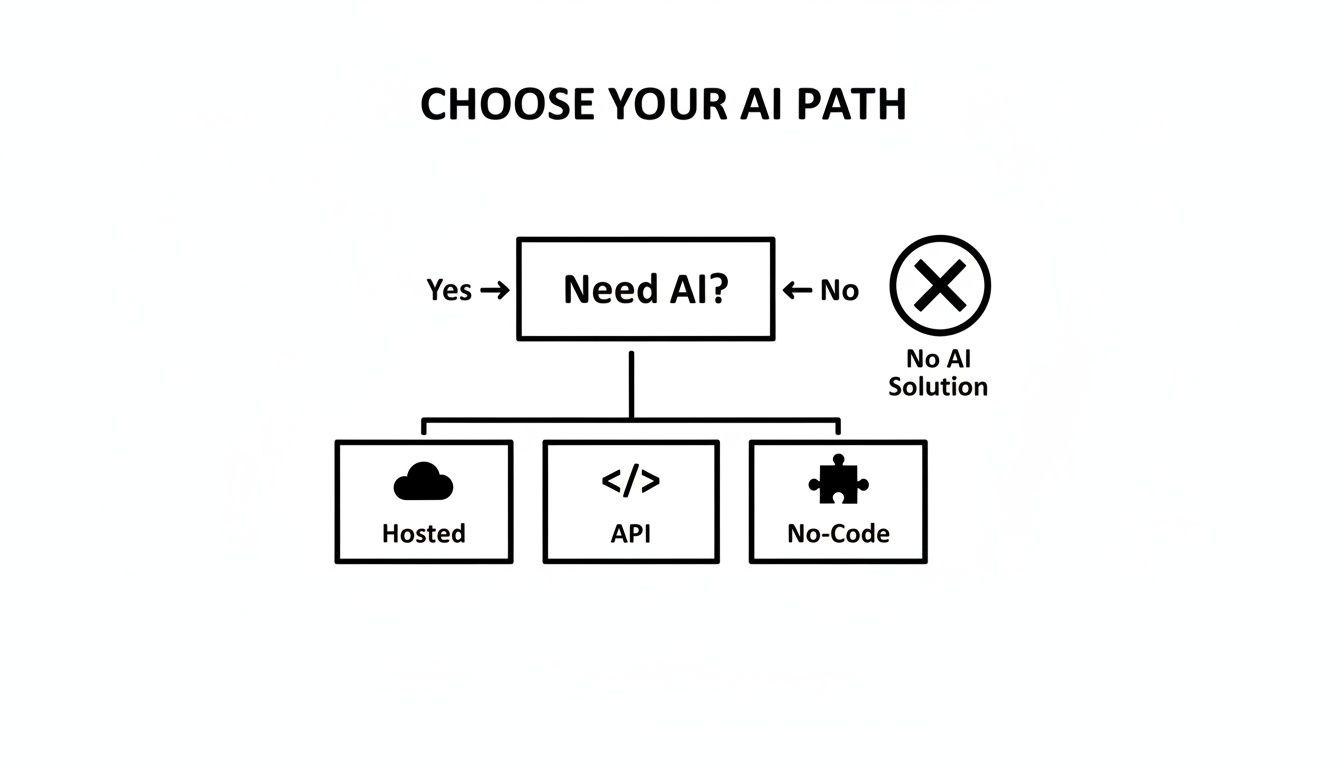
As you can see, no-code platforms hit a sweet spot, giving you the power of custom knowledge without the complexity of building from scratch.
Step 3: Test and Refine for Accuracy
Before you let your new AI agent loose on customers or employees, you have to put it through its paces. This testing phase is what builds trust and makes sure the tool is genuinely helpful.
Start acting like a real user. Ask it tough questions about your pricing, your return policy, or the nitty-gritty details of a product. This is how you find gaps in its knowledge or spot answers that could be a bit clearer.
The most important test? Ask a question you know it can't answer from the documents you provided. A well-trained agent will confidently say, "I don't have that information," instead of making something up. This is critical for preventing misinformation and earning user trust.
If you get a weak answer, just add more specific information to your knowledge base and try again. This back-and-forth process of testing and refining is what separates a decent AI from a truly great one.
Step 4: Deploy Your Agent Anywhere
Once you're happy with how your AI performs, it's time for launch. With a platform like BizSage, this is usually as simple as copying and pasting a line of code.
You've got options for where it can live:
- Embed on Your Website: The most common choice. Add it as a chat widget to your homepage, support section, or any other page where people need quick answers.
- Share a Direct Link: Create a standalone webpage for your AI. This is perfect for sharing internally with your team or with specific groups of customers.
- Integrate with Slack: Bring your knowledge base right into your team's workflow. Staff can ask questions and get instant, accurate answers without ever leaving their chat.
Getting Past the Usual AI Roadblocks
Rolling out any new technology comes with its own set of hurdles, and AI is no different. It’s not just about flipping a switch; a smart implementation requires a bit of planning. While the upside of using AI in your business is huge, getting there smoothly means tackling a couple of common (and totally solvable) challenges head-on. If you get in front of these issues, you build trust and make sure your AI investment pays off right away.
The two things that keep most leaders up at night are data privacy and the fear of the AI spitting out nonsense—what people call "AI hallucinations." These are absolutely valid concerns, especially when you’re thinking about public AI tools that learn from the wild west of the internet. But the good news is that business-grade AI platforms are built specifically to put those fears to rest.
Keeping Your Data Safe and the Answers Straight
When you use an AI tool designed for business, your data stays your data. Full stop. Unlike the public models, your internal documents, customer chats, and company secrets aren't fed back into some global brain to train the AI for everyone else. Everything is kept in a secure, private space, used only to power your agent. That’s a non-negotiable security principle.
As for the made-up answers? That problem is largely solved by a clever technique called Retrieval-Augmented Generation (RAG). Here’s a simple way to think about it: instead of letting the AI pull an answer out of thin air based on its general knowledge, RAG forces it to first find the specific, correct information within your company’s documents. Only then does it use that verified text to build the response.
This is the game-changer. Grounding the AI in your source material means every answer can be traced back to a specific sentence in a document you uploaded. It turns the AI from a creative-writing major into a meticulous research assistant.
A Practical Plan for a Smooth Rollout
The tech is only half of it. How you introduce AI to your team and weave it into your daily operations is just as important. If you rush it, you’ll end up with confused employees and a tool nobody uses. A measured, step-by-step approach is the way to go.
Here's a simple, field-tested framework for getting it right:
-
Define What "Success" Looks Like: Before you even start, decide what you're trying to accomplish. Do you want to knock down customer support tickets by 20%? Are you trying to slash the time it takes new hires to find HR info by 50%? Setting clear, measurable goals from the get-go is the only way you'll know if it's actually working.
-
Be Real with Your Team: Talk to your people openly about what this AI is supposed to do—and what it isn't. Make it clear that this is a tool to make their lives easier, not a robot coming for their jobs. The goal is to let the AI handle the boring, repetitive questions so they can focus on the tricky, high-value work that needs a human touch.
-
Start Small, Win Big: Don't try to solve every problem at once. Kick things off with a small pilot project where you can get a quick win. For example, build an internal AI assistant just for the sales team to answer questions about product features. This lets you prove the concept, iron out the wrinkles, and create a few enthusiastic fans who will help you champion the tool across the company.
-
Create a Feedback Channel: An AI agent isn't something you just set and forget. It needs to get smarter over time. Set up a dead-simple way for users to give feedback. If the AI gives a clumsy answer or can't find something, there needs to be a process to update the knowledge base and fix it. This constant cycle of feedback and tuning is what makes the tool incredibly valuable over the long haul.
By thinking through these challenges and following a clear plan, you're not just experimenting with a new toy. You're making a strategic investment in a smarter, more efficient way to run your business.
How to Measure Your Return on AI Investment
Any new business expense eventually boils down to one question: What’s the return? When it comes to AI, proving its worth means getting past fuzzy ideas about "efficiency" and digging into cold, hard numbers. The good news is, measuring the impact of a business-specific AI is actually pretty straightforward once you know what to look for.
Having a clear way to measure success helps you build a rock-solid business case for any stakeholder. It takes AI from a "nice-to-have" novelty and proves it’s an essential part of growing the business and saving money.
Key Performance Indicators for AI
To figure out your ROI, you have to track the right Key Performance Indicators (KPIs). These are the metrics that show you exactly where your ChatGPT for businesses solution is making a real difference.
You don’t need to track everything. Just focus on a few core areas where AI tends to deliver the fastest results:
- Customer Support: How many fewer support tickets are your human agents handling? How much faster are issues getting resolved?
- Sales Enablement: Are you getting more qualified leads from your website’s AI assistant?
- Operational Efficiency: Tally the hours saved on internal grunt work, like new employee training or hunting down information.
- Customer Experience: Are your customer satisfaction (CSAT) scores going up?
These KPIs give you the raw data you need to show real financial gains.
Measuring ROI isn’t just about justifying an expense. It's about understanding how a technology is fundamentally making your business better. It connects your AI strategy directly to the bottom line, showing clear wins in cost reduction, revenue generation, and team productivity.
Simple Formulas for Calculating ROI
You don't need a PhD in finance to see the benefits. Start with a few back-of-the-napkin calculations that highlight the biggest wins.
1. Calculating Support Cost Savings
First, figure out your average cost to resolve a single support ticket. Then, just track how many of those tickets your AI agent handles on its own each month.
- (Number of AI-Resolved Tickets) x (Average Cost per Ticket) = Monthly Support Savings
Let’s say your average ticket costs $15 for a human to handle. If your AI deflects 500 tickets a month, you're looking at $7,500 in savings right there.
2. Calculating Increased Lead Value
Next, look at the new leads your AI is capturing—the ones you would have otherwise missed, like from people browsing your site after hours.
- (Number of AI-Generated Leads) x (Average Lead Value) = Additional Monthly Revenue
If your AI assistant grabs 50 extra leads a month and your average lead is worth about $100, that’s another $5,000 in potential revenue hitting your pipeline.
3. Calculating Time Saved Internally
Finally, think about the time your own team gets back. How many hours are they saving by asking an internal AI for instant answers instead of digging through documents or interrupting colleagues?
- (Hours Saved per Employee) x (Number of Employees) x (Average Hourly Wage) = Monthly Productivity Gain
These simple formulas give you a powerful snapshot of your AI’s financial impact. They make it easy to see how a tool like BizSage can pay for itself many times over by automating support, capturing new leads, and giving your team their most valuable resource back: time.
Got Questions About AI for Your Business?
If you're thinking about bringing AI into your company, you've probably got a few questions. That's a good thing. Getting straight answers is the best way to make a smart decision for your team and your customers. Let's tackle some of the most common ones we hear from leaders just like you.
What’s the Real Difference Between a Custom Agent and Public ChatGPT?
The short answer? Their source of truth. A custom AI agent is like a seasoned employee who has spent years learning the ins and outs of your business. It's trained exclusively on your private company documents, support articles, and product specs, so its answers are always accurate and on-brand.
Public ChatGPT, on the other hand, is a generalist. It has read a huge chunk of the public internet, making it incredibly knowledgeable about a wide range of topics. But it knows nothing about your internal processes, your specific customer issues, or your unique brand voice.
A simple way to think about it: A custom AI is your in-house expert. The public version is just a well-read stranger. When you need answers you can count on for your business, you always want the expert.
How Safe Is My Company’s Data on an AI Platform?
This is probably the most important question of all. When you use a platform designed for ChatGPT for businesses, security is baked in from the ground up. These systems are built to handle sensitive information and treat it with the respect it deserves.
Your data is only ever used for one thing: to give your users and employees answers based on the information you've provided. It is never used to train the public AI models. Always look for platforms that offer enterprise-grade security, strong data encryption, and clear privacy policies to keep your proprietary info locked down.
How Long Does It Actually Take to Set Up a Custom AI?
Getting a custom AI agent up and running is faster than you might think. With modern no-code tools, you can often go from sign-up to a fully trained, functional AI in less than an hour.
The process is surprisingly straightforward. You just upload your documents or connect your website, then spend a few minutes customizing the AI’s personality to match your brand. The best part? Maintenance is a breeze. Top-tier systems can sync with your knowledge base automatically, so your AI is always up-to-date without you lifting a finger.
Ready to build an AI that knows your business as well as you do? With BizSage, you can launch a custom AI agent in minutes—no coding needed. Start your free trial today and see how easy it is to deliver instant, on-brand answers.