

When you hear “ChatGPT for business,” don't just picture the public chatbot. Think of it as a secure, private version of the AI, trained exclusively on your company's knowledge. It's like having an in-house expert who's available 24/7 to give instant, on-brand answers to customers, sales leads, and your own team—using only your data.
Your Company's AI Brain Explained

Let's cut through the buzzwords. Using this technology for business isn't about letting a public tool loose on your customers. It's about building a private, controlled version of the AI that acts as your company's central intelligence—what you might call a “Company Brain.”
Think of it like this: you hire a new employee who, on day one, has already memorized every product spec, support article, sales script, and internal policy your company has ever created. This AI knows it all, inside and out. It’s an expert system built to solve specific business problems, not a general-purpose chatbot for casual conversation.
That distinction is everything. The public version of ChatGPT draws its knowledge from a massive, messy, and uncontrolled slice of the internet. A business-specific AI, on the other hand, is grounded only in the information you feed it. This is how you guarantee its answers are always accurate, consistent, and perfectly aligned with your brand voice.
Key Differences from Public AI
Moving this technology into a business setting is all about gaining reliability and control. Here are the core advantages that make it a completely different beast:
- Data Privacy and Security: Your company's sensitive data stays yours. It is never used to train public models, and all conversations and knowledge sources remain confidential. This is non-negotiable for any serious organization.
- Grounded and Accurate Answers: The AI is locked to your knowledge base. This simple constraint prevents it from "hallucinating" or just making things up—a notorious problem with public models. If it doesn't know the answer from your data, it will say so.
- Brand Consistency: You can dial in the AI's personality. Whether you need a formal, friendly, or deeply technical tone, you can configure it to match. Every interaction feels like it comes directly from your team.
This focused approach is why adoption has exploded. The number of dedicated enterprise users grew from just 150,000 in January 2024 and is on track to hit 1.5 million by March 2025. That's a 900% increase in just over a year. It's no wonder that 92% of Fortune 500 companies are already using this kind of tech for everything from writing code to handling customer service.
By training an AI exclusively on your proprietary content, you transform a generic tool into a powerful, reliable asset. It becomes a system built to solve your unique business challenges, not just a chatbot for answering trivia.
If you're curious about the mechanics behind it all, check out a concise explanation of how AI like ChatGPT works. Understanding the fundamentals is the first step toward building your own intelligent business systems.
Key Use Cases Driving Business Value
Knowing what a "Company Brain" is is one thing, but seeing it in action is where things get interesting. So let's move from theory to practice and look at four powerful ways you can use a tool like ChatGPT for business to get an immediate, tangible return.
These aren't just pie-in-the-sky ideas. Companies are already using this technology right now to save countless hours, close more deals, and make their internal operations run a whole lot smoother. Each of these examples shows a clear path to value by handing off repetitive work to AI, freeing up your team for the work that really matters.
Automated Customer Support
Think about your customer support queue for a second. How many questions are just slight variations of the same thing, over and over again? Queries about shipping status, return policies, or basic troubleshooting can easily eat up over 50% of your support team’s day. This is a perfect job for an AI.
You can train a chatbot on your help center articles, FAQs, and product manuals. When a customer asks, "What's your refund policy?" the AI isn't just guessing; it's pulling the answer directly from your official documentation.
The result? Your AI can deflect a huge number of tickets—often up to 70% of common questions—before they ever land in a human's inbox. This frees up your support experts to focus on the tricky, high-stakes problems that actually need a human touch, boosting both your team's efficiency and your customers' happiness.
A 24/7 Sales and Marketing Assistant
Your website is your best salesperson, but it usually clocks out when your team does. What happens when a hot prospect is browsing your site at 10 PM on a Saturday with a burning question? Most of the time, you lose that lead forever. An AI assistant makes sure that never happens.
By feeding the AI your product pages, case studies, and sales decks, it becomes an expert on what you sell. It can:
- Answer Product Questions: Give instant, accurate details on features, pricing, and how you stack up against competitors.
- Qualify Leads: Ask smart questions to figure out a visitor's needs, budget, and if they're a good fit.
- Book Meetings: Connect directly to your sales team's calendars to schedule demos with qualified prospects.
Suddenly, your website isn't just a static brochure. It's an interactive sales machine that works around the clock, capturing and nurturing leads while you sleep.
Streamlined Employee Onboarding
The first few weeks for any new hire can be a chaotic blur of questions. How do I get on the wifi? Where’s the benefits guide? Who do I ask about setting up my software? Answering these questions slows down not only the new person but also the colleagues they have to interrupt. An internal-facing AI is the perfect fix.
Instead of digging through a messy shared drive or bugging a teammate, new employees can just ask the "Company Brain." Questions like, "How do I set up my VPN?" or "Where's the latest employee handbook?" get immediate, correct answers pulled straight from your internal knowledge base. This helps them get up to speed faster and feel more self-sufficient from day one.
Centralized Internal Knowledge
It's not just new hires who struggle to find information. We all waste time hunting for that one piece of data buried in an old email thread, a random Slack channel, or a forgotten Google Doc. This constant searching is a massive, hidden productivity killer.
AI tools give teams a much better way to document processes quickly and make that knowledge instantly accessible. An internal AI acts as a single source of truth for the entire company. Any employee can ask a question in plain English and get an answer synthesized from all connected company documents.
This immediate access to your organization's collective wisdom is a game-changer. It cuts down on redundant work, ensures everyone is on the same page, and helps your team make smarter, faster decisions every single day.
Choosing Your AI Implementation Path
Once you’ve pinpointed a great use case, the next big question pops up: "How do we actually get this into our business?" Bringing a tool like ChatGPT into your daily operations isn't a one-size-fits-all deal. It really comes down to a classic strategic choice that every business faces with new tech: do you build it yourself or buy a solution that's ready to go?
Think of it like building a house. You could hire an architect, source every single material, and manage the construction crew day in and day out. This gives you total control, but it also demands a ton of expertise, time, and a serious budget. The alternative? Buy a brand-new home that’s already built, secure, and waiting for you to move in.
This analogy perfectly captures the "build versus buy" decision for AI. Getting a handle on the trade-offs between these two paths is the key to picking a strategy that fits your team's skills, budget, and timeline.
The Build Path: Working with Raw APIs
The "Build" route means using raw APIs (Application Programming Interfaces) directly from AI providers like OpenAI. This path offers incredible flexibility, letting you create a completely custom solution designed for your exact needs. If you're a large enterprise with a unique, complex problem and a team of in-house developers, this can be the perfect move.
But make no mistake, this path is demanding. It requires:
- Serious technical chops: You need developers who are comfortable working with sophisticated AI models, managing data pipelines, and building a user-friendly interface from scratch.
- Constant upkeep: AI models and their APIs are always changing. Your team will be on the hook for managing updates, squashing bugs, and keeping the system secure and running smoothly.
- High and unpredictable costs: On top of developer salaries, you'll pay for API usage. These costs can swing wildly depending on how much you use the system, making it tough to budget accurately.
For most growing companies, the technical burden and financial gamble of the build path just aren't practical.
The Buy Path: Adopting a Ready-Made Platform
The "Buy" approach means signing up for a ready-to-use platform built specifically for businesses. For most small and medium-sized companies, this is the fastest and most efficient way to get AI up and running. These platforms take care of all the heavy lifting behind the scenes, so you can focus on getting results.
For most businesses, especially those without a dedicated AI development team, the "Buy" path offers the fastest time-to-value. It transforms a complex engineering challenge into a simple setup process, making powerful AI accessible in minutes, not months.
A platform like BizSage, for instance, gives you a no-code interface to train and launch your own AI assistant without writing a single line of code. The big wins here include a managed security environment, pre-built integrations that work right out of the box, and simple, predictable subscription costs. This lets non-technical leaders roll out a powerful chatgpt for business solution quickly and without breaking the bank.
This decision tree can help you see how different business pain points map to specific AI solutions, guiding you on where to start.
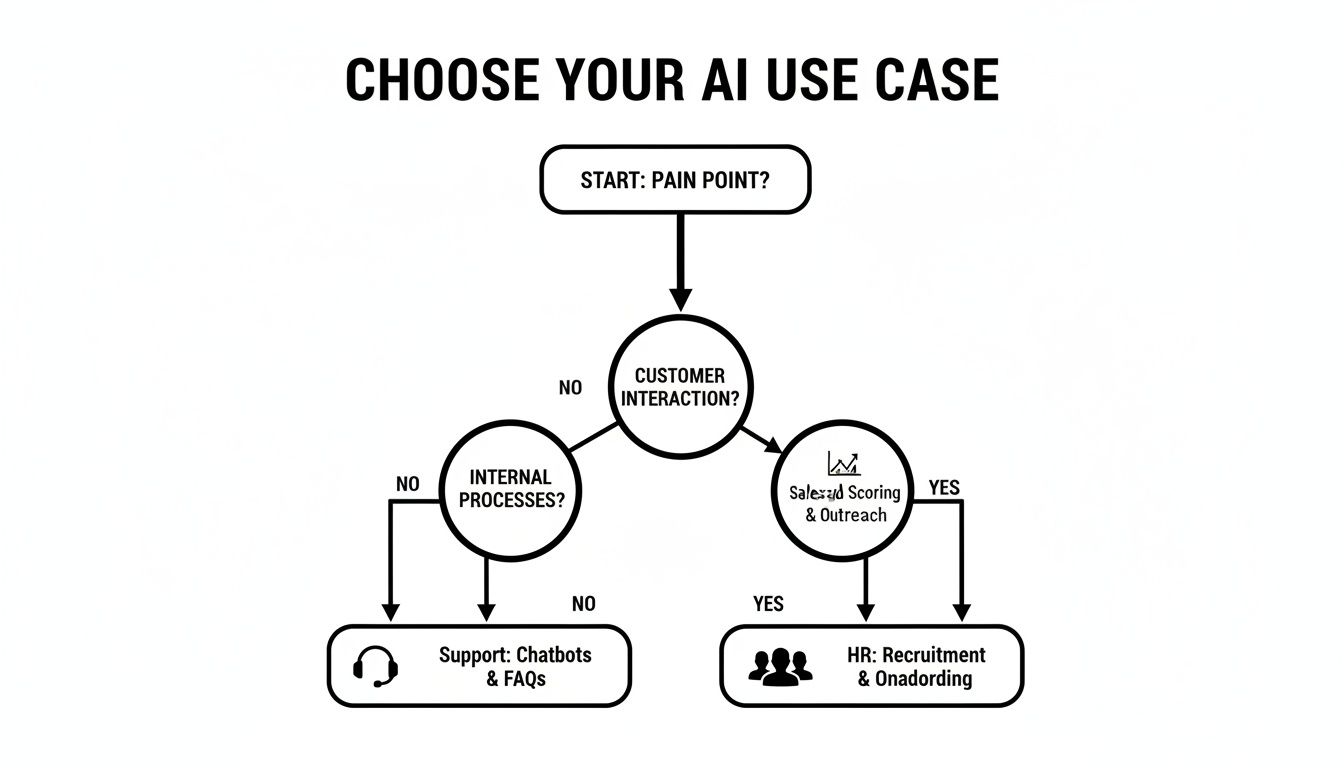
The flowchart shows that whether your biggest headache is in support, sales, or HR, there’s a clear and direct way for a business-focused AI to make a real impact.
Comparing Implementation Approaches
To make the decision even clearer, let's break down the key differences between building a custom AI solution from scratch and buying a ready-made platform.
| Factor | Build (Custom API) | Buy (Ready-Made Platform) |
|---|---|---|
| Time to Launch | Months to over a year | Hours to a few days |
| Upfront Cost | High (developer salaries, infrastructure) | Low (monthly/annual subscription) |
| Ongoing Cost | Variable and potentially high (API usage, maintenance) | Predictable and fixed (subscription fee) |
| Technical Skill | Requires a dedicated team of expert developers | No coding required; can be managed by non-technical staff |
| Maintenance | Handled entirely by your in-house team | Managed by the platform provider (updates, security) |
| Flexibility | 100% customizable to unique, complex needs | High, but within the platform's framework |
| Best For | Large enterprises with unique problems and deep technical resources. | Small to medium-sized businesses needing a fast, reliable, and cost-effective solution. |
Ultimately, the choice depends on your organization's resources and strategic priorities. For most, buying a platform provides a practical and powerful entry point into the world of AI.
Ensuring Data Security and Governance

For any business leader, the thought of feeding sensitive company data into an AI platform immediately brings up a huge red flag: is our information safe? This is the single biggest hurdle to clear when considering chatgpt for business, and the answer comes down to one thing—understanding the massive difference between consumer toys and secure, enterprise-ready solutions.
When you use the public version of ChatGPT, your conversations can be fair game for training future AI models. That's a deal-breaker for any company. Business-grade platforms, on the other hand, play by a completely different set of rules. Your data, from the documents you upload to the questions your team asks, is treated as confidential and is never used to train public models.
This privacy-first approach is the bedrock of any serious business tool. It ensures your proprietary information, customer lists, and internal strategies stay exactly where they belong: with you. Think of it as the difference between shouting your secrets in a crowded public park versus having a discussion in a private, soundproof boardroom.
Understanding Your Security Controls
Beyond the basic privacy promise, a true business solution gives you a dashboard of robust administrative controls. These features put you in the driver's seat, letting you manage how the AI is used and ensuring it operates safely and reliably within your organization.
Here are the non-negotiable controls you should be looking for:
- Data Encryption: All your data—whether it's sitting on a server or moving between systems—must be locked down with industry-standard encryption to keep prying eyes out.
- Access Management: You need the power to decide who on your team can access the AI, who can add or remove information, and who can see the analytics behind the conversations.
- Compliance Certifications: Look for platforms that have done the hard work to earn certifications like SOC 2. This is a clear signal that they have proven processes for securely managing customer data.
These security layers aren't just nice-to-haves; they are essential for any business AI you can actually trust. They provide the peace of mind you need to weave AI into your daily operations without putting your company at risk.
Governance Guardrails for Reliable AI
While security is about protecting your data, governance is about controlling the AI's behavior. An AI left to its own devices can be unpredictable. A well-managed one, however, becomes a reliable extension of your team. Good governance lets you set clear rules of the road, transforming a clever chatbot into a dependable business system.
The goal of AI governance isn't to tie the tool down; it's to make it trustworthy. By defining what it knows, how it speaks, and what it should do when it's stumped, you create an AI that's both powerful and predictably reliable.
Key governance features let you dictate exactly how your AI should act:
- Define Knowledge Boundaries: This is crucial. You can restrict the AI to only pull answers from the specific documents you provide. This "grounding" technique stops it from making up facts or grabbing random information from the public internet.
- Set the Tone of Voice: Make sure every AI response sounds like it comes from your company. You can configure it to be professional, friendly, highly technical, or anything in between, keeping your brand voice consistent.
- Implement an 'I Don't Know' Response: This might just be the most important feature for building trust. When a well-governed AI can't find an answer in its knowledge base, it won't guess. It will simply say it doesn't have the information, which prevents misinformation and makes it a far more reliable resource.
Together, these security and governance features create a controlled environment. It’s a space where you can confidently use a chatgpt for business solution, knowing your data is locked down and your AI is playing by your rules.
How to Measure Your AI Success and ROI
So, you’ve brought an AI into your business. How do you know if it's actually working? Proving its value goes beyond just feeling more efficient; you need cold, hard numbers. To make a real business case and understand your return on investment (ROI), you have to track the right key performance indicators (KPIs).
Think of it this way: you wouldn't hire a new team member without defining what success looks like for their role. Your AI is no different. By setting clear metrics from the start, you can see exactly what's working, what isn't, and show everyone from your team to your stakeholders the tangible impact it's having.
The trick is to connect your metrics directly to the problem you were trying to solve. Whether you set up an AI for customer support, sales, or to help your own team, there are specific numbers you should be watching.
KPIs for Customer Support
When you put an AI on the front lines of customer service, the goal is twofold: handle common questions instantly and free up your human agents for the tricky stuff. You want faster resolutions for customers and a more focused support team.
Here are the core metrics to keep an eye on:
- Ticket Deflection Rate: This is the big one. It’s the percentage of customer questions the AI answers completely, without a human ever getting involved. A high deflection rate directly translates into time and money saved.
- First Contact Resolution (FCR): How many problems get solved in the very first chat with the AI? A high FCR tells you the AI is not only effective but also has a solid grasp of your knowledge base.
- Customer Satisfaction (CSAT) Scores: After a customer chats with the AI, pop up a simple "Was this helpful?" question. This direct feedback is gold for understanding the quality of the AI's responses.
- Average Handle Time Reduction: For tickets that do need a human touch, see if the AI is still helping. By gathering key details upfront, the AI can cut down the time your agents spend on each conversation.
KPIs for Sales and Marketing
In a sales role, an AI's success is all about generating and qualifying leads that turn into revenue. It’s your 24/7 salesperson, making sure you never miss an opportunity, even when the office is dark.
Track its contribution with these KPIs:
- After-Hours Lead Capture: How many qualified leads does the AI bring in outside of your 9-to-5? Every single one is a potential deal you would have otherwise missed.
- Conversion Rate from AI Interactions: Of all the people who chat with the AI, what percentage actually do something meaningful, like book a demo or sign up? This metric ties the AI’s activity directly to pipeline growth.
- Sales Cycle Length: When prospects can get instant answers to their product questions, they often make decisions faster. Check if the time it takes to close a deal is shrinking for leads who talked to the AI first.
The financial upside here can be huge. In the B2B SaaS space alone, AI already plays a part in 8% of customer purchasing journeys, creating an estimated $229 billion in value. If you want to dig deeper into the numbers, you can discover more insights about ChatGPT's market impact.
KPIs for Internal Operations
When you use an AI as an internal "Company Brain," the ROI comes from giving your team their time back. The whole point is to cut down on the minutes and hours people waste digging for information and to help new hires get up to speed in record time.
Measuring internal AI success is about reclaiming your team's most valuable asset: time. Every minute the AI saves an employee from hunting through documents is a minute they can spend on high-value work.
Here’s what to measure inside your own walls:
- Time Saved Searching for Information: Just ask your team. Survey them on how much time they used to spend searching for files or answers before the AI. Even saving 15-20 minutes per person each day adds up to a massive productivity boost across the company.
- Reduced New Hire Onboarding Time: How long does it take a new employee to get fully up and running? An AI that can instantly answer questions about HR policies, IT setup, and company processes can slash that timeline.
- Usage and Adoption Rates: Take a look at how many employees are actually using the internal AI. High adoption is a clear signal that your team finds it genuinely useful in their day-to-day work.
Getting Started with ChatGPT for Business

So, how do you turn all this theory into something that actually helps your business? It’s easier than you might think. You don't need a team of data scientists or a huge budget to start using ChatGPT for business. By following a simple, five-step roadmap, you can go from a nagging problem to a working solution surprisingly fast.
This isn't some complex software project. Think of it more like hiring a new, incredibly efficient employee and showing them the ropes. Let's walk through the exact steps to get your first AI agent up and running.
Step 1 Identify Your Biggest Pain Point
Before you touch any technology, figure out what you’re trying to fix. The best AI projects always start by targeting a specific, real-world problem. Don't try to solve everything at once. Just find the single biggest source of repetitive work or customer frustration in your business right now.
Not sure where to look? Start here:
- Your Support Inbox: Are you drowning in the same five questions every single day? This is the lowest-hanging fruit for AI automation.
- Your Sales Process: Do you lose out on leads who show up on your site after hours? An AI can be your 24/7 sales qualifier.
- Your Internal Wiki: Is your team constantly bugging each other to find the latest policy doc or sales deck? That's a classic knowledge management problem.
Just pick one. The goal is to get a quick, measurable win that proves this stuff actually works. You can always tackle other problems later.
Step 2 Gather Your Knowledge Sources
Once you know the problem, you need to give your AI the information it needs to solve it. This is the "training" phase, but it's really just a matter of collecting the documents that already hold the answers. Your AI agent will learn exclusively from this content—nothing else.
Start by pulling together the core documents related to the pain point you picked. This could include:
- Your website's main pages (like Pricing, Features, and About Us)
- Your entire Help Center or FAQ section
- Key product manuals or technical documentation
- Internal policy documents or employee handbooks
Don't overthink it. Just gather the most important and up-to-date files. A good platform will let you drop in URLs and upload documents directly, making this mostly a copy-and-paste job.
Step 3 Choose a User-Friendly Platform
Now it's time to pick your tool. As we talked about earlier, the "Buy" path makes the most sense for most businesses. You want a platform that lets you get going immediately, without needing to write a single line of code.
Look for a no-code solution like BizSage that’s built for simplicity. The right platform lets you handle the entire setup yourself in a few minutes. This is key because it empowers your team to own the solution without having to call a developer for every tiny change.
Step 4 Train and Test Your AI Agent
With a platform chosen and your documents ready, it’s time for the most important step: training and testing. This is where you bring your AI to life and make sure it works exactly how you want it to.
The process is usually pretty straightforward:
- Add Your Sources: Paste in the website links and upload the documents you gathered in Step 2.
- Ask Test Questions: Start acting like a customer or an employee. Throw the questions at it that you expect it to handle.
- Refine Its Tone: Does it sound like your brand? Tweak the settings to make it more professional, friendly, or whatever fits your company’s voice.
- Check for Gaps: If it can't answer something, you know you need to add another document to its knowledge base.
This back-and-forth testing is absolutely critical. It’s how you build confidence that your AI will be a helpful, reliable resource from day one. Spend a little extra time here to get the answers and the tone just right.
Step 5 Deploy and Monitor
Once you're happy with how your AI agent is performing, it's time to put it to work. Deployment should be just as easy as setup. A good platform will give you a simple snippet of code to embed the chatbot on your website or a direct link you can share with your team for internal use.
But the job isn’t done when it goes live. The final step is to keep an eye on its performance using the KPIs we covered earlier. Track metrics like ticket deflection rate or the number of leads captured. This data is what will prove your ROI and give you clues on how to make your AI even better over time.
Got Questions? We've Got Answers
Stepping into the world of AI always sparks a few questions. It’s a new frontier for many businesses. Here are some straightforward answers to the things we hear most often from leaders just like you.
Can This AI Actually Sound Like Us and Know Our Products?
It absolutely can, and that’s the whole point. Unlike the public version of ChatGPT that knows a little about everything, a business-grade AI is a blank slate ready to learn your business inside and out.
You feed it your own content—your website pages, product docs, help center articles, you name it. The AI ingests it all and uses that information exclusively to form its answers. You can even give it a personality, telling it to be professional, witty, or warm and friendly, making sure every interaction feels like it’s coming straight from your team.
How Do We Stop It From Making Things Up?
This is probably the most important question, and it's addressed by a concept called "grounding." A true business AI is strictly trained to pull answers only from the knowledge base you provide. Think of it as putting up a fence around its knowledge.
If a customer asks something the AI can't find in your documents, it won't guess. Instead, a well-designed system will simply say, "I don't have that information," or offer to connect the user with a human. This single feature is what separates a reliable business tool from a creative toy and is non-negotiable for maintaining trust.
It’s this boundary that prevents the AI from going off-script and giving incorrect or "hallucinated" answers.
Is This Going to Be Complicated or Break the Bank?
Not at all. While a few years ago this would have meant a massive, custom-built project requiring a team of developers, that’s no longer the case. Modern platforms are designed to be simple and affordable.
Most teams can get their first AI assistant up and running in a matter of minutes, often with zero coding required. The pricing is usually tiered, so it's a realistic option for small businesses and startups, not just massive enterprises.
Ready to see how an AI assistant trained on your business can transform your support, sales, and internal knowledge? BizSage lets you build and deploy a custom AI chatbot in minutes, no code required. Start your free trial today and give your customers and team the instant answers they need.