Imagine giving your HR team a tireless, brilliant assistant who can answer hundreds of employee questions at once, any time of day. That's exactly what an HR chatbot brings to the table. These AI-powered tools are fundamentally changing how work gets done by creating a single, smart touchpoint for employee needs and taking repetitive tasks off your team's plate.
How AI Chatbots Are Changing HR

Let's be honest—most HR departments are buried in a constant avalanche of the same questions. "How much PTO do I have left?" "Where's the latest expense policy?" "Can you explain my health benefits again?" Answering these, while necessary, eats up hours that could be spent on work that truly matters.
This is where an HR chatbot becomes a game-changer. It’s not about replacing people; it's about empowering them. Think of the chatbot as an intelligent first line of support that's always on, instantly handling the routine stuff so your human experts can focus on the complex, person-to-person issues.
The right bot fits right into your team's existing workflow, giving employees the power to find what they need, the moment they need it. This guide will walk you through everything—from recruitment and onboarding to measuring the real return on your investment.
A Trend That's Here to Stay
Chatbot adoption isn't just a niche idea anymore; it's rapidly becoming standard practice. Already, 62% of people globally use virtual assistants for HR questions. The momentum is building, with projections showing 46% of SaaS companies will have them fully integrated across their organizations by 2025.
This isn't just a global phenomenon. In North America, 44% of support teams are planning to invest in chatbots, with the Asia-Pacific region seeing some of the fastest growth. The data clearly shows we're in the middle of a major shift.
What Can an HR Chatbot Actually Do?
An HR chatbot is a central piece of the larger puzzle of HR process automation. By taking over a wide range of tasks that used to require a person to stop what they were doing, these tools make the entire workplace more responsive and efficient.
To give you a clearer picture, here's a quick look at the core functions these bots are transforming.
Key HR Functions Transformed by Chatbots
| HR Function | Primary Chatbot Role | Key Benefit |
|---|---|---|
| Recruiting & Screening | Candidate pre-qualification, FAQ handling, interview scheduling. | Speeds up hiring and improves candidate experience. |
| New Hire Onboarding | Guides new hires through paperwork, policies, and first-day questions. | Reduces confusion and gets new employees productive faster. |
| Employee Self‑Service | Instant answers on PTO, pay stubs, benefits, and IT help. | Frees up HR staff by deflecting common tickets. |
| Internal Knowledge Base | Acts as a searchable, interactive guide for company policies. | Ensures employees find consistent, accurate information 24/7. |
The real beauty here is that by handing off these tasks, HR professionals get to focus their energy on high-value work—things like talent development, strengthening company culture, and improving employee well-being. It’s a shift that doesn't just boost efficiency; it elevates the strategic importance of the entire HR department.
Practical Applications for an HR Chatbot

While the big-picture benefits are easy to grasp, the real magic of an HR chatbot happens in the day-to-day grind. It's less of a single tool and more like a multi-talented team member, one that can jump between different tasks across the entire employee lifecycle.
These aren't just minor conveniences; they directly tackle the most repetitive, time-sucking administrative tasks your HR team faces. This frees them up to focus on the human side of human resources.
Let's break down five core areas where an HR chatbot can make a real difference.
Streamlining Recruiting and Candidate Screening
A candidate's first real taste of your company culture often comes from the hiring process. A slow, clunky experience can be a major turn-off for top talent. An HR chatbot works like a tireless front-line recruiter, ready to engage potential hires 24/7.
It can instantly field common questions about job openings, company perks, or office locations, creating a great first impression. Better yet, the chatbot can handle the initial screening by asking pre-qualifying questions about experience, certifications, or work authorization.
This automated first pass means your human recruiters only spend their valuable time on candidates who already meet the basic requirements.
- Automated Scheduling: The bot can tap into recruiters' calendars to book interviews, putting an end to the endless email chains.
- FAQ Handling: It can answer questions like, "What are your parental leave policies?" or "Do you offer remote work options?" in a heartbeat.
- Application Status Updates: Candidates can get a quick update on their application from the bot instead of pinging a busy recruiter.
Revolutionizing New Hire Onboarding
The first few weeks on the job can be a whirlwind of new faces, new systems, and a mountain of paperwork. A chatbot acts as a friendly, patient guide for new hires, helping them navigate the flood of information without feeling like they're bothering their manager or HR.
This is a huge area of impact. In fact, a striking 92% of HR departments now use chatbots to point new employees toward essential information, completely reshaping the onboarding experience. This works because 66% of HR leaders report their teams are perfectly comfortable using bots to learn about company policies. You can find more chatbot adoption in HR insights on masterofcode.com.
Instead of being handed a stack of documents, a new employee gets an interactive welcome. The bot can walk them through setting up payroll, submitting forms, and even introduce them to company values through a simple conversation.
Powering Employee Self-Service
For your current team, the chatbot becomes the go-to resource for instant answers. Think of it as an internal search engine that actually talks back. This is where you really see "ticket deflection" in action, as the bot intercepts and solves routine questions before they ever land in an HR inbox.
Employees don't have to hunt down the right person or wait hours for an email response. They just open a chat window and get what they need, when they need it.
An employee self-service chatbot gives your team autonomy. It changes the dynamic from "I need to ask HR" to "I can find this myself," creating a more efficient and self-sufficient workforce.
Common self-service questions include:
- Checking remaining paid time off (PTO) balances.
- Requesting copies of recent payslips.
- Finding the company's policy on travel expenses.
- Getting quick IT help for a password reset.
Acting as an Internal Knowledge Base
Let's be honest—company policies are often buried in dense handbooks or scattered across a dozen different internal sites. An HR chatbot can be trained on all of this documentation, turning it into a single, searchable knowledge base that's always up to date.
It becomes the one source of truth for all company-related info. Employees can ask complex questions in plain English and get precise answers pulled directly from official documents. This ensures everyone gets consistent, accurate information and cuts down on confusion.
For example, an employee could ask, "What are the steps for submitting a professional development reimbursement request?" The chatbot wouldn't just spit out the policy; it could guide them through the process step-by-step and even link them straight to the right form.
Handling Payroll and Benefits Queries
Questions about pay and benefits are personal, sensitive, and often urgent. A chatbot provides a secure, confidential way for employees to get answers without having to discuss private details with a colleague.
When securely connected to your HRIS, a chatbot can provide personalized information in seconds. This automation takes a huge administrative load off your payroll and benefits specialists, giving them more time to handle complex cases and strategic planning.
A few real-world examples:
- "When is the open enrollment period for health insurance this year?"
- "Can you explain the difference between the PPO and HMO plans?"
- "How much have I contributed to my 401(k) so far this year?"
Each of these applications shows how a chatbot in HR shifts from being a "nice-to-have" novelty to an essential tool for building a more efficient, responsive, and supportive workplace.
What's the Real Payoff? The Business Case for an HR Chatbot
It's one thing to see how an HR chatbot works, but the real question is, "What's in it for the business?" Bringing a chatbot into your HR function isn't just a tech upgrade; it's a strategic decision that delivers a clear, measurable return by fundamentally changing how your team operates and how your employees get help.
The benefits aren't just confined to the HR department, either. They ripple out, touching everything from daily productivity to the overall employee experience. By automating the routine, you free up your people to focus on the human side of HR—driving growth, saving money, and building a better place to work.
Give Your HR Team Their Time Back
Think about a typical day for your HR team. So much of it is spent answering the same questions over and over again. "Where's the holiday calendar?" "How do I change my direct deposit?" "I need my last paystub." These are all valid questions, but they drain hours away from more strategic work.
An HR chatbot steps in as the first line of defense, instantly fielding this flood of repetitive queries. This simple shift moves your HR pros from being reactive problem-solvers to proactive, strategic partners in the business.
With all that reclaimed time, they can finally focus on what really moves the needle:
- Building meaningful career paths and developing your top talent.
- Launching initiatives to improve company culture and engagement.
- Navigating the complex, sensitive employee issues that absolutely require a human touch.
Watch HR Support Tickets Disappear
Every email or call to HR is basically a support ticket, and each one costs time and money to resolve. A chatbot changes this entire equation by giving employees the power to find answers themselves. This is where you see a massive drop-off in ticket volume.
Instead of emailing HR and waiting for a reply, an employee gets an accurate answer on the spot, anytime. That immediate resolution means fewer inboxes to manage, fewer calls to field, and a much lighter administrative load for your team. The end result is a real reduction in the operational cost of handling internal support.
A 24/7 self-service channel doesn't just cut down on support tickets; it builds a culture of empowerment. Employees feel more capable, and the HR team is freed from the constant churn of low-level queries.
Offer Consistent, Around-the-Clock Support
Work doesn't just happen from 9-to-5 in an office anymore. With remote employees, flexible schedules, and teams spread across different time zones, the need for 24/7 support has never been greater. This is where an HR chatbot truly shines, offering always-on help to everyone, no matter where or when they work.
This means the graveyard shift worker or the colleague on the other side of the world gets the exact same quality of support as someone sitting at headquarters. No more frustrating delays. This kind of automation is delivering incredible results, with some companies seeing an 88% reduction in contract processing time and an 80% decrease in signature processing. It’s no surprise that by 2023, 75% of HR inquiries were starting with a chatbot. You can learn more about the impact of chatbots on business efficiency from botpress.com.
Improve Consistency and Nail Compliance
Let's face it, humans make mistakes. In HR, even small inconsistencies can lead to confusion or, worse, compliance issues. One team member might explain a policy slightly differently than another, or an old version of a document might get sent by accident. A chatbot wipes out that risk.
You train your chatbot on a single source of truth—your official employee handbook, your most current policies, your centralized knowledge base. This ensures every answer it gives is standardized, correct, and perfectly aligned with company rules. This level of consistency is a game-changer for staying compliant with labor laws and internal regulations, guaranteeing every single employee gets the right information, every single time.
Your HR Chatbot Implementation Roadmap
Bringing a new HR chatbot into the fold is more than just a software purchase; it's a full-fledged project. A thoughtful, well-planned rollout is what separates a genuinely helpful tool from one that employees ignore. Think of it like building a house—you need a solid blueprint before you even think about laying the foundation.
This roadmap breaks the process down into clear, manageable steps. Following them will help you launch a chatbot that actually fits your company culture, solves real problems, and becomes an indispensable resource for your team.
Phase 1: Define Your Goals And Scope
Before you get lost in the tech, start with strategy. What, specifically, are you trying to fix or improve with this chatbot? A vague goal like "improving efficiency" won't cut it. You have to get granular.
Maybe your primary objective is to slash the HR team's email volume by 30%. Or perhaps you want to ensure every new hire completes their onboarding paperwork within their first 48 hours. When you have clearly defined goals, they become the North Star for every decision that follows, from choosing the right platform to measuring your success.
- Pinpoint Key Use Cases: Will the bot focus on recruiting, onboarding, or just answering common policy questions? Start with the area that causes the most friction or consumes the most time.
- Set Measurable Targets: You need clear Key Performance Indicators (KPIs). This could be your ticket deflection rate, average time-to-hire, or even employee satisfaction scores related to HR support.
- Know Your Audience: Is this bot for candidates? New hires? All current employees? Who you're building it for will shape its tone, personality, and knowledge base.
Phase 2: Prepare Your Data And Content
Let's be clear: a chatbot is only as smart as the information you feed it. This is arguably the most critical part of the process, where the old "garbage in, garbage out" saying really hits home. Your chatbot needs access to a clean, organized, and up-to-date source of truth.
This means gathering all your relevant documents, policies, and FAQs, and linking to essential systems. You're essentially building the curriculum for your new AI assistant.
One of the most common reasons chatbots fail is because they're built on a foundation of messy data. Before you do anything else, audit your knowledge sources. Consolidate outdated policy documents, get rid of duplicates, and make sure every piece of information is accurate and ready for your bot to learn from.
Your chatbot will need to tap into a few key places:
- Your HRIS (Human Resource Information System): This is for personalized info like PTO balances or pay stubs.
- The Employee Handbook: This is the bible for all your company policies and procedures.
- Internal Wikis or SharePoint Sites: This is often where departmental knowledge and specific process guides live.
- Frequently Asked Questions (FAQs): Just pull the top 20 questions your HR team answers every single day.
When you connect your chatbot to reliable, high-quality data, you unlock tangible benefits that make a real difference.
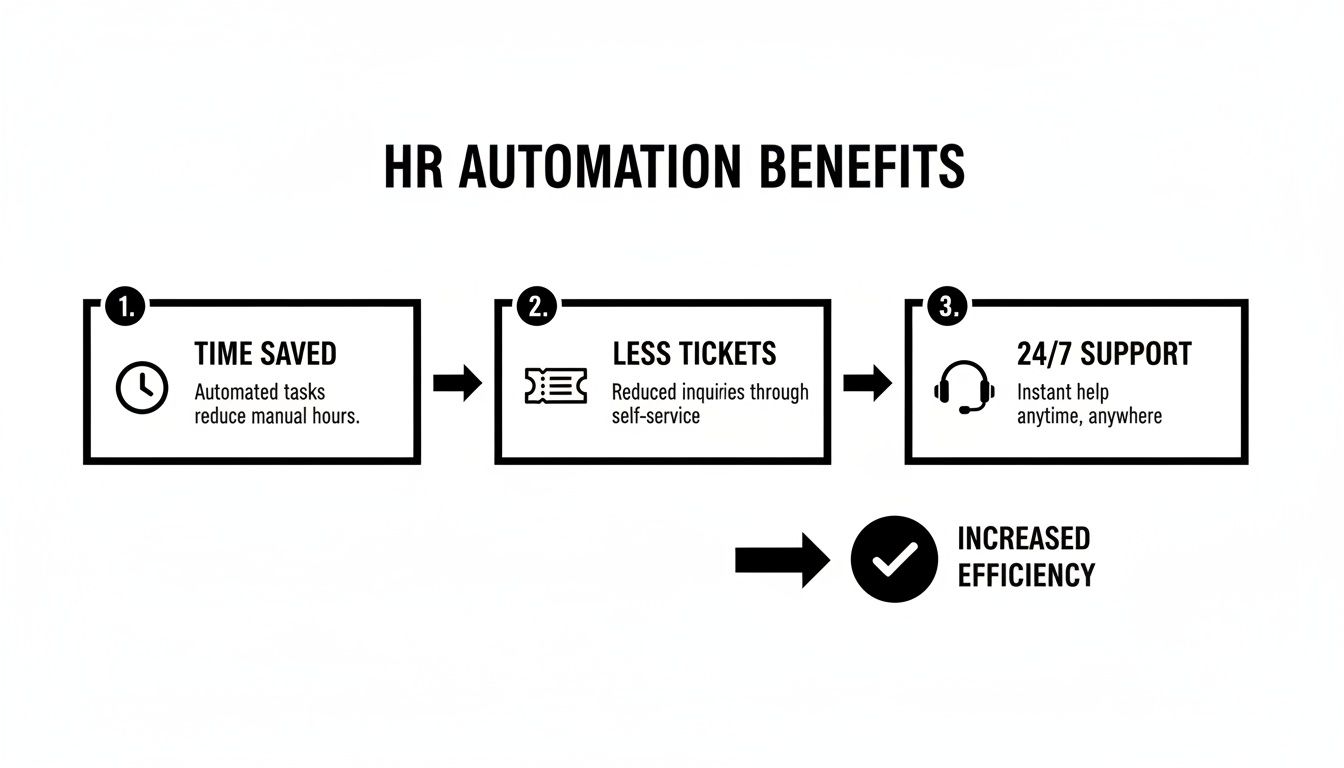
As you can see, connecting your bot to the right data directly leads to saving time, cutting down on repetitive support tickets, and giving your people the 24/7 support they expect.
Phase 3: Design The Conversation And User Experience
It's time to give your chatbot a personality. The bot’s tone of voice should be a direct reflection of your company culture. Are you buttoned-up and professional, or more friendly and casual? Consistency here is key to making the bot feel like a natural part of your organization, and a more approachable bot gets used more often.
Then, you have to decide where employees will actually talk to it. For the bot to be truly convenient, you have to put it where your people already work.
- Choose a Voice: Does the bot have a name? What pronouns does it use? Take the time to craft a personality that aligns with how your company communicates.
- Plan Your Integrations: Will the bot live on your intranet? In Slack? Or maybe Microsoft Teams? Go where your employees are.
- Prioritize Security and Compliance: This is non-negotiable. Ensure any platform you choose, like BizSage, is fully compliant with data privacy laws like GDPR. You must confirm that sensitive employee data is encrypted and that access is tightly controlled.
Phase 4: Test, Launch, And Promote
The final stretch is all about execution and encouraging adoption. You can't just flip a switch and hope for the best. A strategic rollout makes all the difference.
Always start with a small, controlled group of users to get honest feedback. This pilot phase is your chance to find and fix any bugs or awkward conversational flows before you go live for the whole company.
- Train and Pilot: Start by training the chatbot on all the clean data you prepared. Then, run a pilot test with your HR team or a friendly department to work out the kinks.
- Create a Launch Plan: Put together a mini internal marketing campaign to introduce the new chatbot. Use emails, Slack announcements, and team meetings to explain what it is, how it helps, and where to find it.
- Gather Feedback and Iterate: Once it's live, create a super simple way for employees to report issues or suggest new things the bot should know. Use that feedback to constantly make the bot smarter and more helpful over time.
To help you stay organized, here is a simple checklist you can use to track your progress.
HR Chatbot Implementation Checklist
This checklist provides a clear, phase-by-phase guide to keep your chatbot project on track from planning to launch.
| Phase | Key Action | Status (To Do, In Progress, Complete) |
|---|---|---|
| 1. Strategy | Define primary goals and identify key use cases (e.g., reduce onboarding questions). | |
| 1. Strategy | Set measurable KPIs (e.g., decrease HR ticket volume by 25%). | |
| 2. Data Prep | Audit and consolidate all knowledge sources (handbook, wiki, FAQs). | |
| 2. Data Prep | Identify and configure connections to core systems like your HRIS. | |
| 3. Design | Define the chatbot's name, personality, and tone of voice. | |
| 3. Design | Confirm integrations (e.g., Slack, Teams) and security protocols. | |
| 4. Rollout | Train the model and run a pilot test with a select group of users. | |
| 4. Rollout | Create and execute an internal communication plan for the launch. | |
| 4. Rollout | Establish a feedback channel for continuous improvement post-launch. |
By methodically working through these steps, you'll be well on your way to deploying an HR chatbot that your team not only uses but loves.
Measuring Success and Proving ROI
Bringing a chatbot into your HR ecosystem isn't just a tech upgrade; it's a strategic business decision. To get—and keep—buy-in from leadership, you have to prove its worth. That means going beyond "people seem to like it" and showing the cold, hard numbers that prove its value.
The secret is to start thinking about measurement before you even launch. By grabbing a baseline of your current state, you can tell a powerful before-and-after story. This data turns the conversation from "we think it's helping" to "we know it's saving us X hours and Y dollars every month."
Demonstrating the chatbot's impact is a lot like proving ROI on your people initiatives. The logic is the same: focus on the tangible, quantifiable impact it has on the business.
Key Performance Indicators to Track
To get a real handle on your chatbot’s performance, you need to track the right metrics. These Key Performance Indicators (KPIs) give you a clear picture of how well it's working, whether people are actually using it, and the difference it’s making for your HR team.
Focus on these four critical areas:
-
Ticket Deflection Rate: This is your number one metric for efficiency. It tells you what percentage of employee questions the chatbot handled on its own, without a human ever getting involved. A high deflection rate is direct proof that the bot is shouldering your team's administrative burden.
-
Employee Satisfaction (CSAT/NPS): What do your people think of their new digital colleague? A quick "Was this helpful?" prompt after an interaction gives you instant feedback. Tracking this over time shows if you're creating a genuinely helpful experience or just another frustrating hurdle.
-
Average Resolution Time: How fast can an employee get an answer? For a chatbot, it should be a matter of seconds. Compare that to the hours—or even days—it used to take for an email response. The difference is a huge selling point.
-
User Adoption Rate: It doesn't matter how great a tool is if no one uses it. Keep an eye on how many employees are actually talking to the chatbot each week or month. Seeing that number climb tells you that people find it valuable and that your internal launch plan worked.
Calculating the Return on Investment
Proving ROI is all about translating those KPIs into dollars and cents. You need to show that the money you save and the value you create are greater than what you're paying for the chatbot. Even a simple calculation can build an incredibly strong business case.
ROI isn't just about cost savings; it's about value creation. When your chatbot handles the routine questions, it frees up your skilled HR pros to work on what really matters—talent development, strategic planning, and culture building. That’s where the real return is.
Here’s a simple framework to get you started:
-
Calculate Total HR Hours Saved: First, figure out how much time your HR team used to spend on all those repetitive questions. Then, multiply that by the number of tickets the chatbot is now deflecting.
-
Assign a Monetary Value: Take those total hours saved and multiply them by your HR team's average loaded hourly rate. This gives you a hard number for labor cost savings.
-
Factor in Other Gains: Don't forget the softer benefits! Think about the value of getting a new hire up to speed faster or the productivity boost from employees getting instant answers instead of waiting around. These are real, and they add weight to your case.
-
Compare Gains to Costs: Add up all your savings and gains. Now, subtract the total cost of the chatbot subscription. If the result is positive, you’ve got a clear, compelling return on investment for your chatbot in HR.
Common Pitfalls to Sidestep During Rollout
Rolling out an HR chatbot isn't a one-and-done project. While the tech is impressive, a successful launch means steering clear of a few common stumbles that can trip up even the most well-intentioned teams. Think of it like preparing the soil before planting a garden—without the right prep work, you simply won't see the results you're hoping for.
Getting ahead of these issues is the secret to building a tool employees actually want to use, rather than one that just adds to their frustration. From messy data to a personality that falls flat, these problems are completely avoidable with a little planning.
The "Garbage In, Garbage Out" Trap
Here’s the hard truth: your chatbot is only as smart as the information you feed it. The most common pitfall by far is messy source data. If your internal knowledge base is a jungle of outdated policies, conflicting documents, and confusing FAQs, your bot will just serve up that same chaos, delivering answers that are confusing or just plain wrong.
Before you even touch a conversation flow, you need to do a serious audit of your source material. This is probably the most critical step you can take to ensure your bot is accurate and builds trust from the very first interaction.
- Consolidate Documents: Get rid of duplicate policies. Create a single, definitive source of truth for every topic.
- Purge Old Content: Archive those old handbooks and benefits guides that are no longer in play.
- Fact-Check Everything: Have your subject matter experts give all the content a final once-over to confirm it's 100% correct.
Nailing the Tone: From Robot to Resource
Another mistake I see all the time is launching a chatbot that sounds cold, robotic, and totally out of sync with the company's vibe. If your culture is fun and informal, a bot that talks like a legal disclaimer will feel jarring and unhelpful. That kind of mismatch is a huge turn-off for employees.
Your chatbot is a digital extension of your HR team and, by extension, your brand. Its personality needs to match.
Take a moment to really define its voice. Is it professional and efficient? Or is it more cheerful and witty? This seemingly small detail has a massive impact on whether people will actually use it.
The "If You Build It, They Will Come" Myth
You could build the most incredible, helpful chatbot on the planet, but if no one knows it exists or understands why they should use it, it’s destined to fail. A weak internal launch is one of the fastest ways to kill a great project. People are busy; they won't go out of their way to find a new tool unless you give them a good reason.
You need a simple, clear communication plan to introduce your new digital assistant. Announce its arrival on company-wide channels like Slack or in a dedicated email, and focus on the problems it solves for them. Frame it as a resource for instant answers 24/7, designed to make their work lives easier. A few reminders and tips in the following weeks will keep it top-of-mind and drive home its value.
Got Questions About HR Chatbots? We've Got Answers.
As you get closer to bringing a chatbot into your HR world, it’s completely normal to have a few lingering questions. Let's tackle some of the most common ones that come up before leaders take the plunge.
How Do You Handle Sensitive Employee Data Securely?
This is the big one, and rightly so. Protecting employee data isn't just a priority; it's a must. Any worthwhile chatbot in HR treats security as its foundation, usually with a few key layers of protection.
First, everything is encrypted. That means all the data, whether it's being sent back and forth or just sitting in the system, is scrambled into an unreadable format. Think of it like a coded message that only the right people can decipher.
Next up are strict access controls. This is all about making sure only authorized people and systems (like your core HR platform) can get near sensitive information. It’s a digital version of a lock and key. On top of that, these platforms are built to comply with major regulations like GDPR, so you know they're following the legal rules for data privacy.
Can This Thing Actually Talk to Our Other HR Systems?
Absolutely—and if it can't, it's not worth your time. A chatbot's real power comes from its ability to connect with the HR tools you already use, like Workday or BambooHR, through Application Programming Interfaces (APIs).
An API is basically a secure bridge that lets different software programs talk to each other. This is how the chatbot can look up an employee’s specific PTO balance in real-time without having to store that sensitive data itself. That integration is what makes it a genuinely helpful HR assistant instead of just a glorified FAQ page.
What’s the Real Difference Between an AI and a Rule-Based Chatbot?
This is a great question because the difference is huge. A simple, rule-based chatbot is basically a flowchart. It follows a script you give it and can only answer the exact questions it's been programmed to understand. If you ask something even slightly differently, it gets stuck.
An AI-powered chatbot, on the other hand, uses Natural Language Processing (NLP) to figure out what you mean, not just what you type. It can handle questions it's never seen before, learn from conversations, and give much more relevant answers. For the sheer variety of questions that pop up in HR, an AI chatbot is almost always the better choice.
Ready to see what a secure, on-brand AI agent could do for your team's internal support? With BizSage, you can turn your company's knowledge into instant, trustworthy answers. Set up your own AI chatbot in minutes.