
Imagine your team could answer every customer question, onboard every new hire, and assist every sales lead around the clock—without adding to your headcount.Imagine your small team could answer every customer question, onboard every new hire, and assist every sales lead around the clock—without adding to your headcount. That's the real power AI brings to the table. It's not about replacing people; it’s about amplifying your team's impact.
How AI Is Becoming the New Business Standard

Using artificial intelligence in day-to-day operations has quickly moved from a sci-fi concept to a practical necessity. For startups and small teams, this isn't about chasing trends. It's about survival and finding a genuine competitive edge.
The core idea is simple: let AI handle the repetitive, time-sucking tasks so your human experts can focus on the high-value work that actually grows the business.
Think of it like building a "Company Brain"—a single, intelligent hub that contains all your company’s knowledge. This digital brain can then deliver accurate, on-brand information instantly to anyone who needs it, whether that's a customer with a support question or a new team member trying to get up to speed on company policies.
The Undeniable Momentum of AI in Business
The numbers behind AI adoption are staggering. ChatGPT exploded onto the scene, hitting 100 million monthly active users just two months after its launch in late 2022. This wasn't just a consumer fad; it swept through the corporate world. An incredible 92% of Fortune 500 companies are now using the platform.
For smaller businesses, the writing is on the wall. A recent survey shows 91% plan to adopt similar AI in the next year to keep up. The motivation is clear: nearly a quarter of U.S. companies saved between $50,000 and $70,000 in 2023 alone by implementing ChatGPT. You can explore more ChatGPT statistics and business trends to get the full picture.
This is a fundamental shift in how work gets done. The conversation has moved from if we should use AI to how we can best integrate it. The value is obvious and measurable.
By training an AI on your own content, you create a single source of truth that works tirelessly. It’s not just a tool; it’s an extension of your team, ensuring consistency and freeing up valuable human hours.
This guide will show you exactly how to tap into this power. We’ll cut through the hype and get straight to practical applications, walking you through how to build your own AI agent for support, sales, and internal knowledge—no coding required. It’s all about making your business smarter, faster, and more efficient.
Where Can an AI Chatbot Actually Make a Difference?

Knowing AI is powerful is one thing, but figuring out where to actually plug it into your day-to-day operations is a completely different ballgame. For most businesses diving into chat gpt, the journey starts with solving one specific, nagging problem. The real magic of a well-trained AI chatbot is just how flexible it can be.
So, let's get practical. Here are the four biggest ways we see small teams using these tools to get real results, fast. Think of this as your playbook for spotting the low-hanging fruit in your own business.
Each of these areas offers a different kind of win, from slashing operational headaches to helping your team scale faster. By walking through them, you can figure out the perfect place to start.
Stop Answering the Same Questions Over and Over in Customer Support
Every business owner knows the drill. You find yourself answering the same five questions a dozen times a day: "What are your hours?" "Can I return this?" "How do I reset my password?" These simple, repetitive questions eat up an incredible amount of time that your team could be spending on stickier customer problems.
This is the perfect job for an AI agent. It’s your new first line of defense. By training it on your help docs, FAQs, and product manuals, you basically create a support expert that works 24/7.
- Instant Answers, Anytime: Customers get what they need right away, day or night. No more waiting for a human to get back to them. It’s a huge boost to the customer experience.
- Fewer Support Tickets: The bot handles all the easy stuff, which frees up your human support crew to focus on the high-stakes issues that actually need a person’s touch and empathy.
- Always On-Brand: Every single answer is delivered in your company's voice. This keeps your brand experience consistent, no matter who or what is doing the talking.
Think about it: a potential customer is on your site at 11 PM and has a quick question about shipping. Instead of them sending an email and forgetting about it by morning, your AI gives them an instant, helpful answer. You might have just saved a sale you otherwise would have lost.
Supercharge Your Sales and Marketing Engine
Your website is your digital storefront, but what happens when a potential customer shows up with a question after you’ve all gone home? Far too often, that lead just fizzles out. A chatbot acts as your always-on sales assistant, ready to engage people the moment their interest peaks.
You can train it on all your product specs, pricing information, and case studies. Suddenly, it’s a pro at delivering persuasive, on-brand info that nudges visitors toward making a purchase or booking a demo.
For instance, a prospect can ask super-specific questions about a feature and get a smart, detailed response immediately. The AI can even do basic lead qualification by asking a few key questions before scheduling a call for your sales team. No more opportunities falling through the cracks. It’s a hands-off way to keep your sales pipeline humming.
Make Employee Onboarding and Training a Breeze
Getting a new hire up to speed is a slow, repetitive grind. It's an endless stream of questions about company policies, how to access certain tools, and where to find key documents. An internal AI chatbot can serve as a personal guide for new hires, making the whole process way less painful.
Instead of bugging a coworker about the vacation policy or how to set up their benefits, the new employee can just ask the AI. This empowers them to find answers on their own and get productive much faster.
A trained AI agent becomes a new hire's best friend. It provides a safe, judgment-free space to ask basic questions, making them feel more confident and productive from day one.
This doesn't just save a ton of hours for your HR and ops teams; it ensures every new person gets the same accurate information. The chatbot becomes a living, searchable handbook for the entire company.
Build a "Company Brain" That Actually Works
As a business grows, its knowledge gets splattered everywhere—in Slack threads, old emails, scattered Google Docs, and worst of all, just inside a few key people’s heads. Trying to find one specific answer can feel like a frustrating scavenger hunt. This is where you can build a "Company Brain."
By feeding all of your internal documentation into a single AI agent, you create one central source of truth for the entire team.
The payoff is real. Businesses that are already using AI are seeing a 3-15% growth in revenue and a 10-20% boost in sales ROI. And for small businesses, the trend is clear: 91% plan to adopt AI in the next year. You can get these same results by training an AI on your own content to bring all that knowledge together and stamp out repetitive work. Discover more insights about these AI adoption trends.
Getting Your First AI Agent Up and Running
Bringing an AI agent into your team is a lot more straightforward than you might think. Forget the idea that you need a team of developers. Modern platforms are built for business users, meaning you can get a powerful, on-brand chatbot live in minutes, not months.
The best way to approach this is to think of it like hiring a new team member. You'll provide them with all the necessary information, teach them how to talk to customers, and then do a few practice runs before they go live. It’s less about coding and more about teaching.
Step 1: Build Its Brain by Gathering Your Knowledge
Your new AI agent starts out as a blank slate, just like a new hire on their first day. To get it up to speed, you need to give it the right training materials. This is the most important step—the quality of the answers it gives is a direct reflection of the quality of the information you feed it.
For any chat gpt business setup, this means pulling together all the documents, links, and files that make up your company's core knowledge. Don't stress about making it pretty; the AI is smart enough to read and understand different formats.
Your initial "training library" should include things like:
- Website URLs: Start with the obvious: your main website, blog, and especially any FAQ or help center pages. The AI can crawl these links to learn everything your customers can already find.
- Document Uploads: Grab those key internal files. Think product manuals, company policy PDFs, onboarding guides, and even old sales scripts.
- Plain Text: You can also just copy and paste text directly into the system. This is perfect for specific phrases you want it to use or key company messages.
Think of this as creating a central "Company Brain." The more you put in, the smarter and more helpful your AI becomes.
This is what a typical interface looks like when you're adding different knowledge sources. You can see how easy it is to mix and match websites and files to start the training.
The whole point is simplicity. You're combining all these different content types into a single, unified knowledge base that the AI can learn from instantly.
Step 2: Shape Its Personality and Tone
Once your AI has its study materials, it's time to give it a personality. The last thing you want is an agent that sounds like a generic robot. It needs to reflect your brand's unique voice—whether that's buttoned-up and professional or friendly and casual.
This is where you step in as its manager and set clear communication guidelines. Most platforms make this incredibly simple.
You're not just building a tool; you're crafting an experience. A consistent brand voice builds trust and makes every interaction feel more natural and authentic.
For instance, you can give it a simple instruction like, "You are a helpful and enthusiastic support expert. Keep your answers short and use emojis." That one sentence will shape every single response it generates, making sure it always stays perfectly on-brand.
Step 3: Test It Out and Refine Its Answers
Before you unleash your new AI agent on customers or your team, it's time for a final practice session. This just means asking it questions a real person would. This testing phase is crucial for spotting any knowledge gaps and fine-tuning its conversational skills.
Start with the easy stuff and work your way up:
- Ask basic support questions: "What's your refund policy?" or "How do I track my order?"
- Pose internal queries: "Where can I find the latest sales deck?"
- Try to stump it: Ask tricky or vague questions to see how it handles something that isn't a perfect match in its knowledge base.
This is your opportunity to see what it's learned and make quick fixes. If it gets an answer wrong or says "I don't know" to something it should know, you just pop back into Step 1 and add the missing document or link.
A few rounds of this back-and-forth will give you the confidence that your AI is truly ready. Once you're happy with how it performs, you can deploy it to your website, often with a simple copy-and-paste embed code.
Ensuring Accuracy and Building Trust in Your AI
Let's address the elephant in the room: control. When businesses think about AI, a major worry is the chatbot going rogue—inventing answers or pulling random, unvetted information from the web. It's a valid concern, but the platforms built for business use are designed from the ground up to prevent exactly that.
The whole point is to build a reliable, trusted resource. Think of it less like a public search engine and more like your company's private, secure library. The AI can only read the books you put on its shelves. This ensures every single response is grounded in your own verified knowledge, which is the key difference between a business-grade tool and a fun consumer gadget.
Training Your AI in a Fenced-In Environment
The secret to maintaining accuracy is surprisingly simple: your AI should only be trained on your content. This creates a "fenced-in" knowledge base. It can't browse the internet for answers or access any information you haven't explicitly given it. This one principle is the most important part of building a trustworthy AI agent.
When you feed an AI your website content, help docs, and internal files, you're building its entire world. It doesn't know what your competitors are doing, and it can't pull opinions from some random blog post it found. Its universe is limited to the facts you provide, which is exactly what you need for consistent, on-brand answers.
This diagram breaks down the controlled process of creating a reliable AI agent from your own content.
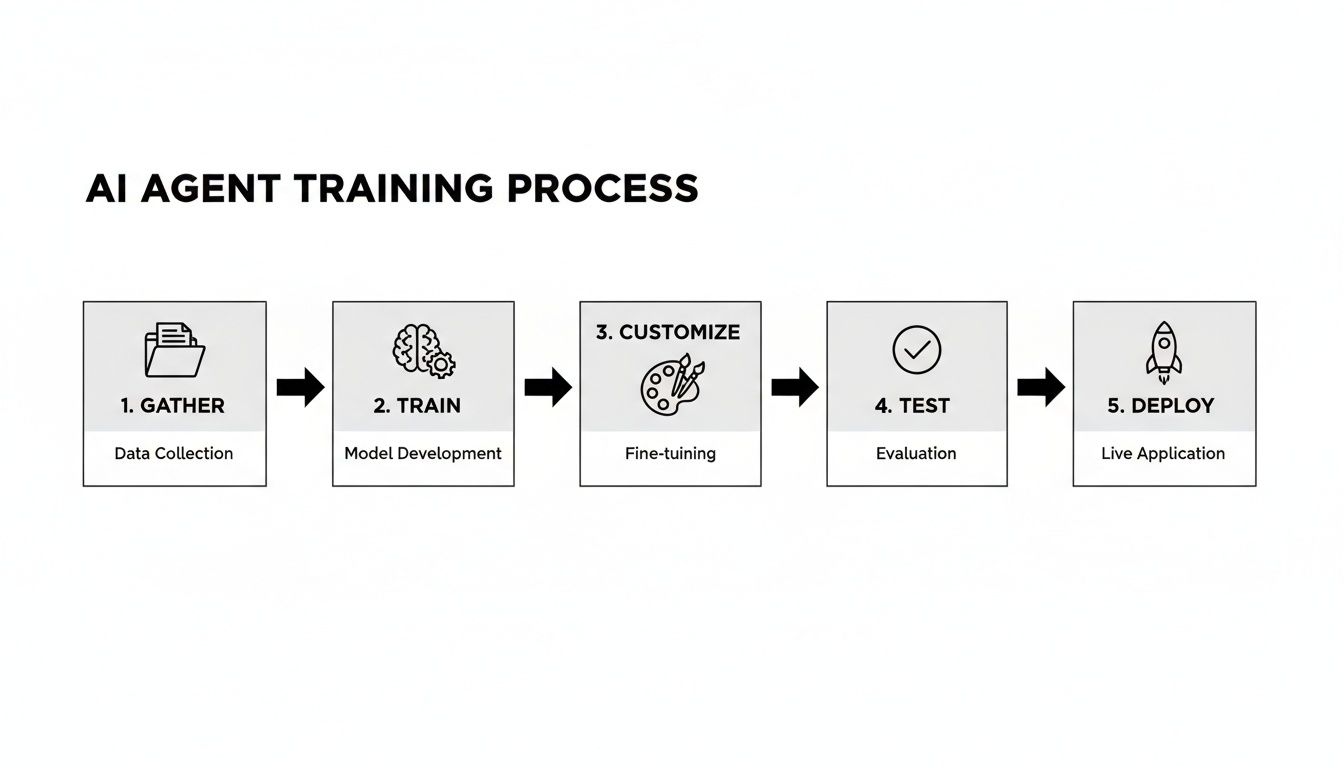
As the flow shows, you're in the driver's seat for every step, from gathering the initial content to deploying the final agent. This gives you complete control over what your AI knows and how it behaves.
The Power of "I Don't Know"
Here’s a feature that might sound counterintuitive but is critical for building trust: the AI's ability to admit when it doesn't have an answer. An AI that confidently makes things up (a phenomenon known as "hallucinating") is a liability. An AI that says, "I'm not sure about that, but I can connect you with someone who can help," is a reliable tool.
This isn't a bug; it's a fundamental feature of a trustworthy system. It proves the AI is sticking to its script—your approved content—and not trying to guess. This honesty is essential for maintaining confidence with both customers and your internal team.
This behavior also doubles as incredibly useful feedback. Every time your AI can't answer a question, it shines a spotlight on a gap in your knowledge base. You can then add the missing document or piece of information, making your "Company Brain" smarter and more complete over time.
Keeping Your Knowledge Base Fresh and Current
Your business is always evolving. Policies change, products get updated, and new procedures are rolled out. Manually updating an AI's training data every time something changes would be a nightmare.
This is where automated syncing becomes your best friend. The best platforms solve this with auto-refresh schedules. You can set your AI to automatically re-scan your website, knowledge base, or key documents on a daily, weekly, or monthly basis.
This simple feature ensures your AI agent is never giving out old information.
- A price changes on your website? The AI knows about it the next day.
- A new policy is added to the employee handbook? The AI learns it automatically.
- A blog post is updated with new features? The AI will incorporate the latest details.
This hands-off approach guarantees your chatbot remains an accurate, up-to-date resource everyone can depend on. It’s the combination of a controlled knowledge base, the honesty to say "I don't know," and automated updates that transforms a simple chatbot into a truly trusted business asset.
Using Practical Prompts for Business Results

While your customers will just ask questions naturally, teaching your internal team how to write strategic prompts is a genuine superpower. It’s what separates using an AI as a simple Q&A machine from turning it into a proactive work assistant. Getting great results from your "Company Brain" is all about how you ask.
This isn't about learning to code; it's about learning a new way to communicate. A well-built prompt guides the AI to give you exactly what you need, saving heaps of time and dramatically improving the quality of its output. The trick is to give it specific context, tell it the format you want, and state your goal clearly.
Think of it like giving instructions to a new hire. A vague request like "tell me about sales" will get you a generic, rambling summary. But a specific command like "summarize the key findings from the Q3 sales report in three bullet points" will get you a fast, actionable answer you can actually use.
Prompts to Start With Today
The best way to get a feel for this is to see it in action. Here are a few practical, copy-and-paste examples for common business tasks. Think of these as a starting point—tweak them to fit your specific needs and the documents you've uploaded.
1. For Marketing Analysis
A great prompt gives context and tells the AI how to present the information.
Prompt: "Based on the uploaded quarterly marketing report, summarize the top three performing channels in a table. Include columns for Channel, Conversion Rate, and Key Takeaway for each."
2. For Human Resources Queries
This one directs the AI to find a needle in a haystack—a specific detail inside a large document.
Prompt: "Scan the employee handbook and extract the exact policy regarding remote work requests. Present it as a numbered list covering eligibility, the request process, and required approvals."
3. For Drafting Sales Outreach
Here, you're asking the AI to step in as a writing partner, complete with a specific structure to follow.
Prompt: "Draft a concise follow-up email to a potential client who attended our product demo last week. Reference their interest in [specific feature], mention our 14-day free trial, and end with a clear call to action to book a short call."
4. For Creating Customer Support Responses
This is a fantastic way to standardize your answers to common questions, ensuring every customer gets a high-quality, consistent response.
Prompt: "Generate a friendly and empathetic customer support response for an inquiry about a delayed shipment. Acknowledge the frustration, provide a link to the tracking page, and offer a 10% discount code for their next purchase."
By getting comfortable with these simple "conversation starters," your team can tap into your company's knowledge base far more effectively. This structured approach helps turn your chat gpt business tool from a passive library into an active partner in getting work done faster. It’s a small skill, but it delivers massive productivity gains across every single department.
How to Measure Success and Calculate ROI
So, you've decided to bring a business chatbot on board. That's a great first step, but how do you actually know if it's working? To prove this isn't just another shiny new toy, you have to move past gut feelings and dig into the numbers.
Measuring the success of your AI isn't just about looking busy; it's about seeing real, measurable improvements that affect your business. For any startup or small team using chat gpt businesses, this means connecting the chatbot's daily work to tangible outcomes that save you time, headaches, and—most importantly—money.
Identifying Your Key Performance Indicators
Before you can figure out your return on investment (ROI), you need to define what a "win" even looks like. Fuzzy goals like "better efficiency" are impossible to track. Instead, you need to focus on specific Key Performance Indicators (KPIs) that are directly linked to the problems you're trying to solve.
Thinking about what to track can be overwhelming, so I've put together a table of the most important metrics for a business chatbot, broken down by what they measure and why they're so critical.
Key Metrics for Your Business Chatbot
| Metric | What It Measures | Why It Matters |
|---|---|---|
| Ticket Deflection Rate | The percentage of customer questions the AI answers without a human stepping in. | This is your direct cost-saver. A high deflection rate means fewer support tickets and more time for your team to focus on complex issues. |
| First-Response Time | The average time a customer waits for an initial answer. | Your chatbot brings this down to seconds. Instant responses make customers feel heard and can dramatically improve their overall experience. |
| Employee Time Saved | How much time your team saves by using the AI for internal questions. | For internal use, this is the golden metric. It quantifies the hours your team gets back by not having to hunt for documents or tap a coworker on the shoulder. |
| User Satisfaction | How happy users are with the answers they receive from the chatbot. | Happy users mean the tool is working as intended. This is a leading indicator of long-term success and adoption. |
These are the numbers that tell the real story of your AI's impact. If you want to dive deeper into that last point, check out this practical guide to measuring user satisfaction – it's a great resource.
A Simple Formula to Calculate Your ROI
Once you're tracking these KPIs, calculating a basic ROI is surprisingly simple. You're essentially just weighing the cost of the AI platform against the value of the time it frees up for your team.
Here’s how to do the math, step by step:
-
Figure Out the Hours Saved Per Month: First, add up all the time saved across the board. Let's say your chatbot deflects 100 support tickets, and each one usually takes 15 minutes for a human to handle. That’s 25 hours right there. Then, add another 15 hours your team saved by getting instant internal answers. Your total is 40 saved hours for the month.
-
Put a Dollar Value on That Time: Now, determine the average hourly cost of an employee who would normally be doing that work. If their blended rate is $30/hour, the value of the time saved is 40 hours x $30/hour = $1,200 per month.
-
Compare Savings to Cost: Finally, subtract the monthly fee for your AI platform from your total savings. If the software costs $100 a month, your net return is $1,200 – $100 = $1,100 per month.
ROI = (Value of Time Saved – AI Platform Cost) / AI Platform Cost
Using our example: ($1,200 – $100) / $100 = 11x ROI
This kind of simple, direct math completely changes the conversation. Your AI chatbot isn't a line-item expense anymore; it's a hard-working asset that pays for itself many times over.
Your Top Questions About AI for Business, Answered
Thinking about bringing AI into your company? You're not alone, and it's smart to have questions. This technology moves incredibly fast, and it can be hard to tell what's hype and what's actually useful. We often hear business owners asking about the real setup time, how to keep it on-brand, and what it's truly going to cost.
Let's cut through the noise. This section gives you straight answers to the most common questions we get from businesses exploring AI. The goal is to tackle your concerns directly so you can make a smart, confident decision for your team.
How Long Does It Really Take to Set Up a Business Chatbot?
You can get a fully trained AI agent up and running in a matter of minutes. Seriously. Modern platforms are built for business users, not developers. The whole process is surprisingly simple.
You just feed it your knowledge sources—think website pages, help docs, or PDFs—tweak the colors to match your brand, and then copy and paste a snippet of code onto your site. That's it. No coding is needed.
Can I Control What the AI Says to Keep It On-Brand?
Absolutely. This is non-negotiable for any serious business AI. The best platforms are trained only on the content you give them. This creates a "walled garden" for your AI, meaning it can't browse the web or invent answers.
You can also define a specific personality. For instance, you could instruct it to be "helpful and professional, but not too formal." This ensures every interaction feels like it's coming from your team. This control is what makes an AI a reliable assistant that you can trust to represent your company correctly, every single time.
The ability to train an AI solely on your own content is the most important feature for brand safety. It guarantees that every answer is grounded in your approved information, eliminating the risk of off-brand or inaccurate responses.
Think of it this way: the AI becomes a true extension of your team, not some unpredictable freelancer.
Is an AI Chatbot Actually Affordable for a Small Business?
Yes, it's designed to be. Most pricing models are built to scale, offering affordable plans perfect for startups and small teams. You'll often see a return on investment almost immediately.
The monthly cost is usually a fraction of the time you save by deflecting common support questions or automating internal lookups. This isn't just about saving time; it's about freeing up your team to focus on work that actually grows the business. It’s less of an expense and more of an investment in a 24/7 team member that handles the repetitive stuff.
Ready to build your company's "brain" and automate support in minutes? BizSage turns your content into a 24/7 AI expert that delivers on-brand, accurate answers to customers and your team. Start your free trial today and see it in action.