
Let’s be honest. Your company already has the answers to most of its problems. The real challenge? Finding them.
That information is buried in a chaotic mess of Slack channels, Google Docs, Notion pages, and email threads. It’s like a massive, disorganized library where finding one specific insight feels like a treasure hunt with no map. How often do your employees end up redoing work that someone else has already finished, just because they couldn’t find the original? It happens all the time.
Your Company Has The Answers. AI Can Help You Find Them.
Now, imagine that same library, but staffed by a team of genius librarians who have read every single book. They don’t just point you to the right aisle when you ask a question. They understand the context behind your query, find the exact page you need, pull together key points from a few different sources, and hand you a perfect summary.
That’s exactly what AI-powered knowledge management does. It fundamentally changes the game from simply storing information to actively using it. The goal is no longer a bigger digital filing cabinet; it’s about building an intelligent, interactive brain for your entire business.
From Static Repositories to Active Intelligence
Traditional knowledge bases are often graveyards for good information. They’re static, quickly go out of date, and rely on someone meticulously tagging every single document. Searching them is a chore. AI turns this model on its head.
- It understands how people actually talk: You can ask questions in plain English, just like you’d ask a coworker. Instead of keyword-searching “Q3 marketing budget report,” you can just ask, “How much did we spend on marketing last quarter?”
- It connects the dots for you: The system can pull information from your sales CRM, a project management tool, and customer support tickets to give you a complete, unified answer.
- It gets smarter with every use: Each question and answer teaches the AI what information is most valuable, making its future responses even more accurate and helpful.
At its heart, AI-powered knowledge management is about converting passive information into active intelligence. It ensures that the best answer, regardless of where it’s stored, is always just a simple question away.
The Accelerating Shift in Business
This isn’t some far-off future concept; it’s happening right now. The market for AI-driven knowledge management was valued at around $5.23 billion this year. It’s expected to jump to $7.71 billion by next year, which is a massive Compound Annual Growth Rate (CAGR) of 47.2%.
This explosive growth tells a clear story: businesses are racing to adopt this technology to finally unlock the value trapped inside their own data. You can find more of these market insights on The Business Research Company.
This guide will walk you through how this technology works and how you can use it to turn your company’s scattered information into its most powerful asset.
How AI Actually Unlocks Your Company’s Hidden Knowledge
To really get why AI-powered knowledge management is such a big deal, we need to pop the hood and see how it works. This isn’t just a fancier way to store files. It’s a dynamic process that turns all your digital clutter into clear, trustworthy answers. It takes your scattered data from being a dusty, passive archive and transforms it into an active, intelligent partner for your team.
Think of all your company’s information—the documents, the spreadsheets, the Slack messages—as a huge, tangled mess of threads. AI acts as the brain that meticulously untangles it all, weaving those threads into something useful and coherent.
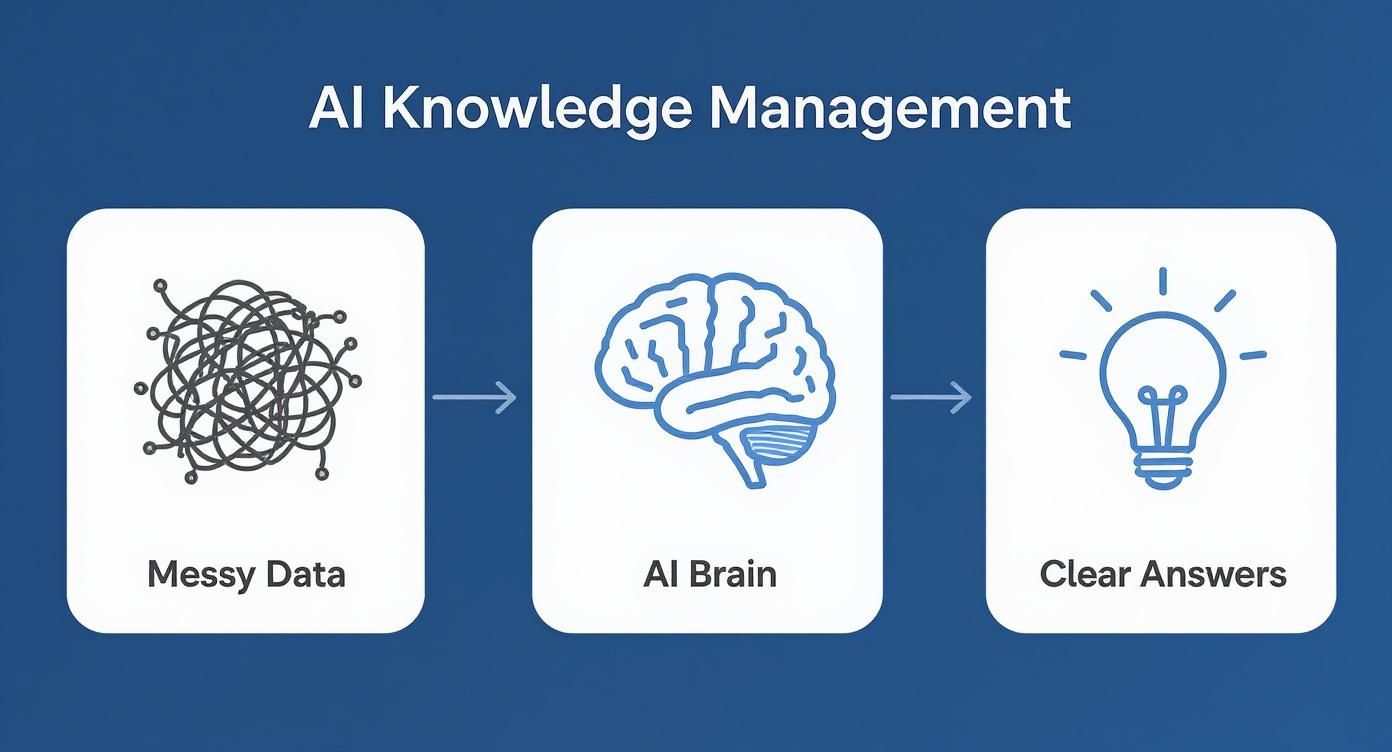
This whole process boils down to three key stages that work together to make sense of the chaos.
Stage 1: Ingestion and Indexing
First up is Ingestion and Indexing. Picture a super-smart librarian who doesn’t just shelve your books but reads and understands every single page. The AI plugs into all your data sources—Google Drive, Slack, Notion, customer support tickets, you name it—and starts absorbing everything.
This goes way beyond a simple keyword scan. Using Natural Language Processing (NLP), the system actually comprehends the content. It figures out the main ideas, sees how different concepts are related, and can even pick up on the tone. It then builds a massive, searchable index—like a hyper-detailed map of all your unorganized information. This map is the foundation for everything that comes next.
Stage 2: Intelligent Retrieval
Now we get to Intelligent Retrieval. This is where you see the massive gap between old-school search and an AI-powered one. A traditional search bar just matches the exact words you type, which usually leaves you with a long list of documents to dig through yourself. It’s frustrating and slow.
Intelligent retrieval, on the other hand, relies on semantic understanding. It’s not just looking for keywords; it’s trying to understand the meaning and intent behind your question.
Let’s look at a quick example:
- You ask: “What were our top customer complaints in Q3?”
- Keyword search gives you: A jumbled list of every file that happens to contain the words “customer,” “complaints,” and “Q3.”
- Intelligent retrieval gives you: A direct summary of the most frequent issues, pulling insights from Zendesk tickets, support channel conversations in Slack, and maybe even a customer feedback survey.
This ability to grasp context allows the system to pinpoint the right information, even if it’s buried in a place you’d never think to look.
Stage 3: Retrieval-Augmented Generation (RAG)
The final stage is Retrieval-Augmented Generation (RAG), and this is where the real magic happens. Once the retrieval system has located all the relevant bits and pieces of information from across your company, RAG steps in to connect the dots.
Instead of just dumping a list of links on you, the generative AI model writes a single, cohesive answer in plain English. It pulls facts from multiple documents, figures from different spreadsheets, and context from various conversations, then synthesizes it all into a neat summary.
Retrieval-Augmented Generation is the difference between being handed a stack of research books and getting a custom-written brief that tells you exactly what you need to know. It does all the hard work of analysis for you.
What’s really important is that a good AI-powered knowledge management platform using RAG will also cite its sources. Every piece of information in the generated answer is linked directly back to the original document. This lets you verify everything, building trust and ensuring the answers are reliable. This powerful combination is how your company’s collective knowledge is finally put to work.
What’s the Real-World Payoff for Your Business?
The tech behind AI knowledge management is impressive, no doubt. But for anyone running a business, the only question that truly matters is: what’s the ROI? We need to look past the fancy features and focus on the real, measurable impact on the bottom line. This is where a smart knowledge system stops being a line item on an expense report and starts acting like a growth engine.
The most immediate and obvious win is getting back lost time. Think about it—how many hours does your team waste every single week just trying to find that one document, that one answer, or that one piece of data? An AI system brings that frustrating hunt to an end, slashing operational drag and freeing up your people to do the strategic work that actually pushes the business forward.
Stop Searching, Start Working: A Boost in Team Productivity
What happens when every person on your team gets back 30 minutes a day? It doesn’t sound like much at first, but it quickly snowballs into thousands of hours of reclaimed productivity over the course of a year.
It’s not just a guess, either. A study from McKinsey found that a well-oiled AI knowledge system can cut the time employees spend searching for information by up to 35%. That same report ties these efficiency gains to a 20-25% jump in overall productivity. We’re already seeing this shift happen, with 38% of knowledge management teams now using AI to surface relevant content and 31% using generative AI to create it from scratch. For a deeper dive into these trends, check out this comprehensive overview on AI in knowledge management.
These aren’t just vanity metrics; they translate directly into cost savings and a stronger, more effective team.
Supercharge Your Sales and Support Teams
The value of AI-powered knowledge management really clicks when you see it in action with your customer-facing teams. For sales and support, having the right information at the right moment isn’t a nice-to-have; it’s the difference between winning a deal and losing it, or between creating a happy customer and a frustrated one.
Think about the daily grind for these teams:
- Sales Reps: They’re on a call with a big prospect and desperately need the perfect case study, the latest spec sheet, or a quick competitor takedown. Any delay can completely kill the conversation’s momentum.
- Support Agents: They’re digging through clunky internal wikis or tapping a colleague on the shoulder for the fifth time, all while a customer’s patience wears thin. The same basic questions come in, day in and day out, eating up valuable time.
An AI knowledge platform solves these problems instantly. A salesperson can simply ask, “Show me our best case study for a healthcare client with 500 employees,” and get a perfect, summarized answer with a link to the full document in seconds. That kind of speed helps shorten sales cycles and has a real impact on win rates.
By putting the entire company’s collective wisdom at their fingertips, AI empowers every team member to perform like a seasoned expert, driving consistency and excellence across the board.
For your support crew, this means resolving issues on the first try far more often, which sends customer satisfaction (CSAT) scores through the roof. When an agent can instantly pull up the answer to a tricky technical question, they close tickets faster and turn a moment of friction into a great brand experience. This newfound efficiency also means they can handle more inquiries or dedicate their time to solving the truly complex problems that require a human touch. It’s not just about making work easier—it’s about fundamentally improving every single customer interaction.
ROI of AI Knowledge Management Across Departments
This table illustrates the specific, measurable impact of AI-powered knowledge management on key business functions, linking features to tangible outcomes.
| Department | Challenge Without AI | AI-Powered Solution | Key Performance Indicator (KPI) Improvement |
|---|---|---|---|
| Sales | Reps waste time searching for case studies, pricing, and competitive info, slowing down deal cycles. | Instant, natural language search provides immediate access to relevant sales collateral and product data. | 15-20% reduction in sales cycle length; 10% increase in win rates. |
| Customer Support | High ticket resolution times due to difficulty finding answers in complex knowledge bases. | AI-powered search and chatbots provide instant, accurate answers to common customer and agent queries. | 30% faster first-contact resolution; 25% increase in agent productivity. |
| Human Resources | HR team is bogged down answering repetitive employee questions about policies, benefits, and payroll. | An internal AI assistant answers employee questions 24/7, pulling directly from official HR documents. | 40% reduction in repetitive HR inquiries; improved employee satisfaction. |
| Engineering | Developers struggle to find technical documentation, past project details, or code snippets, slowing innovation. | A centralized AI hub that understands technical jargon and can surface relevant code and documentation. | 20% increase in developer productivity; faster onboarding for new engineers. |
As you can see, the benefits aren’t abstract. By targeting specific pain points within each department, an AI knowledge management system delivers clear, quantifiable improvements that contribute directly to growth and efficiency.
Your Practical Guide to Getting Started
Thinking about building an AI-powered knowledge management system can feel daunting, but it doesn’t have to be. You can get this done without a massive, complicated project. The trick is to break it down into simple, manageable stages. This roadmap will walk you through how even a small team can build an intelligent “company brain” from the ground up.
The whole idea is to start small, show some quick wins, and then expand. Forget trying to connect every single app and data source at once. A phased approach that delivers real results at each step is the only way to go.
Step 1: Assess Your Knowledge Landscape
Before you can organize your knowledge, you have to figure out where it is. Think of this as drawing a map of your company’s information. Is it scattered across a messy Google Drive? Buried in endless Slack channels? Or neatly tucked away in Notion?
Make a quick list of your main information hubs. More importantly, identify the biggest bottlenecks. Where are people constantly getting stuck looking for answers? Knowing this tells you exactly where an AI system can make the biggest difference first.
Step 2: Define Your Initial Goal
Now that you have your map, it’s time to pick a destination. It’s tempting to try and fix everything at once, but that’s a recipe for failure. Instead, pick one high-impact use case for your first pilot.
What could that look like?
- Speed up new hire onboarding: Imagine an AI assistant that can instantly answer all the common questions about benefits, company policies, and internal tools.
- Equip your sales team: Give your reps a tool that finds the perfect case study or product spec sheet right when they need it on a call.
- Cut down on support tickets: Set up a customer-facing bot to handle the easy, repetitive questions, freeing up your support agents for the tough stuff.
By zeroing in on a single, clear goal, you can prove the system’s value much faster. That early win builds the momentum you need to get everyone else on board.
Step 3: Connect Your Core Data Sources
Alright, time to feed the brain. Based on the goal you just set, connect the most critical data sources to your platform. If you’re focused on onboarding, that means plugging in your HR handbook, policy docs, and the internal wiki.
The mantra here is quality over quantity. It’s so much better to start with a handful of clean, trusted, up-to-date documents than to dump everything in at once. That just leads to a “garbage in, garbage out” problem. A strong, curated foundation is the key to getting trustworthy answers.
A successful AI knowledge management system isn’t built on having the most data; it’s built on having the right data. A focused, high-quality knowledge base will always outperform a vast but messy one.
Step 4: Launch, Train, and Iterate
The final step is to get the system into the hands of real people. Don’t aim for a perfect, company-wide launch from day one. Start with a small pilot group—the team that feels the pain of your chosen use case the most.
This trial run is absolutely critical for a few reasons:
- Get Real-World Feedback: You’ll immediately see what kinds of questions people are actually asking, which will shine a light on any gaps in your knowledge base.
- Train the AI: Every query is a lesson. The more people use it, the smarter the system gets at providing accurate and relevant answers.
- Refine and Improve: Use the early feedback to add new information, tweak the AI’s tone, and make the whole experience better.
This cycle—launch, get feedback, and refine—is the secret to making this stick. It ensures your AI-powered knowledge management system evolves from a cool project into a tool nobody can live without, turning all that scattered information into a genuine competitive edge.
How to Choose the Right AI Knowledge Management Platform
Picking the right partner for your AI journey is a huge decision. With so many platforms out there, it’s easy to get lost in a sea of marketing buzzwords and technical jargon. To cut through all that noise, you need a solid framework for sizing up your options.
Think of this as your practical buyer’s guide. We’re going to break down the four essential pillars that separate a truly effective AI-powered knowledge management platform from one that just looks good on paper. Use this checklist to make a smart choice and find a tool that becomes a real asset for your team.
1. Assess Its Integration Power
An AI platform is only as good as the data it can actually get to. It has to connect seamlessly with the tools your team already uses every single day. If setting it up is a headache or requires constant IT support, your team just won’t use it. Plain and simple.
When you’re looking at a platform, ask these questions:
- Does it offer one-click integrations? You want to see native connectors for the big ones: Slack, Google Drive, Notion, and whatever help desk software you rely on.
- How deep do the integrations go? Can it understand the nuances of a conversation in a Slack channel, or is it just indexing files? The deeper it goes, the smarter the answers will be.
- Can it handle different file types? The system has to be able to pull in and understand everything from PDFs and Word docs to slide decks and spreadsheets.
The goal is to find something that slots right into your existing workflow, not a tool that forces you to change how you work. A platform like BizSage is built on this very idea, letting you connect all your knowledge sources in just a few minutes.
2. Scrutinize Its Search Intelligence
The real promise of an AI knowledge system is getting answers, not just a list of links. This is the single biggest leap from old-school keyword search. A basic search tool might point you to ten documents you have to sift through; an intelligent one gives you the specific answer you actually need.
A platform’s true intelligence is measured by its ability to synthesize information and provide direct, actionable answers. Anything less is just a slightly better search bar.
Put this to the test during a demo. Ask a complex question that you know requires pulling information from multiple places. Does the platform give you a confident, well-written summary with citations pointing back to the original documents? Or does it just dump a list of files on you? The first one is true AI-powered knowledge management.
3. Prioritize the User Experience
The most powerful AI on the planet is worthless if it’s too complicated for your team to use. The interface needs to be clean, intuitive, and welcoming to everyone—not just your most tech-savvy people. A simple, conversational interface is the key to getting people on board.
Think about the whole experience, from asking a question to getting the answer. Is it easy to ask follow-up questions? Can users give feedback on the quality of the answers to help the system learn and get better over time? A platform designed with simplicity in mind makes finding information feel as natural as asking a coworker for help.
4. Verify Its Security and Governance
Finally, you’re trusting this platform with your company’s collective brain, and that might include some pretty sensitive information. Robust security and governance features aren’t just nice-to-haves; they’re non-negotiable.
Make sure any vendor you consider meets your standards for data protection and access control. Look for these key security features:
- Role-Based Access Controls: Can you lock down certain information so it’s only visible to specific users or departments?
- Data Encryption: Is your data encrypted both when it’s being transferred and when it’s stored to protect it from prying eyes?
- Compliance Certifications: Does the vendor hold recognized security certifications like SOC 2?
By carefully looking at these four areas—integration, intelligence, experience, and security—you can confidently pick a platform that will actually unlock your company’s knowledge and deliver real, lasting value.
Avoiding Pitfalls to Ensure Long-Term Success
So you’ve decided to bring in an AI knowledge management system. That’s a great first step, but it’s crucial to understand that this isn’t a “set it and forget it” tool. It’s a living asset. Without the right care and attention, even the most advanced platform can slowly degrade into another neglected, untrustworthy data silo.
The single biggest mistake I see teams make? They fall into the “garbage in, garbage out” trap. If you feed the AI a diet of low-quality, outdated, or contradictory information, you’ll get untrustworthy and confusing answers back. This absolutely kills user trust and, before you know it, nobody will use the system.

Prioritizing Data Quality from Day One
You absolutely have to start with clean, high-quality data. This is non-negotiable. It’s also a major hurdle for a lot of businesses. Poor data quality costs the U.S. economy an estimated $3.1 trillion every year, and a big reason is that AI projects simply stall out when they hit messy, unstructured information. You can find more on these knowledge management trends and challenges if you want to dig deeper.
The practical advice here is to start small. Begin by connecting only your most trusted and current sources—the single source of truth for your team. A smaller, well-curated knowledge base is infinitely more valuable than a massive, chaotic one. This ensures the initial answers are reliable, which is key to building the confidence you need for wider adoption.
Establishing a Content Lifecycle
Information has a shelf life. A product spec sheet from two years ago isn’t just unhelpful; it’s actively harmful if a salesperson uses it. A well-defined content lifecycle is what stops your knowledge base from turning into a digital junkyard.
This process doesn’t have to be complicated. Just focus on a few key habits:
- Scheduled Reviews: Assign owners to key documents and set regular reminders—maybe quarterly or semi-annually—for them to check for accuracy.
- Clear Archiving Rules: Create a simple process for archiving or deleting old info so it stops polluting search results.
- Feedback Loops: Make it easy for users to flag answers that seem off. This creates a self-correcting system that gets better over time.
This proactive approach makes sure your AI is always working with the best information you have.
Think of an AI knowledge system like a garden. It needs consistent weeding (archiving old data), planting (adding new knowledge), and watering (user feedback) to thrive and produce valuable results.
Implementing Clear Governance and Security
Finally, good governance provides the essential guardrails. Without clear rules, you’re opening the door to data leaks and losing control over sensitive information. It’s critical to define who is responsible for what.
Start with these foundational practices:
- Assign Ownership: Designate a specific person or a small team to be the system administrator. Their job is to monitor its health, manage integrations, and champion best practices.
- Set Up Access Controls: Use role-based permissions to ensure people only see what they’re supposed to see. This is vital for protecting sensitive HR, financial, or strategic documents.
- Monitor Usage Patterns: Regularly check the analytics. What questions are people asking? This will show you where the gaps are in your knowledge base and which content is most valuable, helping you focus your efforts.
Common Questions About AI Knowledge Management
Whenever teams start looking at an AI-powered knowledge management platform, the same practical questions always pop up. Let’s be honest, moving from familiar (even if frustrating) systems to something driven by AI can feel like a big step.
This section tackles those common concerns head-on, giving you straightforward answers so you can feel confident about what’s next. We’ll get into the reality of implementation, how your data is handled, and what this all really means compared to the tools you use today.
How Much Technical Skill Is Needed to Implement This?
Surprisingly little, at least for modern platforms. The best tools are built for everyone, not just engineers. They feature simple data connectors and user-friendly interfaces, so you don’t need a background in coding to get started.
The setup is usually more about authorizing access to your existing apps—like Slack or Google Drive—than dealing with complex configurations. Think of it less like a massive IT project and more like connecting a new app to your phone. You can often get a basic system running in minutes, not weeks.
Can AI Really Handle Our Messy and Unstructured Data?
Yes, and this is where it truly shines. Traditional knowledge systems often crumble because they rely on perfect, consistent tagging and rigid folder structures that nobody has time to maintain. Modern AI is built to thrive in the chaos of real-world business data.
Advanced language models are fantastic at finding the meaning buried within all sorts of formats:
- Lengthy project docs and slide decks
- Informal Slack threads and chat logs
- Customer support tickets and old email chains
The AI can piece together key information, relationships, and concepts on its own. It effectively turns your digital clutter into a clean, searchable asset without you having to lift a finger.
The real magic of AI is its ability to find the signal in the noise. It doesn’t need perfectly curated data to deliver value; it’s designed to make sense of the information you already have, exactly as it is.
What’s the Real Difference Between This and Our Old Keyword Search?
It’s the difference between asking a librarian for every book with the word “sales” in it versus asking them for “our top sales strategy for Q4.” A keyword search just matches text. It gives you a long list of documents you still have to dig through to find your answer.
An AI search, on the other hand, understands your intent and meaning. It goes beyond matching words to figure out what you’re actually trying to achieve. It can even pull information from multiple sources and stitch together a single, comprehensive answer, citing exactly where it found everything. This changes your knowledge base from a passive filing cabinet into an active, intelligent assistant.
Ready to see how an AI-powered brain could work for your business? BizSage turns your company’s scattered documents and conversations into a single source of truth, providing instant, on-brand answers for your team and customers. Get started in minutes and stop searching for answers. Explore BizSage today.
Article created using Outrank