
Let's get one thing straight: AI for small businesses isn't some far-off, futuristic concept anymore. It's not just for the tech giants with sprawling budgets. Think of it as your best employee—the one who works tirelessly around the clock, handling all the repetitive, time-consuming tasks so your team can focus on what actually grows the business. It’s an incredibly powerful, and surprisingly achievable, way to scale your operations.
Putting AI to Work for Your Small Business

The term "artificial intelligence" can sound intimidating, but its role in a small business is actually very simple: automate the grunt work and open up new doors for growth. This isn't about building complex robots or hiring a team of data scientists. It's about using smart, often user-friendly, tools to manage the predictable, everyday parts of your business. This frees up your people for the creative and strategic work that truly makes a difference.
This guide is here to cut through the noise and give you a clear, practical roadmap. We’ll look at how these tools are already making a huge impact for businesses just like yours, every single day.
The New Competitive Edge
It used to be that cutting-edge technology was a luxury only big corporations could afford. Not anymore. Today, AI platforms give small teams a massive advantage, letting them punch well above their weight and compete with much larger companies. By automating key functions, you can offer faster customer service, create deeply personalized marketing, and run your entire operation with incredible efficiency.
The numbers back this up. It's not just a passing trend; it's a real shift in how business gets done. A staggering 58% of small businesses are already using generative AI—a figure that has more than doubled in just two years. This rapid adoption tells you everything you need to know about how essential these tools are becoming. For a deeper dive into these figures, check out the latest small business AI adoption statistics.
AI Impact at a Glance for Small Businesses
To put it in perspective, here's a quick look at the kind of immediate impact we're talking about when small businesses bring AI on board.
| Area of Impact | Key Benefit | Average Time Saved Per Month |
|---|---|---|
| Customer Support | 24/7 instant answers to common questions | 20+ hours |
| Marketing | Automated social media & email campaigns | 15+ hours |
| Sales | Instant lead qualification & follow-up | 10+ hours |
| Operations | Automatic scheduling & data entry | 12+ hours |
As you can see, the time savings alone are substantial, allowing small teams to reclaim dozens of hours each month to focus on strategy and growth.
What You Will Learn in This Guide
This guide breaks down everything you need to know into simple, actionable steps. My goal is to show you that bringing AI into your business isn't a scary technical hurdle—it's one of the smartest strategic decisions you can make.
Here’s a quick preview of what we’ll cover:
- Practical Applications: We'll explore real-world examples of how AI can supercharge your customer support, sales, marketing, and day-to-day operations.
- Measurable Benefits: You’ll understand the tangible return on investment, from massive time savings to capturing more leads and boosting customer happiness.
- A Simple Implementation Plan: I’ll walk you through a step-by-step roadmap to pinpoint your biggest needs, pick the right tool, and score a quick, morale-boosting win.
- Common Mistakes to Avoid: Learn from the missteps of others so you can sidestep common pitfalls, like picking overly complicated software or feeding your AI poor-quality data.
By the end of this guide, you'll have a clear, confident understanding of how AI can become your company’s most valuable asset—automating tasks, delighting customers, and freeing you up to finally focus on the big picture.
How AI Can Actually Run Parts of Your Business

It’s one thing to hear about the potential of AI for small business, but it’s another thing entirely to see it work in the real world. This isn't about futuristic robots or complicated code. It's about practical tools that solve the nagging, everyday problems that steal your focus from growing the business.
So, let's get practical. Here are the four areas where AI can make an immediate, noticeable impact on your day-to-day operations. These are the quick wins that prove the value right away.
Reinvent Your Customer Support
Your customers have questions, and they want answers now. For a small team, that constant stream of inquiries about hours, return policies, or order status can be a huge drain on your time. This is where most businesses get their first taste of AI, and for good reason.
Think of an AI chatbot on your website as your best front-line employee. It works 24/7, never gets tired, and can answer the same questions a thousand times with perfect patience. In fact, many businesses find that a well-trained AI can handle over 80% of common customer questions without needing a human to step in.
This completely changes the game. Your team is free from the repetitive stuff, letting them focus their brainpower on the tricky, high-value customer problems that actually require a human touch. Your customers get instant answers, and your team gets to do more meaningful work. It’s a win-win.
Supercharge Your Sales Pipeline
Every website visitor who leaves without a conversation is a missed opportunity. If someone is browsing your services at 10 PM on a Saturday, you need a way to connect with them in that moment of interest. An AI sales assistant does exactly that, working around the clock to capture and qualify leads.
Instead of a passive "Contact Us" form, an AI-powered chat can:
- Proactively engage visitors with smart, qualifying questions.
- Collect contact info and the specifics of what they're looking for.
- Book demos or appointments right into your team's calendar.
It’s like having a net that catches every potential lead, no matter when they show up. Your sales team walks in every morning to a fresh list of warm, qualified prospects ready to talk. This dramatically cuts down the time it takes to close a deal.
By handling the initial lead capture and qualification, AI tees up your sales team for success. They can start every conversation with an interested person, making their time more productive and their efforts more likely to pay off.
Put Your Marketing on Autopilot
Good marketing requires two things that small teams often lack: endless time for consistent execution and the data to make it personal. This is precisely where AI tools can step in and take over the heavy lifting.
You can use AI to sift through your customer data and whip up personalized email campaigns that actually speak to different groups of people. AI can also write and schedule your social media posts to go live at the perfect time for maximum engagement. It keeps your brand active and in front of customers, even when you’re busy with a dozen other things.
Build a "Company Brain" for Your Team
One of the biggest headaches in a growing business is knowledge management. Critical information gets buried in old emails, lost in various documents, or just stuck inside one person's head. Onboarding new people feels like a slow, painful scavenger hunt.
This is where an internal AI—your very own "Company Brain"—is a game-changer. You feed the AI all of your internal documents: training manuals, process guides, project notes, and company policies. It learns it all and creates a single, searchable source of truth for the entire team.
New hires can ask the AI questions and get instant, accurate answers, cutting their ramp-up time in half. Your seasoned team members can find what they need in seconds without derailing a coworker's focus. It's not just about efficiency; it's about capturing and organizing your company's collective knowledge. For many small businesses, figuring out how to automate data entry with AI is another powerful way to clean up internal processes and save countless hours.
Measuring the True ROI of Your AI Investment
Whenever you put money into a new tool, you need to know what you're getting back. For AI in a small business, that return on investment (ROI) isn't just a buzzword—it's about concrete, measurable gains that hit your bottom line. Figuring out that value helps you justify the expense and see exactly how automation is fueling growth.
The real value of AI comes down to three things: saving you money, making you money, and making your whole operation run smoother. Each one helps you build a healthier, more scalable business, letting you do a lot more with the team you already have.
Cutting Costs with Smart Automation
The quickest and most obvious return comes from cutting down on costs. Just think about all the hours your team spends answering the same five questions day in and day out. An AI assistant can take that on instantly, lowering your customer support costs without letting service quality slip.
But it's not just about support. By handling repetitive tasks like data entry, scheduling, or digging up information, you reduce the need to hire more administrative staff. Your current team can then ditch the manual grunt work and focus on things that actually make a difference, saving you thousands in potential payroll.
Driving Revenue Growth Around the Clock
AI isn't just about saving money; it’s a serious growth engine. One of its biggest perks is acting as a 24/7 sales assistant on your website. It can chat with visitors and capture leads long after you’ve all gone home, making sure you never miss an opportunity just because it came in at 10 PM on a Saturday.
AI can also give your marketing a personal touch, even when you're reaching hundreds of people. It can help you send perfectly targeted email campaigns or segment your audience for special deals, which naturally leads to better conversion rates and more sales. To see this in action, it’s worth looking at real-world examples of how small businesses are making money with AI right now.
Quantifying the Power of Reclaimed Time
Maybe the most valuable return is the one that's hardest to track on a spreadsheet: time. When you automate the routine stuff, your team gets hours back every single week. That's time you can put right back into growing the business.
Imagine getting 20+ hours back per month. You could use that time for:
- Strategic Planning: Cooking up new products or exploring different markets.
- Customer Relationships: Spending quality time building loyalty with your best clients.
- Team Development: Investing in your people and helping them grow their skills.
This is the big shift. You move from constantly putting out fires to proactively building for the future. It’s what allows a small team to punch well above its weight.
The real ROI isn't just about the money you save or the leads you capture. It's about buying back your most finite resource—time—and using it to build a more resilient and profitable business.
And this isn't just wishful thinking. A major Goldman Sachs survey of small business owners found that 94% of AI users saw positive results. Of those, a massive 85% pointed directly to better efficiency and productivity as a major win. What’s really interesting is that 82% of small businesses using AI actually grew their teams over the past year, showing that these tools are here to help your people, not replace them. You can find more details in the small business AI adoption research.
Calculating AI ROI for Your Small Business
To make this more concrete, let's put some numbers to it. A simple calculation can help you visualize the financial impact before you even commit.
| Metric | Before AI (Monthly) | After AI (Projected Monthly) | Potential ROI |
|---|---|---|---|
| Support Agent Hours | 160 hours ($3,200) | 80 hours ($1,600) | $1,600 Saved (50% reduction in time spent on repetitive queries) |
| Leads Captured After Hours | 5 | 50 | 45 New Leads (Potential for thousands in new revenue, depending on close rate) |
| AI Software Cost | $0 | -$100 | A direct cost, but one that is easily offset by the gains. |
| Net Monthly Gain | – | – | $1,500 + 45 Leads (A clear positive return before even factoring in time savings) |
This table is just a starting point, but it shows how quickly the benefits can outweigh the costs. By plugging in your own numbers, you can build a solid business case for bringing AI into your operations.
A Simple Roadmap for AI Adoption
Diving into artificial intelligence can feel like trying to drink from a firehose. With so much hype, it's easy to get overwhelmed. The secret? Ignore the noise and focus on a simple, step-by-step plan. You don't need a massive, complex strategy to get started—you just need to solve one real problem.
This approach makes adopting AI for your small business feel completely manageable and ensures you see a real return, right from the start. We're going to break it down into four straightforward phases. The idea is to build momentum with small, strategic wins instead of trying to overhaul your entire business at once.
This flowchart lays out the four key steps for bringing AI into your small business.
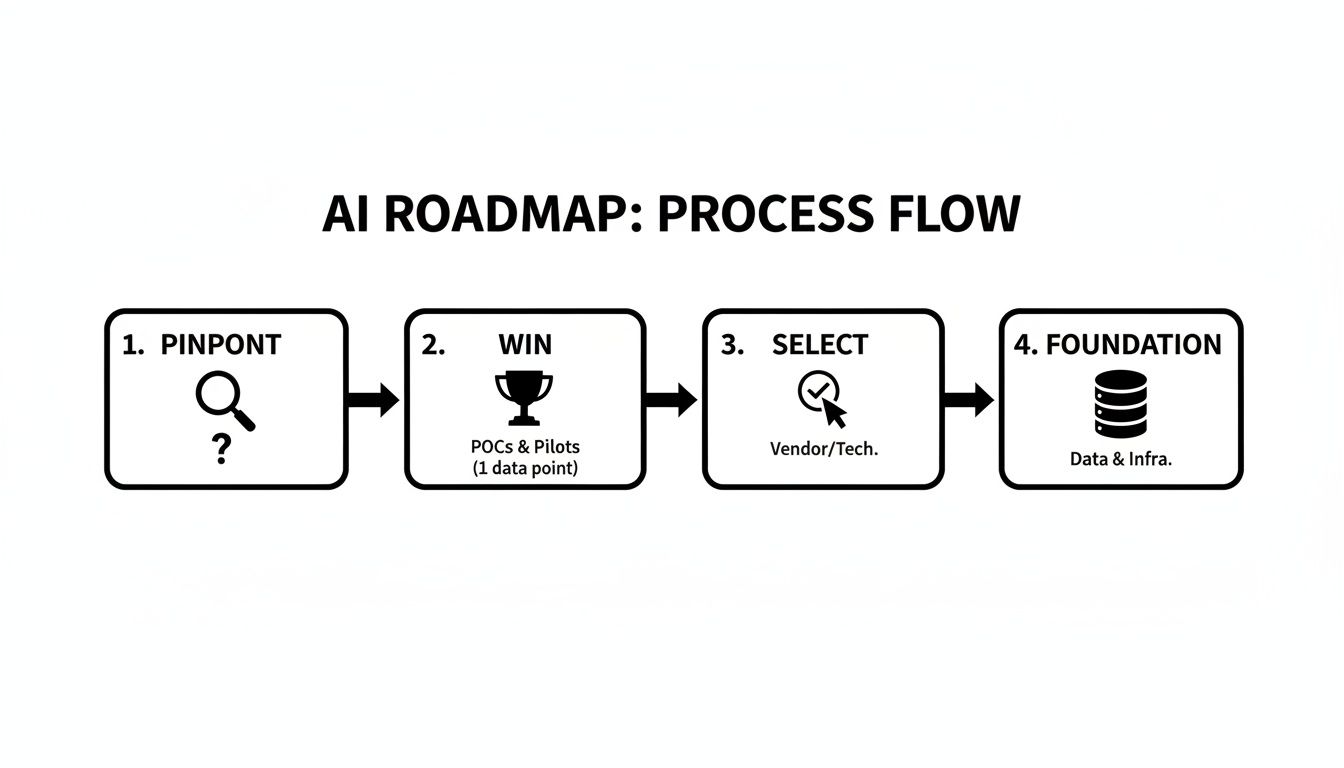
As you can see, successful adoption isn’t a single event. It’s a logical journey from identifying a clear problem to building a reliable data source to power your new tools.
Phase 1: Pinpoint Your Biggest Pain Point
Before you even think about a single AI tool, take a hard look at your business. Where’s the most friction? What are the repetitive, mind-numbing tasks that drain your team's energy day in and day out? Always start with the problem, not the technology.
Maybe it's answering the same five customer support questions over and over. Or manually qualifying every single lead. Or spending hours searching for internal documents. Your goal here is to find the one bottleneck that, if you could just fix it, would give your team immediate relief.
The best place to start with AI is not where it's most advanced, but where it's most needed. Focus on the low-hanging fruit—the tasks that are high in volume, low in complexity, and a constant drain on your resources.
Phase 2: Secure a Quick Win
Once you've identified that key pain point, your next mission is to get a quick, measurable victory. This is absolutely critical for building confidence and showing everyone on the team that this AI stuff actually works. Pick a small, contained project with a crystal-clear definition of success.
For example, if your team is drowning in repetitive support questions, a quick win could be setting up an AI chatbot on your website to handle the top 10 most frequently asked questions. Success isn't a fully autonomous support department overnight. It’s simply reducing ticket volume by 20% in the first month.
This "quick win" approach does a few important things:
- Builds Momentum: A successful first project gets everyone excited and bought into what's next.
- Provides a Learning Opportunity: You get to learn how to implement and manage an AI tool on a small, low-risk scale.
- Demonstrates ROI: It offers concrete proof that the investment is paying off, whether in saved time or more captured leads.
Phase 3: Select the Right User-Friendly Tool
The market is flooded with AI tools, but for a small business, the choice is simple: prioritize ease of use above all else. You don't need a complicated, enterprise-level platform that requires a team of developers to run. Look for no-code or low-code solutions designed specifically for teams like yours.
A platform like BizSage is a great example of this. You can train an AI assistant on your website content, internal documents, and other knowledge bases in just a few minutes, without writing a single line of code. The setup is intuitive, meaning you can get a functional AI agent live on your site the very same day. This kind of accessibility is what makes AI for small business a practical reality, not just a futuristic idea.
Phase 4: Establish Your Data Foundation
Finally, and this is a big one, remember that any AI is only as smart as the information you feed it. You’ve probably heard the old saying: "garbage in, garbage out." It couldn't be more true here. For your AI to give helpful, accurate answers, it needs access to clean, current information.
Start by doing a quick audit of your existing knowledge sources. Is your website's FAQ page up to date? Are your internal training documents accurate? Pull all of this information together into a reliable "source of truth." Modern tools can automatically sync with these sources, ensuring your AI's knowledge is never stale. This final step is what turns your AI from a simple tool into a trusted, intelligent assistant for both your customers and your team.
Avoiding Common Pitfalls on Your AI Journey
Rolling out any new technology has its share of "gotchas," and AI is no exception. The great news is you can learn from the mistakes others have made and sidestep them completely. Think of this as your roadmap to a much smoother, more successful AI implementation.
The point isn't just to have AI, but to use it well. Diving in headfirst without a plan is a surefire way to waste time and money on tools that don't actually help. By anticipating these common hurdles, you can build a smarter, more resilient AI strategy from the get-go.
The Overly Complex Tool Trap
One of the most common mistakes I see is businesses picking an AI platform that’s way too powerful or complicated for what they need right now. It's easy to get mesmerized by software with a million flashy features, but if your team needs a week of training just to figure it out, it's going to end up on the digital shelf. Your people are busy, and a tool that creates more work than it saves is a killer.
The fix? Put simplicity first. Look for no-code or low-code platforms built for teams like yours, not enterprise giants. The right AI for a small business should feel intuitive—something you can get running in minutes, not days. Quick adoption is the name of the game because it leads directly to immediate value.
The best AI tool isn't the one with the most bells and whistles; it's the one your team will actually use. Zero in on solving one specific problem with a simple tool, and you'll see adoption and a clear return much faster.
Ignoring the Quality of Your Data
There's an old saying in the tech world: "garbage in, garbage out." It has never been more relevant than with AI. An AI assistant is only as good as the information you feed it. If you train it on outdated manuals, conflicting spreadsheets, or an incomplete FAQ page, it will dish out wrong answers to your customers and team with 100% confidence.
This kind of thing destroys trust in a heartbeat and can cause more problems than it solves. Before you unleash any AI, take a moment to audit your knowledge sources.
- Website Check: Is your FAQ page current? Are product details accurate?
- Internal Docs: When was the last time someone updated your training guides?
- Single Source of Truth: Make sure there's one official, reliable place for key company info.
Thankfully, many modern AI platforms help with this, offering features that automatically sync with your live website or help center to keep the AI's knowledge base fresh.
Lacking Clear Goals and Metrics
If you don't know what you're aiming for, how will you know if you've hit the target? Another classic pitfall is plugging in an AI tool without ever defining what success actually looks like. You might feel like you're making progress, but you won't have any real way to prove its value or justify the expense.
Before you start, set a few simple, measurable goals. Do you want to cut down customer support tickets by 30%? Or maybe boost after-hours lead captures by 50%? These specific targets give you a yardstick to measure against, turning a fuzzy idea into a trackable business project. This data-backed approach lets you see exactly what's working and where you should invest more.
Businesses are catching on fast. Recent SBA data shows AI use in firms with under 250 employees jumped from 6.3% to 8.8% in just six months. Even more telling, a staggering 92% of small businesses now say they use AI in some part of their operations—a huge leap from just one in five the year before. You can dive deeper into these small business AI adoption trends and see how others are using these tools to get ahead.
Your AI Action Checklist for Immediate Results
Reading about AI for small business is one thing. Actually putting it to work is something else entirely. It's time to close that gap between knowing what's possible and doing something about it.
This final section is a straightforward, actionable checklist. I’ve designed it for busy entrepreneurs who just need a clear path to get started. Think of these steps as your first practical dip into automation—they’re quick, easy, and should give you some immediate insights.
Let's get you from curious to confident in under an hour.
Phase 1: Prepare Your Foundation
Before you even think about touching a new tool, you need to know what problem you’re trying to solve. The smartest AI projects always start by targeting a specific, nagging pain point. A little prep work here will all but guarantee your first AI project is a home run.
-
Identify Your Top 10 Customer Questions: Seriously, grab a notepad or open a document and list the ten questions your team answers over and over again. These repetitive queries are the low-hanging fruit for automation.
-
Audit Your Current Knowledge Base: Take a hard look at your website’s FAQ page, help docs, and any internal guides you use. Are they accurate? Up-to-date? Remember, clean data is the fuel for a smart AI.
This groundwork is non-negotiable. An AI is only as good as the information you give it, so making sure your content is solid is the most important first step.
Phase 2: Launch Your First AI
With your foundation sorted, it’s time for the fun part. The goal here is to score a quick win and see the value of AI firsthand, without getting bogged down in technical details.
-
Start a Free Trial of a No-Code AI Platform: Sign up for a user-friendly tool like BizSage. The key is to pick a platform that requires absolutely zero coding and has a simple, guided setup.
-
Train Your First AI in Under Five Minutes: Just follow the platform's instructions to get your AI trained. Usually, it’s as simple as pasting in your website's URL. The AI then gets to work, crawling your content and learning it on its own.
This is the "aha!" moment for most business owners. Watching an AI learn your entire business from your website in just a few minutes makes the power of this technology feel incredibly real and within reach.
Phase 3: Deploy and Test
Your AI is trained and ready to go. The final step is to put it in front of a real audience—even a small one—to see how it does.
-
Embed Your New AI on Your Contact Page: Add the AI assistant to a single, specific page on your site, like your "Contact Us" or support page. This creates a controlled environment where you can easily watch how it performs.
-
Ask It the Tough Questions: Now, go test your new AI. Use that list of top 10 questions you made earlier and see how it responds. If any answers need a little polish, use the platform’s tools to refine them.
And that's it. By finishing this checklist, you’ll have successfully launched your very first AI assistant. You’ve taken a huge step from theory to practice, laying the groundwork for more powerful automation that will save you time, capture more leads, and help your business grow.
Common Questions About AI for Small Businesses
Dipping your toes into the world of AI often brings up the same set of questions. It's totally normal to wonder about the cost, the learning curve, and what it all means for your team. Let's tackle some of the most common concerns head-on so you can move forward with a clear picture.
We'll cut through the noise and get straight to what you really need to know.
Is AI Too Expensive for a Small Business?
This is usually the first question I hear, and the answer is a resounding no. Not anymore, anyway. When people think of AI, they often picture giant, custom-coded systems that cost a fortune. That's old news.
Today's AI tools are built specifically for small businesses. Many have affordable monthly plans that cost less than what you’d pay an employee for a few hours of work. The real win is the return you get by saving your team countless hours on repetitive tasks and capturing leads you might have otherwise missed. The pricing is designed to be accessible and scale with you, making it a genuinely practical option for any budget.
Do I Need to Be a Tech Whiz to Use AI?
Absolutely not. This is probably the biggest and best change in AI recently. The latest generation of AI tools is designed for regular business owners, not programmers. If you're comfortable using a computer and navigating a website, you have all the skills you need.
Getting started is often as simple as pasting a link to your website or uploading a few business documents. The AI does the heavy lifting, training itself on your information and getting ready to go live in minutes. This is exactly why so many small business owners without big IT teams are finally able to bring AI into their operations.
The old idea that you need a team of developers to use AI is completely outdated. Modern platforms are built for the business owner, not the engineer, putting powerful tools in everyone's hands.
Will AI Replace My Employees?
This is a big worry for many, but for a small business, it’s usually the exact opposite of what happens. Think of AI as a partner for your team, not a replacement. Its job is to handle the draining, repetitive tasks that eat up your team's day—things like answering the same five questions over and over or manually logging data.
By taking that off their plate, you free up your people to focus on the things humans are great at: building real customer relationships, thinking creatively about the business, and pushing for growth. In fact, studies often show that businesses that adopt AI are more likely to grow their teams, not cut them. The efficiency you gain from AI actually fuels your ability to expand and invest more in your people.
Ready to see how an AI assistant can work for your business without the headache? BizSage lets you train a custom AI on your content in minutes. Start your free trial today and get your customer support automated right away.