
Building an AI-powered chat for your website used to feel like a massive, developer-heavy project meant only for big companies with deep pockets. Not anymore. Today, you can get a powerful, on-brand AI agent up and running in minutes. This isn't just a cool new feature; it's a fundamental change in how you can handle everything from customer support to sales.
Why an AI Chat Website Is No Longer Optional
For a long time, the only way to talk to customers online in real-time was through a manual process. Many businesses started with basic live chat—and understanding the old way of doing things, like in this guide on how to add live chat to a website, really highlights the huge leap AI offers. The problem with traditional live chat is that it always needs a person on the other end. An AI chat, on the other hand, works for you 24/7.
This is about more than just being available. It’s about being smarter with your resources.
If you're running a small team, an AI chatbot is like adding a new team member who handles all the repetitive stuff. It takes care of the questions that eat up your day—"What are your hours?" or "What's your return policy?"—freeing up your actual people to solve the complex problems that truly build customer relationships.

Unifying Your Knowledge and Boosting Performance
Beyond just answering customer questions, a well-trained AI becomes a single source of truth for your entire company. Think of it as a "Company Brain" that gives everyone—from a brand-new hire to a seasoned pro—the same accurate information instantly. That kind of internal consistency is gold, especially as you grow.
The market trends are screaming this from the rooftops. The global chatbot market is on track to hit $15.5 billion by 2028, and some experts predict that AI will handle 95% of all customer service interactions by 2026. This isn't a fad; it's a seismic shift in how people expect to interact with businesses.
For small businesses, this all boils down to one thing: AI chat isn’t just a way to get ahead anymore. It's quickly becoming the bare minimum for meeting customer expectations for instant, accurate answers.
Here's a look at how an AI chat directly impacts different parts of a business.
Key Business Benefits of an AI Chat Website
| Business Area | Problem Solved | AI Chat Solution |
|---|---|---|
| Customer Support | High volume of repetitive questions ties up support agents and increases wait times. | Instantly answers common queries 24/7, freeing up human agents for complex issues. |
| Sales & Lead Gen | Potential leads visit the site after hours or leave without finding what they need. | Engages visitors, qualifies leads, and schedules demos, even when the sales team is offline. |
| Internal Operations | Inconsistent information and long search times for internal documents for employees. | Provides a centralized "Company Brain" for instant, accurate answers on company policies and procedures. |
| Marketing & UX | Lack of insight into what customers are actually looking for or confused about. | Collects and analyzes user questions, revealing content gaps and user friction points. |
This isn't just about adding a widget to your site. It's about building a smarter, more efficient business that can respond to customers' needs in real time.
Ultimately, putting an AI chat on your website delivers clear, tangible results:
- Slashed Support Costs: It dramatically reduces the number of repetitive support tickets, directly lowering your operational expenses.
- Always-On Sales Assistant: It captures and qualifies leads around the clock, so you never miss a potential customer.
- Flawless Consistency: It provides perfectly on-brand answers every single time, getting rid of human error.
- Actionable Insights: It gives you a direct line into what your customers are asking, pointing out exactly where you need to improve your content or products.
Your AI Is Only as Smart as You Make It
An AI chatbot is a bit like a new employee—it only knows what you teach it. This is the foundational step where you set your AI up for success, ensuring it delivers trustworthy answers instead of frustrating your customers with guesses. The whole point is to create a single, reliable source of truth that powers every conversation.
This all starts with a deep dive into the content you already have. Don't just think about your FAQ page. The "brain" for your AI can be built from a surprisingly wide range of materials you've already created, turning scattered documents into a powerhouse of knowledge.

Building Your Content Checklist
The best way to start is by mapping out every possible source of information. You need to be thorough here—leave no stone unturned. I find that a simple checklist is the most effective way to keep things organized.
- Public-Facing Content: This is the obvious stuff. Go through every page on your website, from the homepage and product descriptions to your blog articles and case studies.
- Support Documentation: This is often where the real gold is. Pull together all your help center articles, technical manuals, and setup guides. These are usually packed with the most valuable problem-solving answers.
- Internal Knowledge: Look beyond customer-facing content. Internal FAQs, onboarding docs for new hires, and company policy guides are perfect for creating an internal "Company Brain" that a tool like BizSage can use to answer team questions.
- Sales and Marketing Materials: Don’t forget about product spec sheets, brochures, and even old sales scripts. They contain tons of useful details about features, benefits, and positioning.
As you go through this collection process, you’ll almost certainly find conflicts—maybe outdated pricing on an old blog post or a return policy on a help page that contradicts your main website. Finding these now is a good thing!
Your top priority is to iron out these inconsistencies before you train the AI. By creating a clean, unified knowledge base first, you guarantee the AI gives consistent answers to both your customers and your team from day one.
How This Works for an E-commerce Shop
Let’s make this real. Imagine a small e-commerce business that sells handmade leather goods. Right now, their information is a mess. Product dimensions are buried in random spreadsheets, the shipping policy is a short blurb on the contact page, and return rules are hidden in a chain of old customer service emails.
To build a reliable AI chat for their website, they’d need to wrangle this chaos into order.
First, they would consolidate all product specs into one master document, detailing the materials, dimensions, and care instructions for every single item they sell.
Next, they’d create clear, official documents for their shipping, return, and warranty policies. No more ambiguity. Just one definitive source.
Finally, they'd sift through past customer emails to build a list of common questions and write out the perfect answers for each one.
By turning these scattered files into a structured knowledge base, they aren’t just feeding an algorithm. They’re building a central library that ensures every answer—whether from the chatbot or a human team member—is accurate and consistent. This upfront cleanup work is the single most important step in building an AI you can actually trust.
Giving Your AI a Voice and Personality
Now that your knowledge base is in order, it's time to make sure your AI chat doesn't sound like, well, a robot. Nothing kills a user's confidence faster than a generic, unfeeling assistant. The whole point is to create a personality that actually mirrors your brand's voice and connects with your customers.
Believe it or not, this is less complicated than it seems. It all starts with a single, clear instruction that acts as a mission statement for your AI. For a platform like BizSage, a simple prompt can set the entire tone.
Something like this works wonders: "You are a helpful and friendly assistant for the BizSage team. Your tone is always professional but approachable. You avoid using jargon and explain technical concepts in simple terms."
That one directive immediately gives the AI a baseline for how to behave, making sure it’s on-brand from the very first word.
Fine-Tuning How the AI Responds
With the core personality set, the real fun begins: refining its voice through testing. I'm not talking about lobbing softball questions. You need to push the AI with the kind of tricky, nuanced, and sometimes weird queries that real customers will throw at it. This is how you teach it not just what to say, but how to say it—and just as importantly, what not to say.
Here’s a practical framework I use:
- Toss it ambiguous questions. Ask something that could have a few different meanings and see if it knows how to ask for clarification.
- Check for tone consistency. Try asking the same question in different ways—once as a friendly customer, then as a frustrated one. Does it keep its cool and stay on-brand?
- Probe its knowledge limits. Intentionally ask questions you know are outside its scope. How it handles this is critical.
That last point is probably the most important. A trustworthy ai chat website has to know its own limitations.
An AI that can confidently say, "I don't know the answer to that, but I can connect you with our support team for help," is infinitely more valuable than one that just makes something up. Honesty builds trust.
Real-World Scenarios for Personality Testing
Let's say you're a SaaS company. Here are a few test prompts you can use to really shape its personality and make sure it responds correctly when things get real.
- The Upset Customer: "Your software just deleted my work, and I'm on a deadline! What are you going to do about this?"
- The Goal: You're looking for empathy here. The AI needs to be helpful and non-defensive, not just spit out a generic apology.
- The Comparison Shopper: "How are you better than your competitor, XYZ Corp?"
- The Goal: It should answer professionally without bad-mouthing the competition. The focus should stay on your own unique strengths.
- The Off-Topic Query: "What's the weather like in San Francisco today?"
- The Goal: This teaches the AI to politely steer the conversation back to what it’s there to do—help customers with your product.
This back-and-forth of prompting and testing is how you turn a generic tool into a true brand ambassador. You’re teaching it the subtle art of conversation: when to be direct, when to be empathetic, and when to just say, "I need to get a human." This is the detail work that makes an ai chat website feel genuinely helpful instead of just… robotic.
Choosing The Right Deployment Option
How your AI chat shows up on your site is just as critical as what it says. You've spent time building a smart assistant with a great personality; now you need to put it where your customers will actually find and use it. This decision is all about user experience and will directly impact how helpful the AI can be.
The good news? You don't need to be a developer to get this right. There are three main ways to deploy your AI chat, and each one serves a different strategic goal. You can go with an embedded widget, a direct link, or a dedicated subdomain.
The Ever-Present Embedded Widget
The most common approach you'll see is the embedded widget—that familiar chat bubble that lives in the corner of a webpage. Its biggest strength is its constant accessibility. You can place it on high-intent pages, like your pricing or checkout pages, to offer immediate, context-aware help right when people need it most.
This method is perfect for:
- Answering last-minute sales questions and preventing cart abandonment.
- Providing instant support on pages with complex product or feature details.
- Engaging visitors proactively without forcing them to navigate away from what they're doing.
The Versatile Direct Link
Sometimes, the conversation needs to start somewhere other than your website. A direct link to your AI chat is an incredibly flexible tool for just that. You can drop it into your email signature, add it to your social media bio, or even embed it in marketing campaigns.
This simple move transforms your AI from a website-only tool into a universal resource. It's a clean solution for providing consistent answers across all your communication channels, ensuring your customers get the right information no matter where they first engage with you.
The Authoritative Subdomain
For businesses that want to build a comprehensive, searchable knowledge hub, a dedicated subdomain (think help.yourcompany.com) is the gold standard. This approach gives your AI chat its own standalone home, creating a central destination for all self-service support.
This setup essentially turns your AI chat into a powerful, SEO-friendly resource that customers can bookmark and return to again and again. It’s ideal for housing extensive documentation, tutorials, and FAQs in an interactive format. It positions your AI as the single source of truth for your entire business, serving both customers and internal teams.
Your deployment choice isn't just a technical detail; it's a strategic decision about where you want to meet your customers. The goal is to make getting help as frictionless as possible, whether they're deep in your site or clicking from an email.
Choosing the right personality for your bot often goes hand-in-hand with where you place it. This quick decision tree can help you align your AI's voice with its role on your site.
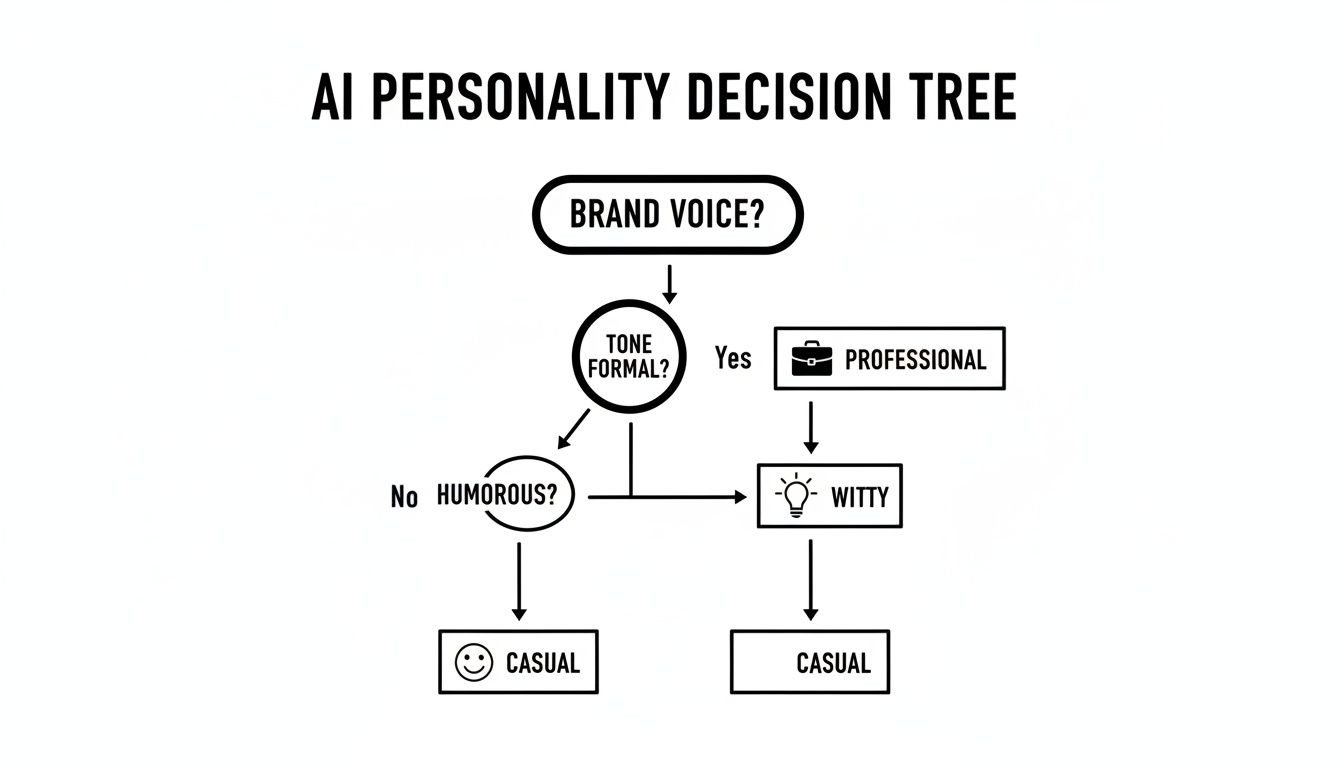
As you can see, your brand's core voice—whether it's casual, professional, or a bit witty—should directly inform the AI's persona. This, in turn, helps you decide on the best deployment strategy to make that personality shine.
When you're weighing these options, it can also be helpful to explore different AI chatbot and assistant options for platforms like Shopify to see how they integrate with various e-commerce infrastructures.
To make the choice a little easier, here's a side-by-side look at the three main deployment methods.
AI Chat Deployment Options Compared
| Deployment Method | Best For | Effort Level | Example Use Case |
|---|---|---|---|
| Embedded Widget | Immediate, on-page support and lead capture. | Low | A SaaS company placing a widget on their pricing page to answer feature questions and book demos. |
| Direct Link | Omnichannel support and off-site engagement. | Low | An e-commerce brand including a chat link in their order confirmation emails for shipping inquiries. |
| Subdomain | Creating a comprehensive, SEO-friendly knowledge base. | Medium | A software company using support.company.com as a central hub for all documentation and user guides. |
Ultimately, the best choice depends on your specific goals. Do you need to reduce support tickets, increase sales conversions, or build a definitive resource hub? Answering that question will point you directly to the right deployment path.
Putting Your AI Chatbot to the Test Before Launch

You’ve defined its personality and fed it a solid knowledge base. Your AI is almost ready for its big debut. But here’s a lesson I’ve learned the hard way: launching without relentless testing is like opening a new restaurant without tasting the food first. A clunky, unhelpful first impression can poison the well and undermine all your hard work.
This final stage is about making sure your ai chat website is bulletproof from the moment it goes live. We need to move beyond simple keyword tests and start thinking like your actual customers—the impatient ones, the skeptical ones, and even the ones who try to break things for fun. The mission is to find the cracks, awkward phrases, and conversational dead ends before they do.
Your Pre-Launch QA Checklist
A structured quality assurance plan is your best defense against a messy launch. You want to cover the entire spectrum of possible conversations, from the slam-dunk easy questions to the weird edge cases that make you scratch your head.
I always start with the basics and then ramp up the difficulty.
- Fact-Checking the Fundamentals: Ask your top 10 most common customer questions. Are the answers spot-on? More importantly, do they sound like your brand?
- Testing Conversational Memory: A good chat isn't a one-and-done answer. Try a multi-step query like, "What are your shipping options?" followed by, "How much is overnight to California?" and then, "Can you guarantee it arrives by Friday?" The AI needs to hold onto the context.
- Embracing Ambiguity: Throw it some curveballs with vague or typo-ridden questions. A smart AI shouldn't just guess; it should ask for clarification.
- Defining the Boundaries: Try to stump it. Ask about something completely unrelated to your business. The best-case scenario is a polite, "I'm not equipped to answer that, but I can help with [X, Y, and Z]," before offering a way to reach a human.
My best advice for this phase? Get into character. Genuinely pretend you're a first-time visitor who knows nothing about your company. This shift in perspective is incredibly powerful and will expose blind spots you'd never see otherwise.
The Secret Weapon: A Soft Launch
No matter how thorough your internal QA is, you will never be able to predict every single thing a real user will do. That's why I'm a huge advocate for the soft launch. The idea is simple: release the chatbot to a small, controlled audience before you announce it to the world.
Who should be in this exclusive club?
- Team members from other departments (your sales team will ask very different questions than your engineers).
- A small group of loyal, long-time customers you have a good relationship with.
- A dedicated list of users who've opted in to be beta testers.
The feedback you get from this group is pure gold. They will ask questions you never anticipated and interact in ways you couldn’t have imagined. Use their insights to patch up knowledge gaps and polish the AI's personality one last time. This controlled rollout lets you iron out the final wrinkles, ensuring your ai chat website offers a truly helpful and polished experience for every single visitor when you finally flip the switch.
Alright, launching your AI chat is a huge win, but that's just the starting line. The real work begins now, shifting from building the thing to making it a powerhouse for your business. This means you need to keep a close eye on its performance and ensure its knowledge base doesn't get dusty.
So, How Do You Know if It’s Actually Working?
Forget vanity metrics like how many conversations it has. You need to track the numbers that show real business impact. Think about what you were trying to solve in the first place and measure that.
Here are the essentials I always recommend clients focus on:
- Ticket Deflection Rate: This is the big one. For every 100 questions the bot answers, how many of those would have otherwise become a support ticket? This is a direct line to your ROI and cost savings.
- User Satisfaction (CSAT): It's simple but powerful. After a chat, ask users for a quick thumbs-up or thumbs-down on the experience. High satisfaction scores tell you the AI isn't just answering questions—it's providing helpful, on-brand responses that people actually like.
- Top Unanswered Questions: This report is pure gold. It gives you a clear, unfiltered look at what your customers are asking that your current content doesn't cover. Use this to patch holes in your knowledge base and even identify gaps in your product documentation or website copy.
Keeping Your AI Chat From Going Stale
An AI chat that gives out-of-date information is worse than having no chat at all. It erodes trust and creates frustrating experiences. Nobody has time to manually update FAQs and documents every single time a tiny detail changes. That's where automation becomes your best friend.
Look for a platform with a built-in auto-refresh feature. For example, a tool like BizSage lets you schedule how often the AI should re-scan your website and other connected sources for new information. You can set it to run daily, weekly, or whatever makes sense for your business. This way, it automatically learns about new product specs, policy changes, and pricing updates without you lifting a finger.
This simple bit of automation is what transforms your AI chat from a static project into a living, breathing asset. It ensures your customers and internal teams always have the most current, accurate information, cementing the AI’s role as the single source of truth.
The timing for this couldn't be better. The market is absolutely primed for this kind of interaction. With tools like ChatGPT grabbing 68% of the AI chatbot market share from a staggering 5.8 billion monthly visits, it's clear people are comfortable and even prefer using chat interfaces. This gives you a massive opportunity to provide that same seamless experience right on your own website. Discover more insights about the AI chatbot market.
Your AI Chat Website Questions, Answered
When you're thinking about adding an AI chatbot to your site, a few key questions always come up. People often wonder about the cost, how long it takes to get going, and—most importantly—if their data is safe. Let's tackle these head-on.
First up, the budget. Is this going to be one of those massive, six-figure development projects? Far from it. Thanks to modern no-code platforms, you're not looking at a huge upfront investment. Instead, it’s usually a straightforward monthly subscription, making it a manageable operational expense even for a small business.
How Quickly Can I Get This Running?
This is where things get really exciting. Forget about those long, drawn-out implementation cycles that used to be the norm. With the right tool, you can literally go from zero to a fully trained, helpful AI assistant on your website in just a few minutes.
The whole process has been boiled down to a few simple actions:
- Feed it your knowledge: Just give it your website URLs or upload your documents.
- Set the right personality: A quick prompt is all it takes to define its tone and style.
- Do a quick spot-check: Ask a few questions to make sure it's on the right track.
- Go live: Copy a small snippet of code and paste it onto your site. That's it.
Because you can launch so quickly, you start seeing the benefits almost right away.
Is My Company’s Information Kept Private?
This is a big one, and rightly so. You're feeding the AI your internal documents and proprietary website content, so you need absolute certainty that your data is secure.
Leading platforms are built with this in mind. They ensure that your information is only ever used to train your specific AI assistant. It’s never shared, sold, or used to train other AI models.
Think of your knowledge base as a private, locked-down asset. It's completely ring-fenced to your account, so your company's unique "brain" stays yours and yours alone. It never bleeds into public AI.
This gives you the confidence to build a powerful AI assistant using your most valuable business knowledge, without worrying about security leaks.
Ready to see how an AI chatbot can transform your business? Get on-brand, 24/7 answers up and running in minutes with BizSage. Build your AI chat website today.