
An AI chat for your website is more than just a pop-up window. It’s a smart, automated tool that uses your own company knowledge to have natural, human-like conversations with visitors. Unlike the clunky bots of the past, a modern AI chat learns directly from your website content, help docs, and product info. It becomes a dedicated digital team member, ready to give instant, accurate answers 24/7.
What Is AI Chat and Why Your Website Needs It Now
Imagine hiring a new team member who has perfectly memorized every single piece of information about your business. They've read every page on your site, studied every support article, and know your product specs inside and out. Now, picture them being available around the clock, ready to instantly answer any question a visitor throws their way.
That’s exactly what an AI chat on your website delivers.
This is a huge leap forward from older, rule-based chatbots. You probably remember those—they followed rigid, pre-programmed scripts and often led to frustrating dead ends, forcing you to rephrase your question or just give up. Modern AI is a completely different ballgame.

The Concept of a Company Brain
The best way to think about a modern AI chat is as a "digital brain" that you train exclusively on your company's content. It isn’t just pulling random answers from a Google search; its entire universe is the information you feed it. This focused approach means every answer is accurate, consistent, and stays perfectly on-brand.
This digital brain quickly becomes an essential extension of your team, capable of handling a huge volume of common questions without breaking a sweat. In doing so, it helps you hit some pretty important goals:
- Give Customers Instant Answers: People today expect immediate help. AI chat meets that expectation, reducing friction and building trust right from the first click.
- Lighten the Support Load: By deflecting all the repetitive questions, it frees up your human support agents to tackle the complex, high-value issues that truly need a person's touch.
- Engage Leads 24/7: The bot works tirelessly after hours and on weekends. It can engage potential customers, answer their pre-sale questions, and gently guide them toward making a purchase.
In essence, an AI chat tool doesn't just answer questions. It creates a centralized, single source of truth for your business, ensuring that every customer and team member gets the same correct information, every single time.
The Real-World Payoff of AI Chat on Your Website
Putting an AI chat on your website isn't just a techy add-on; it's a smart business decision with real, measurable results. Think of it as a force multiplier for your support, sales, and even your internal teams. It takes all your company knowledge and turns it into an interactive tool that completely changes how you talk to customers and share information.

Instantly Lighten the Support Load
The first thing you'll notice is the impact on your customer support team. An AI chat for your website becomes your front line, instantly handling all those repetitive questions that clog up the support queue. You know the ones: "What are your hours?" or "Where's my order?"
The AI fields these queries immediately, freeing up your support agents to tackle the tricky problems that actually need a human touch. This isn't just a nice idea—the data backs it up. Chatbots can now resolve up to 80% of routine support inquiries. That means fewer email tickets, shorter wait times, and a direct boost to both your service quality and your bottom line. Discover more chatbot statistics and their business impact.
Get a Sales Assistant That Never Sleeps
Your website is open 24/7, so why isn't your sales team? An AI chat works around the clock, engaging potential customers the second they land on your site, even if it's 2 AM. It can answer product questions, point out key features, and even qualify leads by asking a few smart questions.
This turns your website from a static brochure into a living, breathing sales tool. The AI guides prospects through those first crucial steps, making sure you never lose a lead just because they showed up after business hours.
Build a Single Source of Truth
Perhaps the biggest long-term win is creating a centralized knowledge hub—what you could call your "Company Brain." When you train the AI on all your official content—help docs, internal policies, website copy—you build one definitive source for answers.
This ensures every response a customer gets is consistent, accurate, and reflects your latest information. No more worrying about different team members giving conflicting advice. The benefits are huge:
- Consistent Customer Experience: Every visitor gets the same, correct information, which builds incredible trust.
- Faster Employee Onboarding: New hires have an expert they can ask anything, getting them up to speed on company processes in record time.
- Unified Internal Knowledge: Your whole team has one reliable place to turn, keeping everyone on the same page.
Ultimately, an AI chat for your website does more than just talk to customers. It organizes your company’s collective intelligence and makes it instantly available to anyone who needs it.
Understanding the Different Types of AI Chat Solutions
Picking the right AI chat for your website can feel overwhelming at first. The market is full of options, and not all of them are built the same. They differ in how they process information, where they're hosted, and how they show up on your site. Getting a handle on these key differences is the first step to finding a tool that actually works for your business instead of creating more headaches.
Let’s start with the most important part: the AI's "brain." This is where you'll find the biggest split between solutions. You'll generally run into two types—retrieval-based and generative—and they couldn't be more different in how they come up with answers.
Retrieval vs. Generative AI
A retrieval-based AI works like a super-smart librarian. When someone asks a question, it doesn't try to get creative. Instead, it meticulously scans all the information you've given it—your website pages, help docs, product manuals—and pulls the exact answer. It retrieves what's already there; it doesn't make things up.
For most businesses, this is the only way to go. Why? Because it guarantees accuracy. The answers are always grounded in your own, pre-approved content, which means there’s zero risk of the AI "hallucinating" or inventing facts. When you're dealing with customer support or sales, that kind of reliability is everything.
A generative AI, by contrast, is more of a creative storyteller. It uses its massive training data to understand the question and then generates a completely new answer. While this technology is incredibly powerful, it's a risky bet for a business. It can easily produce answers that are factually wrong, off-brand, or just plain weird.
Hosted vs. Self-Hosted Solutions
Next up, you need to decide where your AI chat is going to "live." This choice boils down to a classic trade-off: convenience versus control.
- Hosted Solutions: This is the go-to option for the vast majority of businesses. A third-party company (like BizSage) handles all the technical heavy lifting—the servers, the software, the security, and all the updates. You just sign up, give it your content, and pop it onto your site. It's fast, affordable, and you don't need an IT department to make it happen.
- Self-Hosted Solutions: This is the DIY route. You run the AI chat software on your own servers, giving you total control over every little detail. The downside is that it comes with a ton of overhead. You'll need a dedicated technical team to manage the installation, keep it secure, and handle all the ongoing maintenance. It’s a powerful but very resource-intensive path.
For nearly every small or growing business, a hosted solution delivers all the benefits without any of the backend headaches.
Comparing AI Chat Deployment Models
To help you decide which approach is the best fit, here’s a quick breakdown of the common AI chat models.
| Model Type | Best For | Key Advantage | Potential Drawback |
|---|---|---|---|
| Retrieval-Based AI | Businesses needing 100% factual accuracy for support and sales. | Answers are grounded in your own content, eliminating made-up facts. | Less conversational flexibility; can only answer what it knows. |
| Generative AI | Creative brainstorming or internal tools where accuracy isn't critical. | Can generate novel, human-like responses on any topic. | High risk of "hallucinations" (making things up). |
| Hosted Solution | Most businesses, from startups to enterprises, seeking ease of use. | Fast setup, no technical maintenance, and lower upfront cost. | Less control over the underlying infrastructure. |
| Self-Hosted Solution | Large enterprises with specific security needs and a dedicated tech team. | Maximum control, customization, and data privacy. | Extremely high cost, complexity, and maintenance burden. |
Ultimately, the right combination depends on your priorities—whether you value absolute accuracy, ease of use, or total control.
Widget vs. Subdomain Interface
Finally, think about how your visitors will actually use the AI. The user interface is just as important as the tech running behind the scenes.
You’ve probably seen a chat widget a thousand times. It's that little icon that sits quietly in the corner of a website, ready to expand when a visitor has a question. It’s a fantastic way to offer instant help and capture leads right on the page without interrupting the user's journey.
The other common approach is a subdomain, which creates a full-page, dedicated help center (think something like support.yourcompany.com). This is perfect for building out a complete knowledge hub where customers can dive deep into topics. It centralizes all your support content into a single, official resource. Many modern platforms are flexible and offer both, so you can serve quick questions with a widget and in-depth queries with a dedicated portal.
How to Choose the Right AI Chat for Your Business
Picking the right AI chat for your website isn’t just about ticking boxes on a feature list. You need a solid framework for figuring out which solution will actually help your business grow. It's about more than just answering questions—it's about finding a partner that protects your brand, secures your data, and plugs right into how you already work.
Every AI chat solution, no matter how complex, boils down to three core pieces: the model, its hosting environment, and the user interface your customers see.
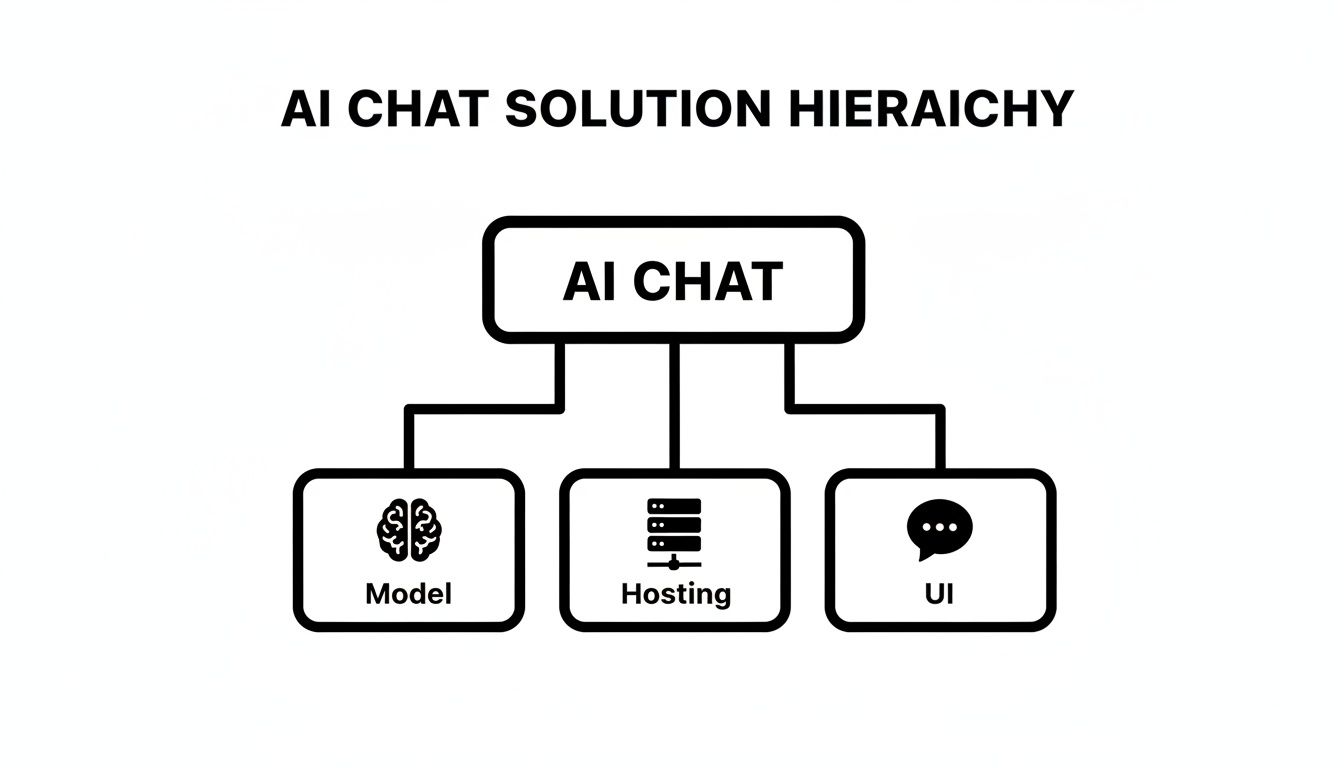
Think of it this way: the AI model is the "brain," the hosting is its "home," and the UI is the "face" you present to the world. A smart evaluation looks at all three to land on a tool that's both reliable and effective.
Evaluate Accuracy and Brand Voice
First things first: does it give the right answers? This is the most basic test, and the only way to pass is with an AI trained exclusively on your content. That's a non-negotiable. It stops the bot from making things up or pulling random, irrelevant info from the web, keeping every response grounded in your business's reality.
But getting the facts right is only half the battle. Your AI chat is a new member of your team, and it absolutely has to sound like one. Look for platforms that give you control over the bot's personality. Whether your brand is fun and casual or buttoned-up and professional, the conversation should feel like it’s coming from you.
Prioritize Data Security and Trust
You wouldn't hand your company's private files to just anyone, and the same caution applies here. Any AI chat provider worth its salt will be completely transparent about how your data is handled, stored, and protected. Make sure they have clear security protocols and can guarantee your proprietary content won't be used to train models for other customers.
Trust also comes from how the AI behaves. A truly great chatbot knows its own limits.
The most crucial feature for building user trust is the AI's ability to say, "I don't know the answer to that." This honesty prevents the spread of misinformation and shows users they can rely on the tool for accurate information when it's available.
Assess Knowledge Cadence and Integrations
Your business is always evolving, and your AI’s knowledge base needs to keep up. A critical factor to consider is the knowledge refresh cadence. How often and how easily can the AI learn new information? The best tools offer automated, scheduled syncs—daily, weekly, or monthly—so your bot is always up-to-date with your latest content, no manual uploads required.
Finally, think about how this new tool will play with your existing software. Integrations are what separate a helpful tool from a frustrating one. Your AI chat should connect smoothly with your help desk, CRM, or other essential platforms to make things like creating a support ticket or handing off a sales lead completely seamless.
This is the framework we built BizSage around—prioritizing accurate, on-brand answers, automated knowledge updates, and useful integrations. By focusing on these core areas—Accuracy, Brand Voice, Security, Refresh Cadence, and Integrations—you can confidently pick a solution that truly works for you.
A Quick Start Guide to Implementing Your AI Chat

Here's some good news: you don't need a team of developers or weeks of coding to get an AI chat for your website up and running. Modern platforms have made the process so simple that you can go from zero to launch in just a few minutes.
Think of it less like engineering from scratch and more like building with LEGOs. You start with your existing business knowledge—that's your instruction manual—and simply snap the pieces together. The whole process is designed for business users, not programmers, so anyone on your team can handle it.
Your Five-Step Implementation Checklist
Getting your AI agent live is a surprisingly straightforward process. It all comes down to feeding it the right information and then fine-tuning its personality. Follow these five core steps for a smooth deployment.
- Gather Your Knowledge Sources: Pull together all the content you want the AI to learn from. This means your website pages, help center articles, product documentation, FAQs, and even those PDF guides you have stored away. The more you give it, the smarter it gets.
- Train Your AI Agent: This part is often as simple as uploading your files or just pasting in your website URLs. The platform handles the heavy lifting, processing the content to build the AI's "Company Brain." No manual data entry required.
- Customize Its Personality: This is where you get to define the AI’s tone and voice so it actually sounds like your brand. Do you want it to be professional and direct? Friendly and witty? You decide. This is key to making every chat feel authentic.
- Test for Accuracy: Before you push it live, give it a test run. Ask it the same questions your customers would, hitting on topics like pricing, features, and support policies. This is your chance to spot any knowledge gaps you need to fill.
- Publish to Your Website: Once you’re happy with how it performs, the platform will generate a single snippet of code. All you have to do is copy and paste that code into your website’s backend, and the chat widget will appear. It’s really that easy.
By following these steps, you’re not just launching a tool; you're creating a reliable, 24/7 resource for your customers. Modern platforms like BizSage are built to make this process incredibly fast, turning a once-complex project into a task you can complete over a cup of coffee.
Measuring Success from Day One
Getting the chat live is just the beginning. To really understand the value your AI chat for your website is delivering, you need to track its impact from day one. Keep an eye on key metrics like the number of support tickets deflected, user engagement rates, and what kinds of questions people are asking.
This data is a goldmine. It gives you direct insight into what your customers are looking for, helping you refine your knowledge base and improve the entire customer experience.
Just consider how quickly user behavior has changed. When ChatGPT rocketed to 100 million active users just two months after its 2022 launch, it was a clear signal. People are comfortable talking to AI, and tapping into that is just smart business. In fact, users click external links from AI chats 1.4 times per visit—more than double Google’s rate—driving high-intent traffic right where you want it. Discover more key AI and SEO statistics to see the full picture.
Got Questions About AI Chat? We've Got Answers.
Jumping into any new technology brings up a lot of "what ifs" and "how to's." It's smart to ask those questions before you commit. When it comes to adding an AI chat to your website, you're probably wondering about the setup, the impact on your marketing, and of course, the cost.
Let's walk through some of the most common questions we hear from businesses, so you can move forward with total confidence.
How Much Technical Skill Do I Really Need to Set This Up?
Honestly, for most modern platforms, you need virtually none. These tools are built for business owners and marketing teams, not engineers. If you can navigate a simple software dashboard, you've got this.
The process is usually dead simple: create an account, point the AI to your knowledge sources (like your website URLs or a folder of help docs), and let it learn. Customizing the chat widget's look and feel is typically a point-and-click affair, and getting it live on your site is as easy as copying one line of code. You can realistically go from signup to a fully functioning AI agent in under an hour.
Will an AI Chatbot Mess Up My Website's SEO?
Quite the opposite, actually. A well-built AI chat can be a genuine asset for your SEO efforts. Think about it: it keeps visitors on your site longer by giving them instant answers, and that increased "dwell time" is a huge positive signal to search engines like Google.
Plus, a good AI will answer questions by linking directly to your blog posts, product pages, and other key resources. This not only helps users but also drives internal traffic and slashes your bounce rate. And don't worry about performance—most modern chat widgets are designed to load separately from your main content, so they won't drag down your page speed or hurt your Core Web Vitals.
How Can I Trust the AI to Give Accurate, On-Brand Answers?
This is a big one, and the answer lies in how the AI is trained. The key is to choose a system that learns exclusively from the content you provide. This creates a walled garden for your AI, preventing it from pulling in random, unverified junk from the wider internet or making things up (a problem known as "hallucination").
To nail your brand voice, look for platforms that let you set a specific personality and tone—whether you're formal and professional, or friendly and fun. It's also crucial that the AI knows when to say "I don't know." Honesty builds far more trust than a confident but wrong answer.
This "Company Brain" approach means every single answer is rooted in your approved knowledge base. It's the only way to guarantee consistency and reliability.
What's This Going to Cost Me?
The cost of adding an AI chat to a website can vary, but you don't need a massive budget. Many solutions are designed to be affordable and scale with small to medium-sized businesses.
Pricing is usually tied to a few factors:
- Message Volume: How many conversations the bot handles each month.
- Knowledge Base Size: How much data you need the AI to learn from.
- Premium Features: Things like advanced analytics, API access, or removing the provider's branding.
Starter plans often fall in the $50 to $150 per month range, which is plenty for most growing businesses. As you scale, you might look at more advanced plans from $200 to $500+ per month for higher capacity. Pro tip: look for per-company pricing with unlimited users. That way, your whole team can collaborate without your bill creeping up every time you add a new team member.
Ready to see what a smart AI chat can do for your business? With BizSage, you can build a custom AI agent trained on your unique content and have it live on your site in minutes. It's time to give every visitor the instant, on-brand support they've been looking for.