
So, what exactly is an AI agent platform? Think of it less as a piece of software and more as a command center for building your own digital teammate. It’s a place where you can teach an AI everything about your company, so it can handle repetitive tasks, answer customer questions, and keep workflows moving 24/7.
Your New Digital Teammate

If you're a business owner, you know the feeling of being pulled in a dozen directions at once. You’re answering the same support questions day after day, walking new hires through the same documents, and trying to qualify sales leads well after business hours. It's a grind that can keep you from focusing on what really matters: growing the business.
Now, imagine a new team member showing up on day one who has already memorized every single thing about your company—every help article, every product spec, every internal policy. That's the whole idea behind an AI agent platform.
This isn't just another complicated tool. It's a system built to help you create a digital employee that you train yourself, without needing to write a single line of code.
Beyond a Simple Chatbot
We've all dealt with frustrating chatbots that just follow a rigid script. An AI agent is a completely different beast. It can:
- Understand Intent: It gets to the heart of what a user is actually asking, even if they word it in a strange way.
- Access Knowledge: The agent instantly taps into your specific business data—your website, help docs, or internal files—to pull out the right answer.
- Reason and Act: It can think through a problem, pull information from different places, and then do something, like book a meeting or open a support ticket.
This is what turns the platform from a simple Q&A bot into an active, helpful part of your daily operations.
A Market on the Rise
The demand for this kind of technology is exploding. The global market for AI agents is projected to rocket by USD 23.56 billion between 2025 and 2029. North America alone is expected to account for 43% of that growth. This signals a massive shift as businesses of all sizes rush to bring intelligent automation on board. You can discover more about these market trends and what they mean for the future.
An AI agent platform is a true force multiplier. It gives a small team the power to provide the kind of instant, accurate support that used to be possible only for huge corporations with massive call centers.
In short, an AI agent platform gives you the tools to build a knowledgeable, independent, and scalable digital workforce that plugs right into how you already do business.
How an AI Agent Platform Actually Works
So, how does one of these platforms actually get the job done? The best way to think about it is like building a custom "company brain." The platform gives you all the essential pieces, and you bring them to life by feeding it your unique business knowledge.
This whole process breaks down into five key stages. Each one is crucial for turning your raw data into an intelligent agent that can think, act, and solve problems on its own.
Let's look under the hood.
Knowledge Ingestion: The Foundation
First things first, your agent needs to learn. This is where Knowledge Ingestion comes in—it's basically the agent's education. The platform reads, digests, and organizes all the information you provide, building a structured knowledge base it can pull from in an instant.
But this isn't just about dumping files into a folder. The system is smart enough to break down complex documents into useful, interconnected pieces of information, creating a map of concepts.
- Website Content: The agent can crawl your entire website, learning everything from product descriptions to blog posts and FAQs.
- Document Uploads: You can feed it your internal playbooks, training manuals, or technical spec sheets in formats like PDF.
- Direct URLs: Have a specific help center article you want it to know? Just give it the link.
Without a solid knowledge base, the agent is just an empty shell. This step is the bedrock for every accurate answer and helpful action that comes next.
Model Orchestration: The Thinking Process
With knowledge in hand, the agent needs a way to think. Model Orchestration is the central nervous system that makes this happen. When a user asks a question, this component figures out the intent and then coordinates with the rest of the system to craft the best possible response.
This is where the magic of Large Language Models (LLMs) comes into play. The platform uses these powerful AI models to understand natural human language, reason through complex problems, and generate answers that are not just correct, but also relevant and coherent. To get a feel for the kind of tech that powers this, you can look at innovations like OpenAI's Whisper AI technology, which is a master at processing human language.
The orchestrator is like a great project manager. It doesn't do all the work itself, but it knows exactly which specialist to tap on the shoulder to get the job done right.
This intelligent coordination is what allows the agent to provide genuinely helpful, context-aware assistance instead of just spitting out facts.
Action and Tool Integration: The Doing Part
Here’s where an AI agent platform really starts to pull away from the pack. It’s not just about answering questions; it’s about taking action. Action and Tool Integration is what gives your agent hands and feet, letting it connect to your other software and get things done in the real world.
For example, you can set up an agent to:
- Schedule Meetings: Connect it to your calendar to book demos or appointments right inside the conversation.
- Create Support Tickets: Integrate with your help desk to automatically log an issue when a problem needs a human touch.
- Qualify Leads: Let it gather key information from a prospect and then pass it directly into your CRM.
These integrations are what make an agent truly autonomous. They enable it to handle entire workflows from start to finish, freeing up your team from repetitive tasks and creating a much smoother experience for your customers.
To truly understand how these components work together, it's helpful to see them laid out.
Core Components of an AI Agent Platform
This table breaks down the essential functions within an AI agent platform, explaining the role of each component and its business value.
| Component | What It Does | Why It Matters for Your Business |
|---|---|---|
| Knowledge Ingestion | Reads, processes, and organizes information from your website, documents, and other data sources. | Creates a single source of truth, ensuring the agent provides accurate, consistent, and up-to-date answers based on your specific business knowledge. |
| Model Orchestration | Uses LLMs to understand user intent, reason through problems, and coordinate tasks to generate the best response. | Delivers intelligent, context-aware conversations that go far beyond simple keyword matching, making interactions feel more human and genuinely helpful. |
| Action & Tool Integration | Connects the agent to external software (like CRMs, calendars, and help desks) to perform tasks. | Transforms the agent from a passive information source into an active problem-solver, automating workflows and freeing up your team's time. |
| UI & Deployment | Provides the user-facing interface (e.g., website widget, standalone page) for people to interact with the agent. | Makes the agent easily accessible to your customers and employees right where they already are, embedding it naturally into your existing channels. |
| Governance & Analytics | Offers a dashboard to monitor performance, review conversations, control agent behavior, and gather insights. | Gives you full visibility and control, allowing you to measure ROI, identify knowledge gaps, and continuously improve the agent's effectiveness. |
Each piece is designed to build on the last, creating a powerful, cohesive system that can learn from your business and act on its behalf.
UI and Deployment: The Customer Interface
Once your agent is trained and ready to go, you need a way for people to actually talk to it. UI and Deployment covers all the channels where your agent can live and interact with users.
Good platforms offer a lot of flexibility here, making sure the agent can meet people wherever is most convenient for them. You can typically deploy it as:
- A website widget for instant support.
- A standalone page for a dedicated Q&A portal.
- A shared link you can drop in emails or on social media.
The goal is to make interacting with the agent feel like a natural part of the user's journey, not a clunky add-on.
Governance and Analytics: The Control Center
Last but certainly not least, you need a mission control. Governance and Analytics is your central dashboard for monitoring the agent's performance, checking its accuracy, and uncovering valuable insights from its conversations.
This is where you maintain control. You can track key metrics like the most common questions, how often the agent successfully resolves an issue, and overall user satisfaction. With the agentic AI market projected to hit USD 88.35 billion by 2032, the ability to measure impact and prove ROI is more important than ever. This growth is all about driving real business efficiency, and a solid analytics dashboard is what makes that possible. You can read the full research on the agentic AI market growth to dig deeper into the numbers.
AI Agents vs Chatbots and Other Tools
The term "AI" gets thrown around so much these days that it's easy to get lost. You might be wondering how an AI agent platform is any different from the chatbots or other AI tools you've already seen. Many businesses have a simple chatbot or have tinkered with LLM APIs, but an AI agent is a completely different beast—far more capable and autonomous.
Getting a handle on these differences is the key to understanding the unique power an agent brings to the table. Let's break down how an AI agent stacks up against its more common cousins.
Agents vs Basic Chatbots
The most common point of comparison is the basic chatbot. We've all run into them: rigid, menu-driven bots that can only follow a pre-programmed script. If your question doesn't fit their narrow flowchart, you hit a dead end.
Think of a basic chatbot as a receptionist with a very strict, laminated instruction sheet. They can point you to the right department or answer a handful of FAQs, but they're lost the moment you ask something they weren't explicitly trained for.
An AI agent, on the other hand, is like a seasoned pro who can think on their feet.
- Chatbots follow scripts: They are bound by fixed rules and can't handle unexpected questions.
- Agents reason and solve: They grasp the context and intent behind a question, then tap into a wide knowledge base to find a real answer.
This diagram offers a simple mental model of how an agent is built to do this.
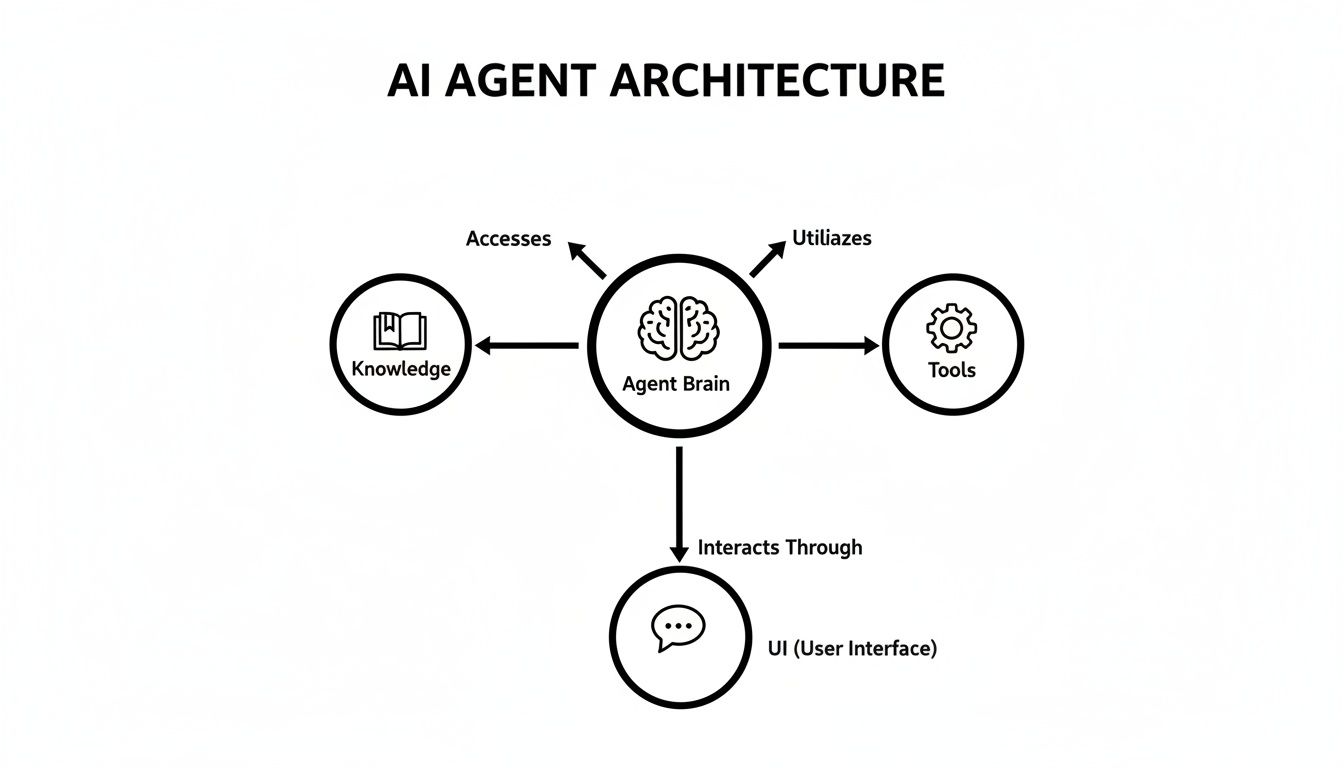
As you can see, the agent combines its core "brain" with your company's knowledge and a set of tools, allowing it to do much more than just trade messages.
Agents vs Standalone LLM APIs
Another area of confusion is how an agent platform stacks up against using a raw Large Language Model (LLM) API from a provider like OpenAI. While LLMs are the powerhouse behind modern AI, they are just one component—a single ingredient in a much larger recipe.
Working directly with an LLM API is like being handed a high-performance car engine. It’s an incredible piece of engineering, but it's not a car. You still need a team of developers to build the chassis, wheels, steering, and controls around it just to make it go.
An AI agent platform is the fully assembled car. It takes the powerful LLM engine and packages it into a business-ready solution with a simple interface, built-in analytics, and seamless data connectors. You just get in and drive.
An AI agent platform like BizSage does all that heavy lifting for you. It's a complete, no-code solution that lets you train an agent on your own content and get it running in minutes, not months.
Agents vs RAG Systems
Finally, you might have heard the term Retrieval-Augmented Generation, or RAG. This is a critical piece of technology that allows an AI to look up information from a specific knowledge base before it answers a question. It's what keeps the model grounded in your company's reality and prevents it from making stuff up.
But here's the thing: RAG is a foundational technology, not a full-fledged solution.
An AI agent platform uses RAG as its foundation and then builds essential business-focused layers on top of it. These include:
- A User-Friendly Interface: A no-code dashboard where anyone on your team can manage knowledge, customize the agent's personality, and deploy it without calling IT.
- Task Automation: The ability to connect with other software to take action, like scheduling a demo or creating a support ticket in your helpdesk.
- Analytics and Governance: A control panel for monitoring performance, reviewing conversations, and gathering insights into what your customers are asking for.
In short, RAG is the research skill. The agent platform provides the complete digital employee—one who can not only find information but also communicate it clearly and actually get things done.
Real-World Examples of AI Agents in Action
Theory is great, but seeing how this technology actually works in the real world is where the lightbulb really goes on. It's one thing to talk about the components of an AI agent platform, but it's another thing entirely to see how small and mid-sized businesses are putting agents to work solving real problems, saving a ton of time, and making life easier for their customers and employees.
These aren't some far-off, futuristic ideas. They're practical, boots-on-the-ground applications that are getting real results for companies right now. Let’s walk through four mini-case studies that show how an AI agent can become an indispensable part of the team.

The 24/7 Customer Support Expert
Picture an e-commerce brand that sells custom-fit apparel. Their support team was drowning in repetitive questions—"What's my order status?", "How do returns work?", "Can you help me with sizing?" This constant stream of basic queries meant they couldn't get to the trickier customer issues that genuinely needed a human touch.
So, they built a support agent and trained it on their entire help center, policy documents, and FAQs. They dropped it onto their website as a simple chat widget, ready to provide instant, accurate answers around the clock.
The impact was immediate. The agent started handling thousands of common questions on its own, leading to a 40% drop in support tickets in just the first quarter. Customers got answers in seconds, and the human team could finally focus on the high-value conversations that build real loyalty.
The Automated Employee Onboarding Assistant
A fast-growing tech startup had a great problem to have: they were hiring quickly. But their small HR department was getting buried under the administrative crush of onboarding. For every new hire, it was the same routine of sharing policy docs, explaining benefits, and answering the same questions again and again.
Their fix? They created an internal AI agent to act as an automated onboarding assistant. They fed it the employee handbook, benefits summaries, and all their IT setup guides. On day one, new hires got a private link to their new "onboarding buddy."
This simple move completely changed their onboarding. Instead of sitting through repetitive HR meetings, new hires had a self-service resource. The HR team got to focus on the human side of things—building culture and doing personal check-ins.
The startup saved dozens of hours every month and, more importantly, ensured every new person got the same, correct information from the get-go.
The After-Hours Sales Qualifier
A B2B marketing agency was getting leads at all hours, but their sales team clocked out at 5 p.m. Any inquiry that came in overnight or on a weekend had to sit and wait. For a hot lead, that delay is a deal-killer.
They decided to put an AI agent on their main landing pages to engage and qualify leads when the team was offline. The agent knew all about their services and what made a good client. It could answer basic questions, ask qualifying questions about company size and budget, and even book a discovery call right on a salesperson's calendar.
This "after-hours assistant" became their most reliable BDR. The team would walk in on Monday morning to find qualified meetings already booked, complete with a full transcript of the conversation. It was a small change that dramatically shortened their sales cycle.
The Centralized Company Brain
A fully remote consulting firm was wrestling with knowledge management. Important info was everywhere—scattered across Google Drive, Asana, and a dozen Slack channels. Finding a specific process document felt like a treasure hunt that usually ended with interrupting a colleague.
To fix this, they used an AI agent platform to build a single "company brain." They connected the agent to all their core knowledge sources and deployed it right inside Slack. Now, anyone could ask, "What's our standard procedure for project kickoffs?" and get an instant, sourced answer.
This central agent broke down information silos and cut out the constant "quick question" pings. It became the single source of truth for the whole company, making remote work smoother and giving everyone the info they needed to do their jobs.
Choosing the Right AI Agent Platform for Your Business
Once you see what a capable AI agent can do, the next obvious question is: how do you pick the right one? The market is already crowded, and it's easy to get lost in the marketing noise. The key is to look past the hype and focus on what will genuinely solve your problems without creating a new set of technical headaches for your team.
Think of selecting an AI agent platform like hiring a key employee. You need to be certain they have the right skills, can quickly learn your business inside and out, and will represent your brand exactly how you want them to. That means having a solid evaluation process and knowing the right questions to ask.
Your Essential Evaluation Checklist
Before you even book your first demo, it helps to have a list of non-negotiables. These are the core features that separate a truly useful, business-ready platform from a slick but flimsy tech demo. A good platform should empower your team, not create more work.
Here’s what you should be looking for right out of the gate:
- No-Code Setup and Management: Can your non-technical team members actually use it? Your marketing manager or support lead should be able to train, manage, and deploy the agent without needing to call a developer.
- Flexible Knowledge Integration: Does it connect where your knowledge already lives? Look for the ability to pull information directly from your website, specific web pages, and different document types like PDFs.
- Brand Voice Customization: Can you make it sound like you? Your agent is a direct extension of your brand, so it has to communicate in a way that matches your company's personality and tone.
- Built-In Accuracy Controls: What stops the AI from just making things up? A reliable platform needs guardrails to ground every answer in your specific content and a clear system for handling questions it can't answer.
- Automated Content Syncing: How does the agent stay current? You'll want features that can automatically re-scan your website or knowledge base on a schedule, ensuring its information is never out of date.
Think of this checklist as your first filter. If a platform can't deliver on these fundamental points, it's probably not a practical, long-term solution for a business that needs to stay agile.
Critical Questions to Ask Vendors
Once a platform passes that initial smell test, it’s time to dig deeper. A product demo is your chance to get specific and push beyond the standard sales pitch. Your goal here is to see how the platform performs in real-world scenarios and how it will handle the unique challenges of your business.
Don't be afraid to ask tough questions. The answers you get will tell you everything you need to know about the product's maturity and the company's commitment to your success.
Key Questions for Your Next Demo
-
"How exactly do you prevent the AI from 'hallucinating' or inventing answers?"
This is the most important question you can ask. A good answer will involve a detailed explanation of their Retrieval-Augmented Generation (RAG) system, how they source information for answers, and their policy on simply admitting when it doesn't know. -
"Can you show me the process for updating the agent's knowledge with a new policy document?"
This is a great way to test ease of use. The process should be simple, quick, and something you can easily do yourself without filing a support ticket. -
"What kind of analytics can I see? How do they help me understand what my customers actually need?"
The platform should offer more than just a tally of conversations. Look for genuine insights: what are the most common questions, where did the agent struggle, and what trends are emerging from customer inquiries? -
"How does the agent handle conversations that need a human touch?"
There will always be situations that require a person. The platform needs a clear, seamless process for escalating a conversation to your sales or support team without friction. -
"What is your pricing model, and are there any hidden costs tied to usage or API calls?"
Some platforms use confusing, credit-based pricing that's impossible to predict. Look for simple, transparent pricing that scales with your business, like the flat-rate models offered by solutions like BizSage.
Asking these pointed questions will help you cut through the marketing fluff and choose an AI agent platform that truly aligns with your goals, team, and budget—setting you up for a successful launch.
So, you're ready to get your hands dirty and build your first AI agent. Where do you even begin?
It’s a lot less intimidating than it sounds. You don’t need to be a developer or have a technical bone in your body to get a powerful digital teammate up and running. Think of it less like coding and more like training a new hire.
The key is to start with a clear, simple plan. We're not trying to solve every business problem at once. Instead, we're aiming for a quick win that proves the value and builds momentum.
A Simple 3-Step Launch Plan
-
Find a Real Pain Point: What's that one repetitive task that drives your team crazy? Maybe it's answering the same ten customer questions over and over, or sifting through new leads to see who's a good fit. Zero in on a single, high-impact problem you can solve right now.
-
Gather Your "Brain" Files: You've already got the training manual for your business. Pull together the core documents and links your agent needs to learn its job. This could be as simple as your website's help center URL, a few key policy PDFs, or your product FAQs. A good platform will digest this information instantly.
-
Jump In with a No-Code Trial: The best way to truly get it is to try it. Sign up for a free trial with a platform like BizSage that’s built for business users. You'll be surprised how quickly you can build a working agent—often in just a few minutes.
The goal isn’t to boil the ocean on day one. It's about launching a focused, helpful agent quickly and seeing firsthand how it can start delivering value to your business right away.
Got Questions? We've Got Answers.
Jumping into new technology always brings up a few practical questions. How does it work? What's the real setup time? And what's it going to cost me? Let's break down some of the most common things people ask when they're first looking at an AI agent platform.
How Long Does It Really Take to Set Up an AI Agent?
This is where people are usually surprised. Forget long, drawn-out IT projects. With a modern, no-code platform, you can have a fully trained, live AI agent ready to go in just a few minutes. Seriously.
The whole process is designed for business owners, not developers. It’s usually just three simple steps:
- Feed it your knowledge: Point it to your website or upload a few key documents (like PDFs or FAQs).
- Set the right tone: Tweak a few settings so the agent sounds like it’s part of your team—whether that’s professional and buttoned-up or friendly and casual.
- Give it a test run: Ask a couple of questions to see how it responds, then pop it onto your website with a simple copy-paste.
All the complicated stuff—the data processing, the model training, building the agent's "brain"—happens automatically in the background.
Is This Going to Be Expensive?
Probably not as expensive as you think. When you weigh it against the cost of hiring another team member or the revenue you lose from missed leads, an AI agent platform is incredibly affordable. Most run on a straightforward SaaS (Software as a Service) subscription.
Sure, some massive enterprise systems can come with a hefty price tag. But platforms built for small and growing businesses offer simple, predictable pricing that’s easy to budget for. Most businesses find that the ROI is a no-brainer when they factor in the hours saved on repetitive questions and the value of having a lead-capture expert working 24/7.
Can the AI Actually Sound Like Our Brand?
Yes, and it absolutely should. This is non-negotiable for a good AI agent platform. Your agent is often the first point of contact for a new customer, so it has to represent your company perfectly.
You’ll get simple controls to define the agent's personality. Want it to be professional and formal? Done. Friendly and warm? Easy. A little bit witty? You can do that, too. This ensures every single customer interaction feels authentic and consistent with the brand you've worked so hard to build.
Maintaining brand consistency is crucial. The right platform allows you to fine-tune the agent's tone, ensuring every response aligns with your established voice and reinforces customer trust.
What Happens If the AI Can't Answer a Question?
A smart AI knows what it doesn't know. Instead of making something up or "hallucinating" a wrong answer—a major risk with some AI tools—a well-built agent will simply say, "I don't know." Honesty is the best policy, especially when it comes to your customers.
The best platforms are designed from the ground up to be accurate, grounding every single answer in the knowledge you provided. If the information isn’t in its knowledge base, the agent is trained to admit it. From there, it can be configured to seamlessly connect the user to a real person on your team for more help.
Ready to see how fast you can build a digital teammate for your business? With BizSage, you can create a fully trained AI agent in minutes, not months. Start your free trial and begin automating support, qualifying leads, and centralizing your company knowledge today. Get started at bizsage.io.