
So, what exactly is a no-code AI agent builder? Think of it as a platform that lets you create a digital workforce without ever touching a line of code. It's like building your own autonomous employee using a simple, visual interface to handle all the repetitive jobs you wish you could delegate.
The Next Wave of Business Automation Is Here
Picture this: you’re drowning in a sea of repetitive tasks. Qualifying leads, answering the same customer questions over and over, compiling daily reports… it’s a daily grind that keeps you from focusing on what actually grows your business. Now, what if you could offload all of that to a team of digital assistants you built yourself?
That’s the reality that no-code AI agent builders are creating. These powerful tools let anyone create sophisticated AI agents that act like autonomous employees.
They're a huge leap beyond simple automation. These agents can use AI to reason, make decisions, and carry out complex, multi-step tasks across all the apps you use every day. This is a fundamental shift that puts serious AI power in the hands of everyone, not just big companies with teams of engineers.
This isn't just a niche trend; it's a market that's absolutely exploding. The global no-code AI platforms market was valued at USD 3.83 billion in 2023 and is on track to hit USD 24.42 billion by 2030. That incredible growth—a compound annual growth rate of roughly 30.6%—shows just how much businesses are clamoring for tools that let non-technical people build their own intelligent workflows. You can dive deeper into this expansion with industry research.
A New Era of Accessibility
The whole point of these platforms is to make advanced technology accessible to all. You don't need to be a programmer to use them. Instead, they give you intuitive, visual tools to get the job done.
- Drag-and-Drop Editors: You can build entire workflows just by connecting blocks that represent different actions.
- Natural Language Instructions: Simply tell the agent what you want it to do in plain English.
- Pre-Built Integrations: They connect right out of the box to the tools you already rely on, like your CRM, email, or Slack.
This image gives you a sense of how a no-code platform can take a once-complex process, like scanning documents and pulling out data, and turn it into a straightforward, manageable workflow.

Ultimately, the goal is to let you translate your business logic directly into an automated process. You're essentially turning your own operational know-how into a digital worker that runs 24/7.
How a No-Code AI Agent Builder Actually Works
Ever built something with LEGOs? Think of a no-code AI agent builder in the same way. You're not trying to create the plastic from scratch. Instead, you're snapping together high-tech, pre-built blocks to assemble a digital worker designed for a specific job.
This approach completely sidesteps the need for programming. You get to focus entirely on the business problem you're trying to solve. Rather than wrestling with code, you're simply telling the AI what you want it to accomplish. The platform handles the how.
The Three Core Components
So, what are these "LEGO blocks"? At its heart, any no-code AI agent builder relies on three fundamental parts that work in harmony. Getting a handle on these demystifies how your simple instructions turn into autonomous actions.
-
The Brain (The Large Language Model): This is the core reasoning engine, usually a powerful Large Language Model (LLM) like GPT-4. It's what allows the agent to understand human language, make sense of context, and think through the next logical step to reach a goal.
-
The Tools (Integrations): An AI agent without tools is like an employee with no access to company software—pretty useless. Tools are the pre-built connectors that plug your agent into the apps you use every day, whether that's your CRM, email, project management board, or Slack.
-
The Instructions (Your Prompts): This is your part of the equation. You give the agent its goals, rules, and marching orders in plain English. Your prompt could be as straightforward as, "When a new lead fills out the website form, find their company on LinkedIn and add their industry to the CRM record."
This powerful trio means you can build incredibly sophisticated automation without ever touching a line of code. The platform does all the heavy lifting in the background. If you're curious about the deeper technical side of things, this guide on how to build an AI agent is a great resource.
Putting It All Together: A Visual Process
The real magic is how these platforms present the whole process. You're not staring at a black screen with a blinking cursor. You’re working in a visual, often drag-and-drop, environment.
A no-code AI agent builder is a platform that lets you tell an AI what to do, not how to do it, using the apps you already use.
You literally draw out the agent's workflow on a canvas, connecting a trigger (like a new email arriving) to a series of actions (like creating a support ticket and notifying a team member). This visual method makes even complex processes easy to map out, understand, and tweak later. It's a genuinely accessible way to build your own digital workforce.
What's Under the Hood? Key Features That Make AI Agents Work
So, what actually makes a no-code AI agent builder tick? To really get a feel for what these tools can do for you, we need to pop the hood and look at the features that bring your ideas to life. These aren't just a list of technical specs; they're the building blocks that give you a functional digital workforce.
Think of these features like the core skills of a star employee. Each one has a specific job, but when you put them all together, you get a highly effective, autonomous assistant ready to take on real business problems.
Visual Workflow Editors
At the heart of any solid no-code platform is the visual workflow editor. This is your command center. It’s like a digital whiteboard where you map out everything you want your agent to do, step by step, using simple drag-and-drop blocks. Instead of wrestling with code, you visually connect a trigger (like "a new email arrives") to a sequence of actions (like "pull out the invoice details" and then "add them to our accounting software").
It’s incredibly intuitive. For instance, you could quickly sketch out a lead follow-up process: start with a "New Lead in CRM" trigger, link it to a "Draft Personalized Welcome Email" action, and finish it off with a "Send Email" command. Anyone on your team can look at this and instantly understand what's happening, making it easy to build and even easier to tweak later on.
Pre-Built Integrations and Tools
An AI agent is only as good as the tools it can access. That’s where pre-built integrations come in—they’re like universal adapters that plug your agent directly into the business software you already use every single day. A good no-code AI agent builder will come with a whole library of these ready-to-go connectors.
- CRMs: Hook into systems like Salesforce or HubSpot to manage all your customer info.
- Communication Hubs: Connect to Slack or Gmail for instant notifications and messaging.
- Data Sources: Effortlessly pull data from Google Sheets or your own internal databases.
These integrations break down the walls between your different apps, letting your AI agent move information around and get things done across your entire tech stack, just like a person would.
Natural Language Instruction
This is one of the coolest parts. Many modern builders let you use natural language instruction, which is a fancy way of saying you can just tell the agent what to do in plain English. No special commands or code required. You could literally type, "Check all new support tickets for the words 'billing issue' and send them straight to the finance team." The AI behind the scenes figures out exactly what you mean and turns your words into actions.
The ability to define an agent's objectives in plain English is a game-changer. It removes the technical barrier entirely, allowing you to focus on the business outcome, not the programming logic.
Autonomous Execution and Reasoning
This is where AI agents really start to feel like magic. Autonomous execution and reasoning means the agent doesn't just blindly follow a script; it can think on its feet. It can run on its own, adapt when things change, and make smart decisions to get the job done.
If a step in its process fails, a smart agent won't just stop. It can reason about what went wrong and try a different approach. This is the difference between basic automation and true intelligent action.
Now, let's talk about the features that let you build and manage these powerful agents.
A great no-code AI agent builder is a bundle of capabilities designed to work together. Below is a quick breakdown of the essential features and, more importantly, what they actually mean for your business.
Essential No-Code AI Agent Builder Features
| Feature | What It Does | Business Benefit |
|---|---|---|
| Visual Workflow Editor | Provides a drag-and-drop interface to design agent tasks and logic visually. | Makes automation accessible to non-technical users, speeding up development and iteration. |
| Pre-Built Integrations | Offers a library of ready-to-use connectors for popular apps (CRM, email, etc.). | Eliminates data silos and allows agents to work seamlessly across your existing tech stack. |
| Natural Language Instruction | Allows you to define goals and tasks for the agent using plain English commands. | Lowers the learning curve dramatically; if you can describe it, you can automate it. |
| Autonomous Reasoning | Enables the agent to make decisions, adapt to changes, and problem-solve independently. | Creates more resilient and effective automations that can handle unexpected situations. |
| Monitoring & Guardrails | Provides dashboards, logs, and controls to track agent activity and set operational limits. | Ensures you have full visibility and control, maintaining security and reliability. |
Ultimately, you need to be in the driver's seat. That's why monitoring and safety guardrails are so crucial. These tools give you the oversight you need, with dashboards to see how your agents are performing and logs to review every single action they take. It's all about ensuring you have total command while your new digital workforce runs reliably in the background.
See How AI Agents Are Actually Used in Business
It's one thing to talk about what AI agents can do, but let's get into what they're already doing. Moving from theory to practice, we can see exactly how these tools solve real, everyday business problems. These examples aren't futuristic concepts; they're concrete workflows you could set up today with a no-code AI agent builder.
The real magic happens when these agents connect your favorite apps and run multi-step tasks all on their own. This is possible because of a few core capabilities: visual workflows, easy integrations with other software, and simple instructions written in plain English.
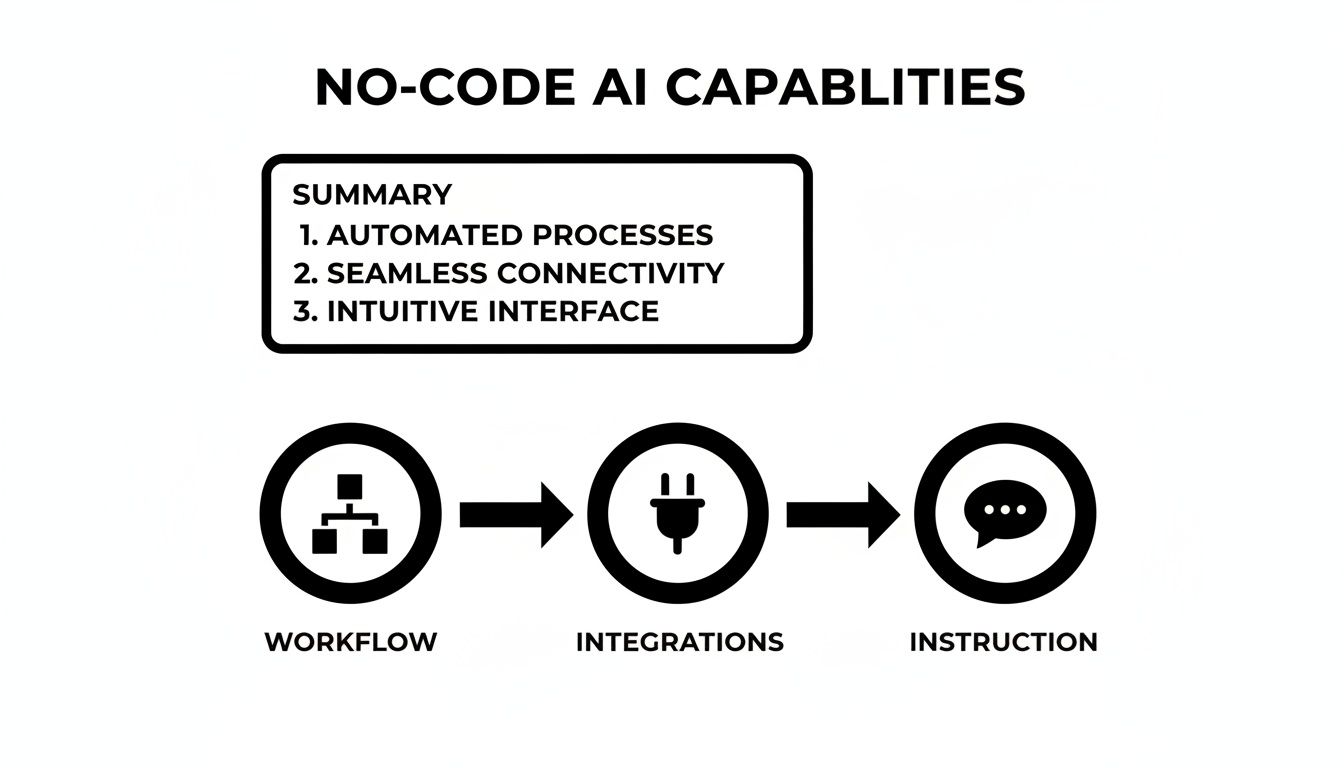
Think of these three elements—workflow, integrations, and instruction—as the building blocks for your new digital workforce. Let's see how they come together to create some incredibly useful assistants.
The Autonomous Sales Development Agent
Imagine an AI agent that does more than just blast out generic emails. This is a true digital sales assistant, built to supercharge your sales pipeline. Its entire purpose is to find and start conversations with high-quality leads, so your human team doesn't have to.
Here’s how it works:
- Workflow: The agent is set up to constantly watch a saved LinkedIn search for new people who fit your ideal customer profile. When it spots a new match, it automatically visits their company's website to find a unique angle for a conversation.
- Tools Used: It connects directly to LinkedIn Sales Navigator, your CRM (like HubSpot or Salesforce), and your email (like Gmail or Outlook).
- Business Outcome: After its research, the agent drafts a genuinely personalized outreach email. It then logs the new contact and the email it sent in your CRM and even creates a follow-up task for a human salesperson. This means your team spends its time talking to warm, engaged leads instead of cold prospecting.
The 24/7 Customer Support Agent
Now, picture a support agent that never sleeps. This agent fields initial customer questions at any time of day, delivering fast, accurate answers. The impact is immediate: happier customers and a less overwhelmed support team.
The goal here is simple: resolve common customer issues instantly by pulling answers from an internal knowledge base. Only the truly complex problems that need a human touch get escalated.
This agent monitors your help desk for new tickets. It uses its language skills to figure out what the customer needs, then dives into your internal FAQs and documentation to find the right answer.
This isn't just a nice-to-have. For many businesses, this kind of agent-driven automation in customer-facing roles is already paying off big time, generating as much as 128% ROI and speeding up lead conversion by up to 35%.
The Operations Automation Agent
Finally, let's look at an agent that tackles all the tedious, behind-the-scenes administrative work. This is your digital operations manager, quietly keeping the business running smoothly in the background.
A perfect example is invoice processing. When a vendor invoice lands in a specific email inbox, the agent springs into action. It reads the email, extracts key details like the vendor, invoice number, amount, and due date, and then checks that information against purchase orders in your accounting software.
If everything matches up, it drafts a payment approval request and sends it to the right manager. A simple workflow like this can save your team hours of mind-numbing data entry every single week.
As AI becomes more integrated into how people find information, businesses can also fine-tune their content for better visibility using approaches like Answer Engine Optimization (AEO).
How to Choose the Right No-Code AI Agent Builder
Alright, you see the potential. The next question is, how do you pick the right tool for the job? Choosing a no-code AI agent builder isn’t about chasing the longest feature list. It’s about finding the platform that actually fits how your team works.
Forget a one-size-fits-all checklist. Instead, let's walk through a few key questions. Your answers here will guide you to a tool that genuinely helps your team, rather than becoming just another piece of software you have to fight with. Think of it like bringing on a new team member—you need to make sure they have the right skills and will fit in with your current workflow.
Is It Genuinely Easy to Use?
Here’s the real test: is the platform actually intuitive for someone who doesn’t code? A good no-code builder should feel natural the moment you sign in. You’re looking for a clean, visual interface where you can drag and drop steps to build out a workflow. If you can’t get a basic agent up and running in under 30 minutes, the learning curve might be too steep for your team to really embrace it.
The whole point of "no-code" is to make powerful technology accessible. The platform needs to make building, testing, and deploying an AI agent feel less like a chore and more like a creative process.
Does It Connect to Your Core Tools?
An AI agent is only as good as the tools it can talk to. Its real power comes from its ability to jump between the different apps you use all day, every day. Before you even think about signing up, check out their integration library. Does it have solid, ready-to-go connections for your must-haves?
- CRMs: like Salesforce or HubSpot
- Communication Hubs: like Slack or Gmail
- Project Management Boards: like Asana or Trello
- Data & Spreadsheets: like Google Sheets or your internal databases
If the integrations aren't there, you'll be stuck trying to patch things together with clumsy workarounds, which defeats the entire purpose.
Will It Scale With Your Business?
Think ahead. Your first agent might handle a handful of tasks. But what happens when you have ten agents running, processing thousands of actions? The platform you choose needs to be built on a rock-solid foundation that won’t buckle under pressure as your needs grow.
A word on pricing: look for a model that's transparent and scales with you. Steer clear of confusing credit systems or pricing tiers that punish you for being successful. You don’t want your growth to be held back by sudden, massive cost increases.
Finally, do your due diligence on security. You’re giving this platform the keys to some of your most important business data. Make sure they have clear, comprehensive documentation on their security and compliance measures. This isn't just a box to check; it's fundamental to protecting your business and your customers.
Why BizSage Is Your Ideal Automation Partner
Picking the right no-code AI agent builder feels a lot like choosing a business partner—you need one that gets your goals and just works with your team. We built BizSage with that exact idea in mind, focusing on what truly matters for growing businesses. Our platform is powerful enough to handle complex tasks but simple enough that you can get your first automation up and running today.
The whole experience starts with our visual interface. We made ease of use a top priority because we believe automation shouldn't require a computer science degree. With a simple drag-and-drop workflow editor, anyone on your team can map out a process, test it, and launch a working AI agent in a matter of minutes.

Built for Your Entire Tech Stack
Let's be honest: an AI agent is pretty useless if it can't talk to the tools you already use. That’s why BizSage comes loaded with a huge library of pre-built integrations. We connect directly to the CRMs, project management boards, and communication apps your team lives in every day, so your agents can work across your entire software stack without hitting a wall.
Behind the scenes, this all runs on an enterprise-grade foundation built for reliability and scalability. As your company grows and your automation needs get more sophisticated, BizSage grows right alongside you. You can throw more and more tasks at it without worrying about performance drops. Plus, we've implemented strict security protocols to keep your business data safe at all times.
Our philosophy is simple: we focus on usability, integration, and scalability so your team can get back to doing what they do best. BizSage isn't just about building bots; it's about building a smarter, more productive business.
This isn't just a trend; it's a fundamental shift in how work gets done. A recent PwC survey backs this up, showing that 79% of senior executives are already using AI agents. Even better, 66% of them are seeing real, measurable boosts in productivity. The report also found that 88% plan to increase their AI budgets because the value is so clear. You can read more about these executive AI insights from PwC's research.
BizSage is designed to deliver those exact kinds of results, giving you a practical way to turn automation into a real competitive advantage.
Got Questions About AI Agents? We Have Answers.
It's completely normal to have a few questions before diving into new technology like a no-code AI agent builder. Getting these common concerns sorted out is often the last step before you feel confident enough to start automating your work. Let's tackle some of the most frequent ones we hear.
How Secure is My Data?
This is usually the first question on everyone's mind: "How safe is it to let an AI agent access my business apps?" It’s a great question to ask. Top-tier platforms are built with security as a foundation, not an afterthought.
They use multiple layers of defense, like end-to-end data encryption, to protect your information both in transit and at rest. More importantly, they give you granular permission controls. This means you decide exactly what an agent can see and what it can do. Your data always belongs to you, and the agent is locked into the specific boundaries you set for it.
Can I Start Small and Scale Up?
Another big one is about commitment. People often ask, "Do I have to go all-in at once, or can I start small?" The answer is a definite yes—you can absolutely start small. In fact, that's the recommended approach.
The real advantage of these tools is that you can build iteratively. Start by creating a simple agent to take one annoying, repetitive task off your plate. Once you see it working and saving you time, you can gradually give it more complex goals, connect it to other tools, and expand its responsibilities. This way, you learn as you go without needing a huge upfront investment of time or money.
What’s the real difference between an AI agent and a chatbot? It all comes down to proactivity and autonomy. A chatbot is reactive; it waits for you to ask it something. An AI agent, on the other hand, can independently kick off and complete complex tasks across different systems to reach a specific goal.
Think of it this way: a chatbot can tell a customer their order status when asked. An AI agent can spot a delayed shipment in your logistics software, proactively email the customer with an update, and create a support ticket in your CRM—all on its own. Agents aren't just for conversation; they are autonomous digital workers built to execute tasks, making them a much more powerful part of your team.
Ready to build a digital workforce without writing a single line of code? With BizSage, you can create intelligent agents to handle the tedious tasks, freeing you up to focus on what really matters—growing your business. Get started for free today!